Research Paper Title Page Example: Common Mistakes Fixed
These pairs take a typical slip and show the corrected version in APA 7 student format, which is the layout most students are asked for. All wording is invented for this guide, so replace it with your own details and your instructor's rules.
Common mistakeTHE EFFECTS OF SCREEN TIME ON SLEEP
CorrectedThe Effects of Screen Time on Sleep
Use title case, bold, centered. Capitalize major words only.
Common mistakeScreen Time and Sleep Quality (underlined)
CorrectedScreen Time and Sleep Quality (bold)
In the student format, only the title is bold. Nothing else is bold or italic.
Common mistakeName: Jordan Rivera / Teacher: Dr. Shah
CorrectedJordan Rivera / Dr. Priya Shah
Skip the labels. The order of the lines tells the reader what each one is.
Common mistakeSCREEN TIME AND SLEEP at top left
CorrectedOnly the page number, top right
Student papers leave out the running head unless the instructor asks for one.
Common mistakeThree blank lines between author, school and course
CorrectedOne blank line between title and author, none elsewhere
Each element sits on its own line, double-spaced, with no extra gaps.
Common mistakeDr. Jordan Rivera, B.S.
CorrectedJordan Rivera
Leave titles and degrees off your own name.
Common mistakeA cover page on an MLA essay
CorrectedName, instructor, course and date at the top of page 1
MLA uses no separate page unless your teacher requests it or the paper is a group project.
How to Make a Title Page for a Research Paper in 5 Steps
These five steps work in any word processor and any style. The details change by style, so check your assignment first.
- Check the requirement. Read the assignment sheet or ask your instructor which style and whether a separate page is needed.
- Set up the page. Use a one-inch margin, a readable 12-point font, and double spacing on the whole page.
- Type the title. Center the title in title case a few lines down, and bold it in APA 7.
- Add the details. List your name, school, course, instructor and due date, each on its own centered line.
- Number and proofread. Insert an automatic page number in the header and check every line against your style guide.
Research Paper Title Page: What It Is and When You Need One
A research paper title page is the cover of your paper. It tells the reader what the paper is called and who wrote it, and in a class it tells your instructor which course it belongs to and when it was due. The page sits before the first page of text and holds no body content. Short essays often skip it, while longer research papers are more likely to need one.
If you want the layout done for you, the free title page generator for APA papers takes your title, name and course and gives you a formatted page with a live preview and a Word file.
What is a title page in a research paper?
What is a title page in a research paper, in one line? It is a standalone first page with the paper's identifying details. Journals and professional papers add an author note and a running head. A title page for research paper assignments in class keeps it to the title, your name, the school, the course, the instructor and the date.
When do you need one?
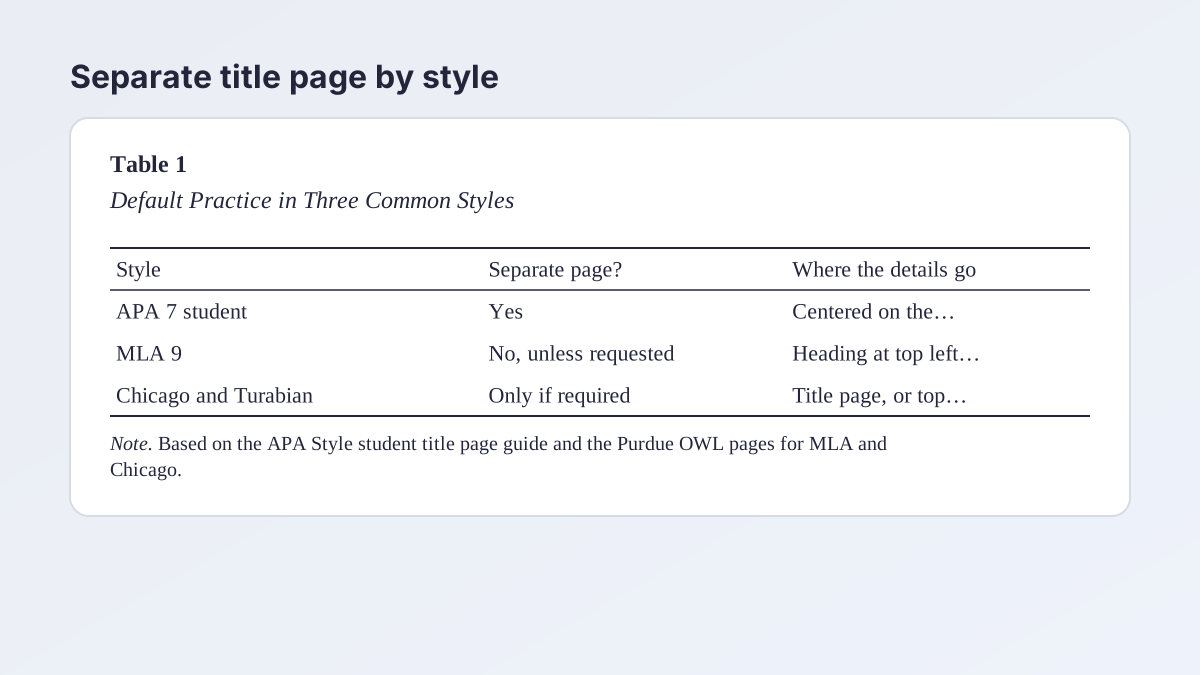
Most teachers expect a title page when you write in APA 7 student format. MLA does not use one by default. Chicago and Turabian treat it as optional and ask for it only when the instructor or the context calls for it. A group project in MLA is the exception: the Purdue OWL's MLA guide says to make one for a paper assigned as a group project. When in doubt, ask, and follow your assignment sheet over any general rule.
Research essay title page or just a heading?
A research essay title page often looks the same as a research paper title page. The question is really which style your teacher assigned. If the style is MLA, use the heading at the top of page 1 instead. Our guide to the MLA heading shows that layout line by line.
What Goes on a Title Page for Research Paper Assignments in APA 7
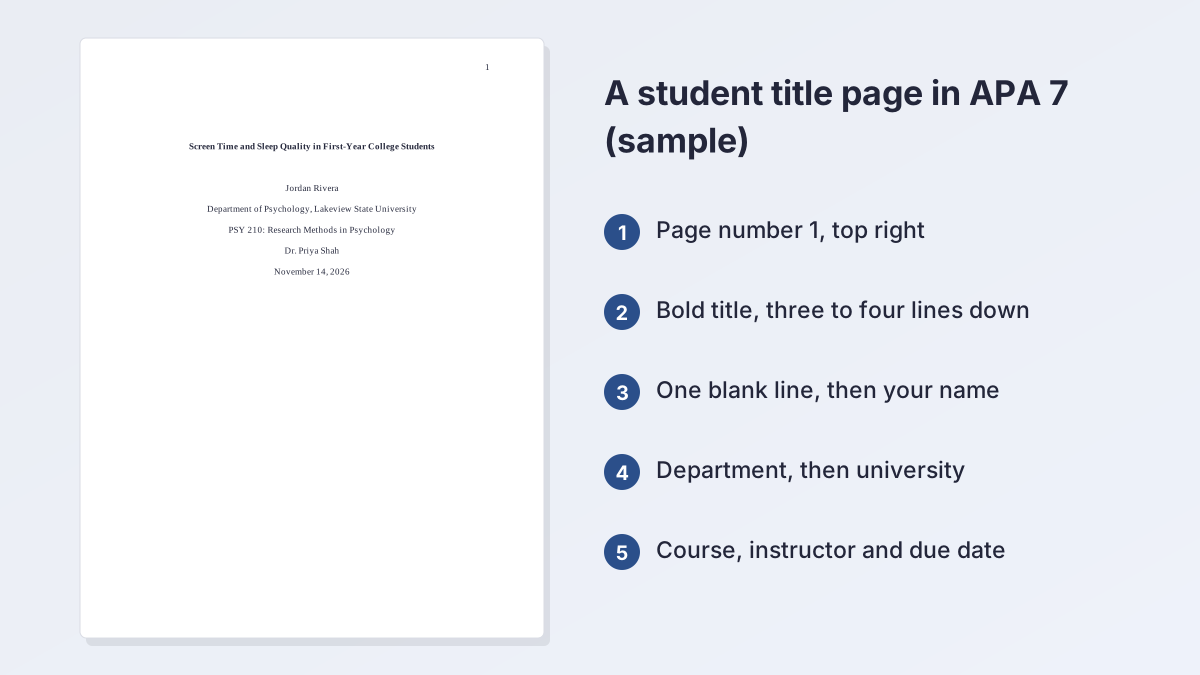
For a student paper in APA 7, the research paper title page has six elements, in this order. The APA Style student title page guide and the APA Style page on the layout agree on them. Check each against your syllabus, because instructors sometimes ask for changes.
The six elements, in order
- Paper title. Centered, in bold title case, three to four lines down from the top.
- Author name. One double-spaced blank line below the title, centered, with no "Dr." or degrees.
- Affiliation. The department, a comma, then the university.
- Course. The course number, a colon and the course name, as shown on your course materials.
- Instructor. Written the way your course materials show it.
- Due date. In the date format common in your country, such as November 14, 2026 in the United States.
Spacing, margins and numbers
Double-space everything, use one-inch margins on all sides, and put each element on its own line with no extra blank lines, except the one after the title. Insert the page number with automatic numbering in the top right of the header, starting at 1. Student papers leave out the running head unless the instructor or school asks for it. APA does not require a specific font, so use the one your course names, often 12-point Times New Roman or 11-point Calibri.
Where professional papers differ
A professional research paper title page, such as one for a journal, adds a running head in capitals, an author note in the lower half of the page and no course, instructor or date. If your teacher asks you to follow the professional layout, use the sample on our APA format guidelines page. The APA title page maker also switches between the two layouts.
Title Page in a Research Paper: APA, MLA and Chicago Compared
The same paper can have a different first page in each style, which is why students often mix them up. The table shows the default, and every sample page here follows one of these patterns.
MLA: no separate page by default
The Purdue OWL's MLA formatting guide says not to make a title page "unless specifically requested or the paper is assigned as a group project." Instead, put your name, your instructor's name, the course and the date in the upper left of the first page, then double-space and center the title. If your instructor asks for a separate page, use the MLA title page maker and follow the layout your instructor gives you.
Why the style matters more than the paper
A title page for research paper work in a psychology course and one for a history course can look different because the departments assign different styles. Psychology, nursing and education usually assign APA. English and the humanities often assign MLA. History often assigns Chicago or Turabian. Ask which style applies before you format anything.
Research Paper Title Page in Chicago and Turabian Style
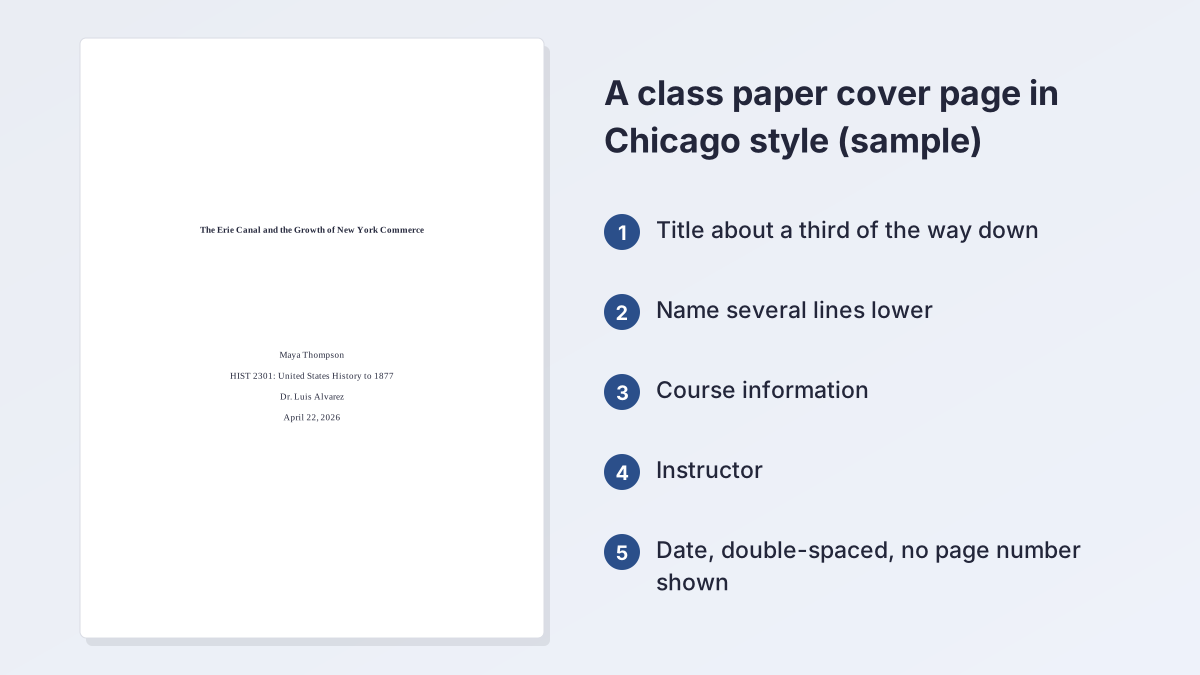
A research paper title page works differently in Chicago and Turabian than in APA. Purdue OWL's Chicago formatting page says the title should be "centered a third of the way down the page," with your name, class information and the date "several lines later." Each line is double-spaced, and subtitles go on the line below the title, with a colon ending the title line.
Number the page, or not
Practice differs by school. Many instructors count the cover page as page 1 but print no number on it, so the first page of text shows 2. Others number the first page of text 1, and the Purdue page says page numbers begin on the first page of text. Ask your teacher. Our guide to Turabian format explains the student rules in more detail, and Chicago style paper format covers the rest of the paper.
Use the generators for exact spacing
For the layout itself, try the Chicago title page maker or the Turabian title page maker. Both show a live preview, leave the title page unnumbered and let you choose whether the first page of text is page 1 or page 2. Without a separate page, the title goes at the top of page 1 and the text follows.
Research Report Title Page for Lab Reports and Proposals
A research report title page is the cover for a lab report, a case study, a literature review or a research proposal. These documents often follow APA, so the elements above usually apply to a research report title page too. The difference is what your instructor adds, so read the lab manual or assignment sheet before you build the page.
Lab reports
On a research report title page for a lab, science courses commonly ask for the standard elements plus course-specific details. These might include a lab section, the date the experiment was run or the names of lab partners. These are conventions of individual courses, not of APA itself, so follow the handout. If the report is written for APA, the title still appears in bold title case with the author lines beneath it.
Research proposals and project papers
A research project title page often looks like a student cover page, with one addition, such as the program or your adviser's name. For the title page of a research proposal in a graduate program, use the template your department provides, because many have their own forms.
Group reports
When several students write one report, list every author on one centered line or on separate lines, using "and" before the last name. APA says to use "and" before the final author. In MLA, the Purdue OWL says a group project gets a title page, so list every author there.
Making a Title Page in Word and Google Docs
Learning how to make a title page for a research paper takes five minutes in any word processor. The steps are short, and the setup is the same in both programs: margins, spacing, centered text and an automatic page number.
How to create a title page for a research paper in Word
This is how to make a title page for a research paper in Word. Open a blank document. Choose Layout, then Margins, then Normal, which sets one-inch margins. On the Home tab, open Line and Paragraph Spacing, choose 2.0 and select Center alignment. Type the title and bold it, press Enter once, then type your name, school, course, instructor and date on separate lines. Insert the page number by choosing Insert, then Page Number, then Top of Page. Word's built-in Cover Page gallery on the Insert tab is designed for reports and may not match your style, so check it against your style guide first.
How to make a title page for a research paper in Google Docs
This is how to make a title page for a research paper in Google Docs. Use Format, then Line & paragraph spacing, and choose Double. Center the text with the toolbar, and type the same lines. For the number, Google's help page says to choose Insert, then Page elements, then Page number, and pick a placement. To keep the number off a separate cover page, check Different first page in the header settings. Headers and page numbers need the document to be in pages format, not pageless.
Starting the next page
Add a page break after the date line. In Word, choose Insert, then Page Break. In Google Docs, choose Insert, then Break, then Page break. On Windows, Ctrl+Enter does the same in both programs. Then begin your abstract or your first page of text.
Choosing the Title for Your Research Paper
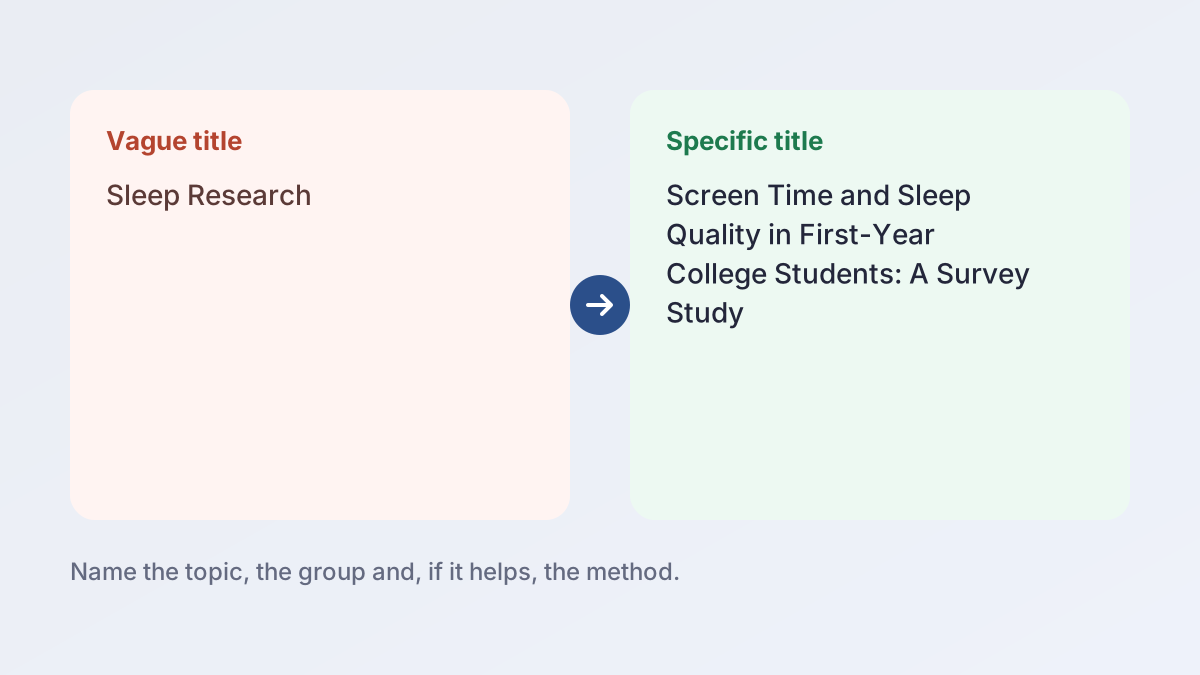
The title is the most visible line on the research paper title page, so spend a few minutes on it. A good research paper title is specific, accurate and short enough to read at a glance. APA sets no maximum length and asks only that a title be focused, though many instructors expect something around 10 to 15 words. It names the topic and, where it helps, the group or the method. Skip abbreviations and phrases such as "A Study of." The fourth illustration shows a vague title next to a specific one.
If you are stuck, the research paper title generator suggests academic titles from your topic. You can also see more ideas in our guide to essay title ideas. Pick one, reread your thesis or research question and check that the title still matches what the paper actually argues. If you are still narrowing your topic, our guide to how to formulate a research question can help you decide.
A quick title formula
Many students use the pattern "Topic: Angle or Group." For example, "Screen Time and Sleep Quality: A Survey of First-Year College Students." APA wants major words capitalized, and a subtitle can go on its own double-spaced line.
Common Title Page Mistakes
Most mistakes on a title page for research paper work come from mixing styles or adding extras. Use the list below as a last check, and compare your page with the sample at the top of this guide.
Mixing styles
An APA title block with an MLA heading on top of it confuses the reader. Pick one style from your assignment and stay with it.
Missing details
A page without the course or the date is incomplete for a class paper. Add every element your instructor asks for, and spell out the course name exactly as it appears on your syllabus.
Wrong spacing and extras
Extra blank lines, bold on every line, clip art and borders are not part of the student format. APA says only the title is bold. Keep the research paper title page plain.
Forgetting the page number
In APA 7, page 1 shows on the title page, in the top right of the header. Check that it is automatic and not typed by hand.
Skipping the final check
Compare the finished research paper title page with your instructor's template before you submit. If you want a second opinion on the layout, use the title page generator to compare its preview with your own, and browse our other student writing guides for the rest of your paper.
Questions About Research Paper Title Pages
What is a title page of a research paper?
It is a separate first page with the paper's title, your name, school, course, instructor and due date. Some styles and classes skip it.
How do you make a title page for a research paper?
Set one-inch margins and double spacing, center the title a few lines down, add your name and course details, then insert an automatic page number.
What goes on a title page for a research paper?
In APA 7 student format: the title, your name, department and university, course, instructor and due date, with page 1 at the top right.
Does a research paper need a title page?
It depends on the style and your instructor. APA student papers have one. MLA uses none by default. Chicago and Turabian use one if asked.
What is a research report title page?
It is the cover of a lab report or similar document. It usually follows the style of the course, plus any extras the instructor lists.
How do you do a title page for a research paper in MLA?
MLA has no separate page by default. Use the heading at the top left of page 1, unless your teacher asks for a cover or the paper is a group project.
Where does the title go on a Chicago or Turabian cover page?
About a third of the way down the page, centered, with your name, class and the date several lines lower.
Does the title page count as page 1?
In APA 7 student format, the title page is numbered 1. Chicago and Turabian practice varies, so ask your instructor.
How long should a research paper title be?
No style sets a fixed limit. APA asks for a focused title, and many instructors expect about 10 to 15 words. Keep it specific and avoid abbreviations.
More free guides
- APA Format GuidelinesMargins, font, spacing, page numbers and headings for an APA 7 paper.
- APA Lab Report FormatSections, headings, tables and references for a lab report in APA 7.
- MLA In-Text CitationsAuthor-page citations for every kind of source, with examples.
- How to Cite a Website in MLAWorks Cited entries and in-text citations for web pages.
- MLA Works Cited PageFormat, order and hanging indents, with a full example page.
- MLA Annotated BibliographyFormat, annotation types and a complete example.
See all 80 free tools for students
Related tools
Last updated by The Study Corp editorial team.