MLA Essay Heading Examples for Every Situation
Each example shows a situation and the heading you would type. Slashes mark where you press Enter, so each item sits on its own double-spaced line. Names are invented examples; use your own details and the form your syllabus gives.
SituationMaya is a junior in Ms. Rodriguez's AP Literature class. The essay is due October 26, 2026.
Heading to typeMaya Johnson / Ms. Rodriguez / AP Literature and Composition / 26 October 2026
Use the class name your teacher uses. Add a period number only if the teacher asks for it.
SituationDaniel takes ENGL 1301 at a community college with Dr. Grace Okafor.
Heading to typeDaniel Nguyen / Professor Okafor / ENGL 1301: Composition I / 26 October 2026
Give the course name and number. Write the instructor's name the way the syllabus does.
SituationA team-taught history seminar, HIST 2310, led by Dr. Alvarez and Dr. Chen.
Heading to typePriya Patel / Dr. Alvarez and Dr. Chen / HIST 2310: The American West / 26 October 2026
MLA doesn't address this; listing both instructors on one line is the usual practice.
SituationThree students write one report together for SPAN 1411 and need to credit everyone.
Heading to typeNo first-page heading. Make a title page that lists all three names, then the instructor, course and date.
MLA 9 says a group project gets a title page. The running head can show only the page number.
SituationCommon mistake: October 26th, 2026 as the last line of the heading.
Heading to type26 October 2026
Day, month, year, with no comma and no “th”. October 26, 2026 is also acceptable; just stay consistent.
SituationCommon mistake: a bold, all-caps title in quotation marks, such as “GATSBY'S GREEN LIGHT.”
Heading to typeThe Green Light in The Great Gatsby (plain text, centered, title case; only the novel's name in italics)
No bold, underlining, quotation marks or final period on your own title.
SituationCommon mistake: typing the four heading lines inside the Word or Google Docs header area.
Heading to typeHeader area: Johnson 1. Body of page 1: Maya Johnson / Ms. Rodriguez / AP Literature and Composition / 26 October 2026
Only your last name and page number belong in the header, so the heading isn't repeated on every page.
How to Do an MLA Heading, Step by Step
Set the page up once and every essay you write for the class starts correctly. These steps follow the MLA Handbook, 9th edition.
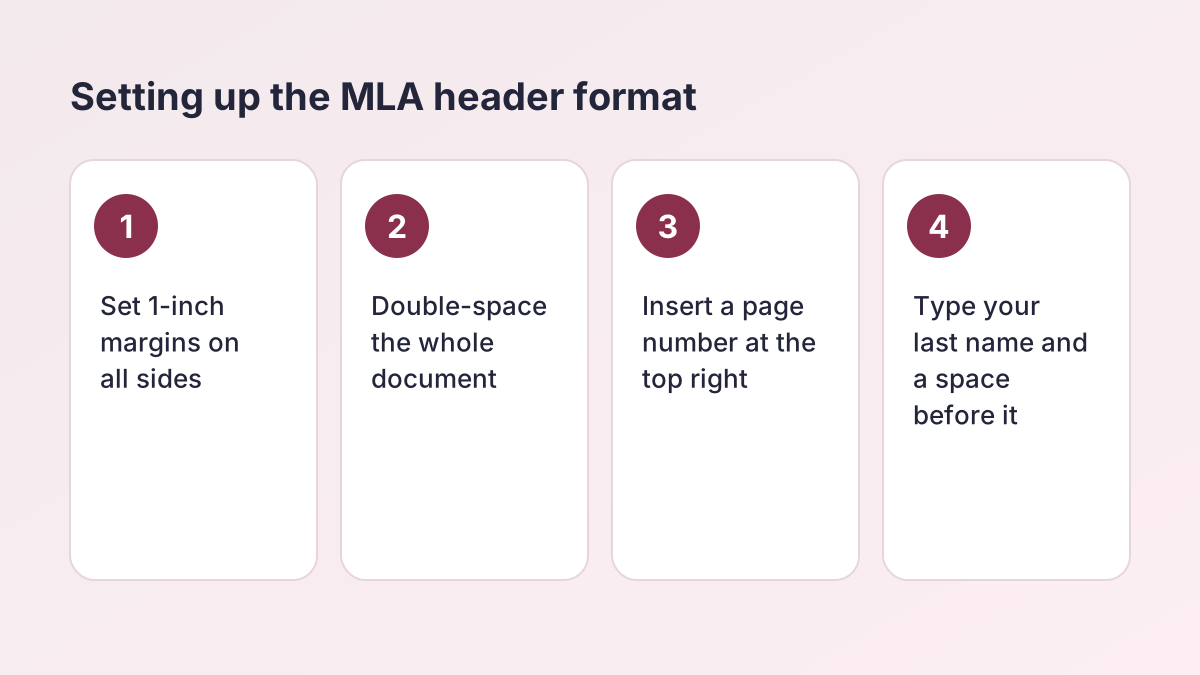
- Set margins and spacing. Use 1-inch margins on every side, a readable font such as Times New Roman at 12 point, and double spacing for the whole document.
- Add the page header. Insert a page number at the top right, half an inch from the top, and type your last name and a space before it, as in Johnson 1.
- Type your name. On the first line of the body, at the left margin, type your full name. Don't bold it or add a label such as Name:.
- Add instructor and course. On the next lines, type your instructor's name as the syllabus gives it, then the course name and number.
- Write the date. Type the due date in day month year order with no commas, such as 26 October 2026.
- Center the title. On the next double-spaced line, center your title in title case, then return to the left margin and indent the first paragraph.
What Goes in the MLA Format Heading
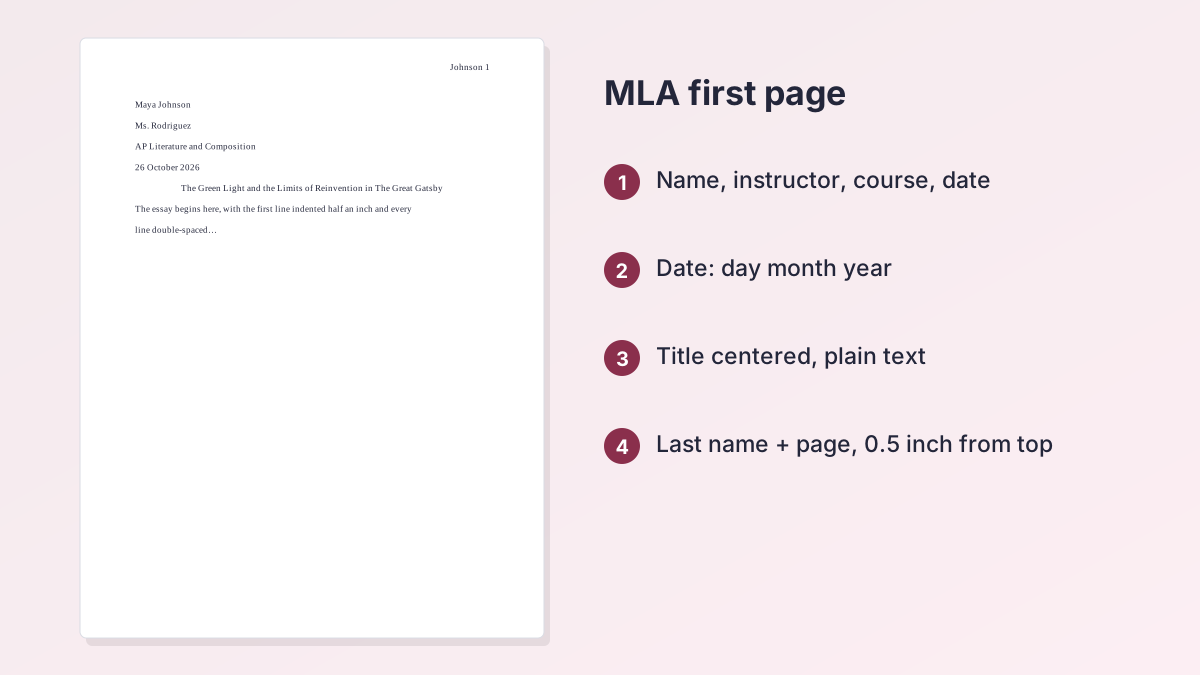
A standard MLA essay doesn't have a cover page. Instead, the MLA format heading sits on the first page, flush with the left margin and one inch from the top. The MLA Handbook lists four items on separate double-spaced lines, in this order: your name, your instructor's name, the course name and number, and the date. If you'd rather not set it up by hand, the MLA Title Page Generator builds this heading and gives you a Word file to type in.
| Line | What to write | Example |
|---|---|---|
| 1. Your name | Your full name, first name first | Maya Johnson |
| 2. Instructor | The name as your teacher or syllabus gives it | Ms. Rodriguez / Professor Okafor |
| 3. Course | Course name, number or both | ENGL 1301: Composition I |
| 4. Date | Due date, day month year | 26 October 2026 |
The MLA heading order
The order never changes: student, instructor, course, date. It moves from you to the class to the deadline, so a teacher grading a stack of papers can find each detail in the same spot. Don't add labels such as "Name:" or "Teacher:", and don't put a blank line between the items. Double spacing already separates them.
The instructor line
MLA doesn't set a form for the instructor's name. Most US students write a title and last name, such as "Ms. Rodriguez," "Mr. Thompson," "Dr. Okafor" or "Professor Lee." Copy what your syllabus or your teacher uses. If a course has two instructors, list both on the instructor line.
The course line
Give the course the way your school names it. A college class usually has a code and number, such as "ENGL 1301" or "HIST 2310," often with the course name after a colon. A high school class might simply be "AP Literature and Composition" or "English 10 Honors."
The MLA heading date
MLA's own samples write the date as day, month and year, with the month spelled out and no commas: 26 October 2026. Use the date the paper is due, not the day you started it. MLA also accepts October 26, 2026, and some teachers prefer it. Whichever form you use, keep it the same throughout the paper. Purdue OWL's MLA general format page shows the same four-item layout.
The MLA Header Format: Last Name and Page Number
The MLA header is the running head at the top right of every page. MLA's term is "running head," but most students call it the header because it lives in the header area of Word or Google Docs. It's short: your last name, one space, and the page number.
Where the MLA page header goes
The MLA Handbook (section 1.4) puts it in the upper right corner, half an inch from the top and flush with the right margin. Number every page in order with plain numerals: Johnson 1, Johnson 2, Johnson 3. Don't write "p." or "pg." before the number, and don't add a dash, a comma or the paper's title.
Page one, and the pages after it
The running head appears on the first page too, above the heading. Some instructors ask you to leave it off page one, so check the assignment sheet. Word and Google Docs both have a "Different first page" option for that.
MLA Header vs. MLA Heading: What's the Difference?
The two words sound alike, so teachers and students often swap them. Here's how to keep them straight.
The heading
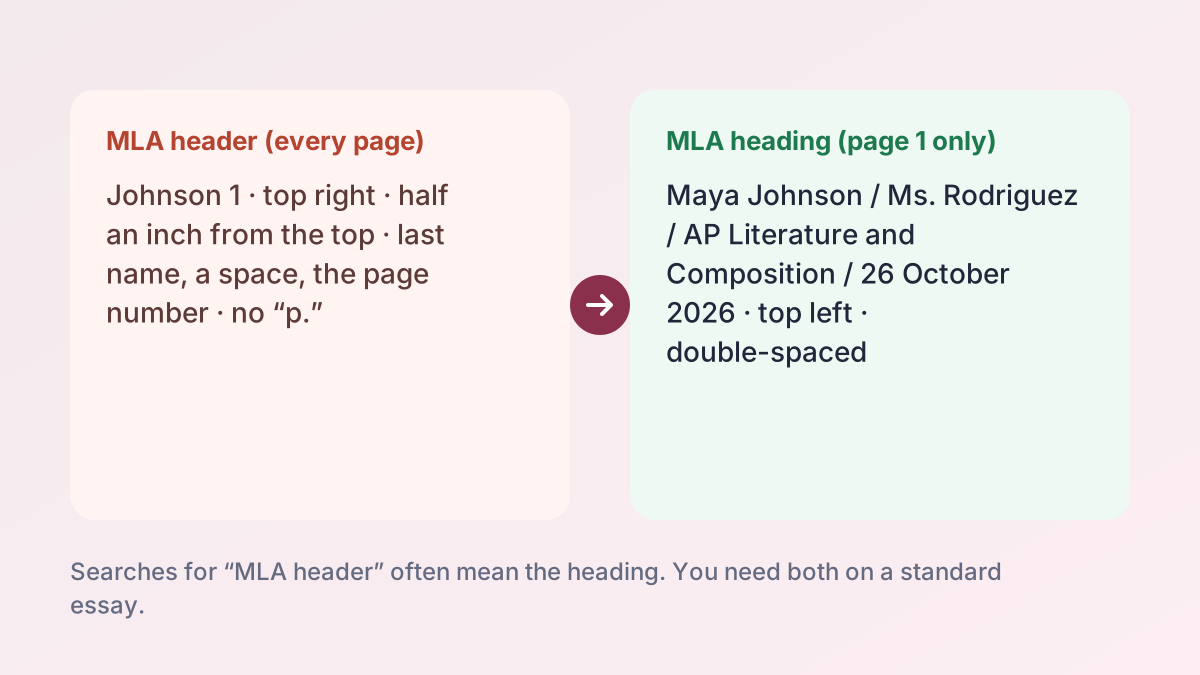
The heading is the block of four lines on page one: name, instructor, course and date. It sits in the body of the document, not in the header area, and it appears only once. When a teacher says "put your heading on," this is what they mean.
The header
The header is the last name and page number at the top right. It repeats on every page because it's in the header area of the file. MLA calls it a running head.
Why it matters
A common mistake is typing all four heading lines into the header area, which repeats them on every page. The other mistake is forgetting the page header because you've already "done the header" on page one. You need both on a standard paper. If an assignment sheet names only one, ask which your teacher means.
Where the Title Goes, and When You Need a Title Page
Your title comes right after the date, on the next double-spaced line. Center it and write it in title case, capitalizing the first word, the last word and all the principal words.
How to style your title
The Handbook is specific: don't italicize or underline your title, don't put it in quotation marks or bold, don't type it in all capital letters, and don't end it with a period. The only italics allowed are for words you'd italicize anyway, such as a book title inside your title: The Green Light in The Great Gatsby. After the title, return to the left margin and start your first paragraph with a half-inch indent.
When a title page replaces the heading
A regular MLA research paper doesn't need a separate title page. You use one in two cases: your instructor asks for it, or the paper is a group project. If your teacher wants one, follow the instructions you're given, since MLA doesn't set a single layout. To make one quickly, switch the free MLA title page generator from the heading to its title page option.
Group Projects: MLA Heading Rules for Several Authors
Group work changes the first page. The MLA Handbook (section 1.3) says that if a paper is a group project, you create a title page and list all the authors on it, instead of putting the names in a first-page heading.
What the title page includes
List each student's full name on its own double-spaced line, then the instructor's name, the course and the date. Many university writing centers, including UNLV's, place these items at the left and center the title lower on the page. Your instructor may want a different arrangement, so check the assignment.
The running head for a group
If all the authors' last names fit in the header, include them. If they don't, MLA says to use only the page number. A group of two might use Patel and Garcia 1; a group of five would use just 1.
How to Set Up an MLA Header in Word and Google Docs
Both programs can set up the page header once so it numbers itself. Menu names change between versions; these paths match the current help pages from Microsoft and Google.
Microsoft Word
- Select Layout > Margins. Word's default margin is already one inch on each side, which is what MLA uses.
- Press Ctrl + A to select everything, then go to Home > Line and Paragraph Spacing > Line Spacing Options. Choose Double and set Before and After to 0.
- On the Insert tab, select Page Number, choose the top of the page, and pick the right-aligned style.
- With the cursor in the header, type your last name and a space just before the number.
- Check Header from Top on the Header & Footer tab. Its default is 0.5 inch, so you usually don't need to change it. Select Different First Page only if your teacher wants no header on page one. Microsoft's margins help page covers custom margins.
How to do an MLA header on Google Docs
- Open File > Page setup, choose Pages (headers don't show in pageless format) and set all margins to 1 inch.
- Select all, then go to Format > Line & paragraph spacing > Double.
- Go to Insert > Page elements > Page number and choose the option that puts the number at the top right.
- Click just before the number in the header and type your last name and a space. Set the header to right alignment if it isn't already.
- To set the header distance, click in the header and use Format > Headers & footers > More options. Google's headers and page numbers help page explains the "Different first page" box.
Then type the heading
Click at the top of the body on page one and type the four lines at the left margin, pressing Enter after each. Don't use extra blank lines or tabs.
Can You Do Subheadings in MLA?
Yes. MLA allows section headings, but it doesn't require them, and most short essays are better without them. The Handbook (section 1.5) says headings can help readers of long works but are generally not needed in short, essay-length work. In a long research paper, a lab-style report or a capstone project, they help readers find their way.
Rules for MLA headings and subheadings
- Style the levels in descending order of prominence, for example bold for main sections and italics for subsections.
- Keep every heading at the same level in the same style and size.
- Don't use a level only once. If you have one subheading under a section, you need at least two.
- Align headings with the left margin; don't center or indent them. The title is the only centered line.
- Capitalize headings like titles of works, avoid all capitals, and don't end them with a period.
- Generally avoid numbering headings unless your field normally does.
A suggested pattern
Because MLA doesn't fix a heading style, Purdue OWL suggests one: level 1 bold and flush left, level 2 italic and flush left, then centered bold, centered italic and underlined flush left for deeper levels. Most student papers never need more than two. Whatever you choose, use it the same way through the whole paper.
MLA format with subheadings: a quick test
If a section would work as one paragraph with a strong topic sentence, skip the heading. When headings are required, add them for the main parts of the argument, not for every paragraph.
MLA Format Heading Example: A Full First Page
Here's how the whole first page fits together for a college paper in ENGL 1301, with every element in place.
From top to bottom
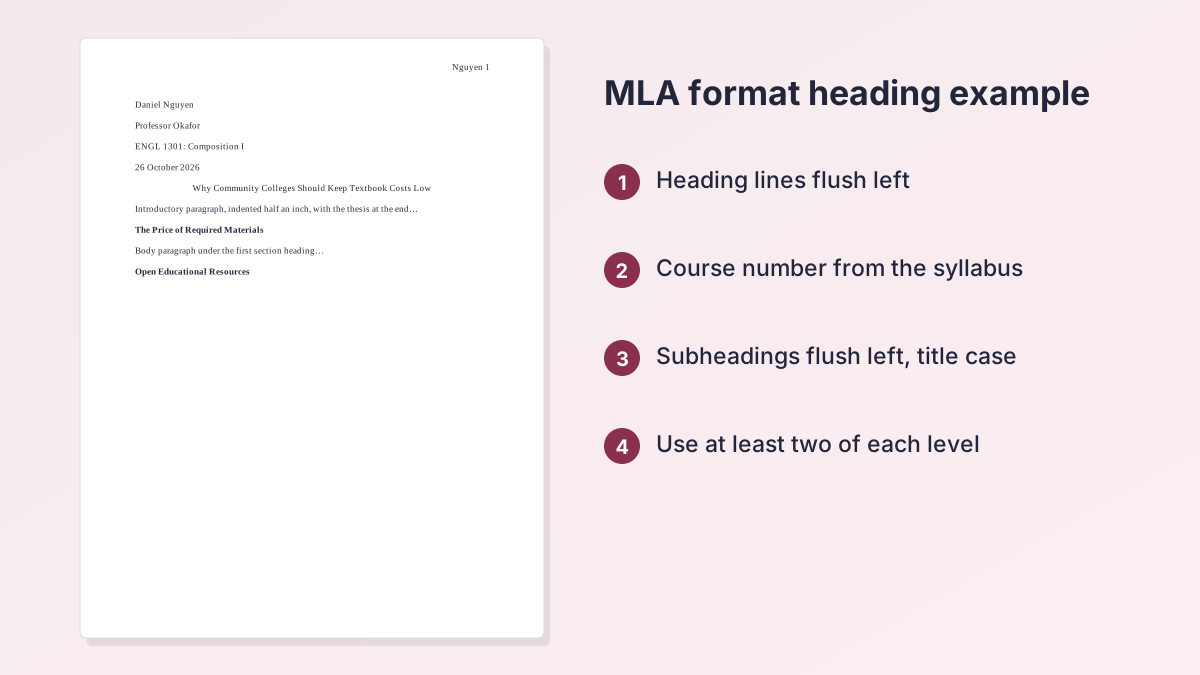
- Header area: "Nguyen 1" at the right, half an inch from the top.
- Heading: Daniel Nguyen, Professor Okafor, ENGL 1301: Composition I, 26 October 2026, each on its own line at the left margin, one inch from the top.
- Title: Why Community Colleges Should Keep Textbook Costs Low, centered, in plain text.
- First paragraph: begins on the next line, indented half an inch, double-spaced like everything above it.
- Section headings (optional): in a longer paper, flush left in bold, with at least two at that level.
The last page of the paper
The heading doesn't repeat, but the running head does, all the way to your sources. The MLA works cited page guide shows how that final page continues the numbering, and the guide to MLA in-text citations covers the citations inside your paragraphs.
Common MLA Heading Mistakes and How to Fix Them
Most points lost on formatting come from a few habits. Here's what teachers mark most often on the first page, with the MLA 9 fix.
| Mistake | What it looks like | Fix |
|---|---|---|
| Heading in the header area | Four lines repeat at the top of every page | Type the heading in the body of page 1 |
| Ordinal in the date | October 26th, 2026 | 26 October 2026 |
| Labels on each line | Name: Maya Johnson | Maya Johnson |
| Single-spaced heading | Lines packed together | Double-space the whole page |
| Styled title | Bold, underlined or ALL CAPS | Plain text, centered, title case |
| “p.” in the running head | Johnson p. 1 | Johnson 1 |
| Heading and title page both | A title page, then the heading again | Use one, as your teacher directs |
Check before you submit
Open your file in print preview and look at page one and page two. Page one should show the running head, the four-line heading, the centered title and an indented paragraph. Page two should show only the running head with the next number. If both pages look right, the rest will too.
Start from a ready page
If you'd rather start from a correct page, the MLA heading and title page tool fills in your details and downloads a Word file with the margins, spacing and header already set. Writing in APA instead? The APA format guidelines guide covers that style's page setup, and every guide is listed on the student writing guides page.
MLA Heading FAQ
What is an MLA heading?
It's the four lines at the top left of your first page: your name, your instructor's name, the course, and the date. It's double-spaced and starts one inch from the top.
What is the MLA heading order?
Your name, then your instructor's name, then the course name or number, then the date, each on its own double-spaced line.
How do you write the date in an MLA heading?
Day, month and year, with the month spelled out and no commas: 26 October 2026. Use the due date. MLA also accepts October 26, 2026; follow your teacher's preference and stay consistent.
What is the difference between an MLA header and an MLA heading?
The header is your last name and page number at the top right of every page. The heading is the four-line block of name, instructor, course and date on page one only.
Does the MLA header go on every page?
Yes. Your last name and the page number appear at the top right of every page, half an inch from the top. Some teachers ask you to leave it off page one.
Is the MLA heading double-spaced?
Yes. The heading, the title and the whole paper are double-spaced, with no extra blank lines between the heading items.
Do you need a title page in MLA?
Usually not. MLA uses a first-page heading. Make a title page only if your instructor asks for one or the paper is a group project.
Can you do subheadings in MLA?
Yes, in longer papers. Keep them flush left, style each level the same way, use at least two at any level, and capitalize them like titles.
How do you do an MLA header on Google Docs?
Go to Insert > Page elements > Page number, choose the top-right option, then click before the number and type your last name and a space.
More free guides
- MLA Format in Google DocsSet up an MLA paper in Google Docs: font, spacing, header, heading and Works Cited.
- MLA In-Text CitationsAuthor-page citations for every kind of source, with examples.
- How to Cite a Website in MLAWorks Cited entries and in-text citations for web pages.
- MLA Works Cited PageFormat, order and hanging indents, with a full example page.
- MLA Annotated BibliographyFormat, annotation types and a complete example.
- MLA Block QuotesWhen a quotation needs a block, how to indent it and where the citation goes.
See all 80 free tools for students
Related tools
Last updated by The Study Corp editorial team.