Chicago Style Paper Format Example for Each Part of the Paper
Each example shows one part of a class paper set up the usual way. The sample sentences were written for this guide, and the book cited is a real one; the page numbers are illustrative.
Part of the paperthe montgomery bus boycott: a study in mass organizing
In Chicago styleThe Montgomery Bus Boycott: A Study in Mass Organizing
Headline-style capitals, centered, with a colon before any subtitle.
Part of the paperA bare 4 in the corner of the page.
In Chicago styleRodriguez 4
Only when your instructor asks for your last name beside the number; otherwise the number alone is fine.
Part of the paperbackground and early organizing
In Chicago styleBackground and Early Organizing (centered, bold)
Headline-style capitals, no period at the end.
Part of the paperorganizing the carpools
In Chicago styleOrganizing the Carpools (centered, regular type)
The same capitalization as level 1 with plain type, so the two levels look different.
Part of the paperThe boycott lasted 381 days.1
In Chicago styleThe boycott lasted 381 days.¹
Superscript number after the period and closing quotation mark; the exception is a dash.
Part of the paperYou cite page 143 of Taylor Branch's book for the first time.
In Chicago style1. Taylor Branch, Parting the Waters: America in the King Years, 1954–63 (New York: Simon & Schuster, 1988), 143.
Full details the first time. This follows Turabian 9 and CMOS 17; the 18th edition drops the city: (Simon & Schuster, 1988). See the Chicago in-text citation guide for full note patterns.
Part of the paperYou cite the same book again two notes later.
In Chicago style3. Branch, Parting the Waters, 149.
Author's last name, short title and page.
Part of the paperWorks cited, in the middle of the page, with a period.
In Chicago styleBibliography (centered, on a new page, no period)
Two blank lines, then the first entry.
How to Set Up a Chicago Style Paper in Word or Google Docs
Set these up on a blank document before you write. Menu names match current versions of Microsoft Word and Google Docs.
- Set margins and font. In Word, choose Layout > Margins > Normal for 1 inch on every side. In Google Docs, choose File > Page setup and type 1 inch in each margin box. Pick Times New Roman or another readable font at 12 points.
- Double-space the text. Select all the text. In Word, use Home > Line and Paragraph Spacing > 2.0. In Google Docs, use Format > Line & paragraph spacing > Double. Remove extra space after paragraphs and indent each first line half an inch.
- Add page numbers. In Word, choose Insert > Page Number and pick the top right of the page. In Google Docs, choose Insert > Page elements > Page number. Keep the number in one place on every page.
- Hide the number on a cover page. Only if you have a separate cover page. In Word, choose Insert > Header > Edit Header, tick Different First Page, and delete the number on page one. Then use Insert > Page Number > Format Page Numbers if your instructor wants the text to start at 1.
- Insert footnotes. Place the cursor after the punctuation at the end of the sentence. In Word, choose References > Insert Footnote. In Google Docs, choose Insert > Page elements > Footnote. Then type the note.
- Start the bibliography. Insert a page break after your conclusion and center the title Bibliography. Select your entries and press Ctrl+T in Word for a hanging indent. Single-space each entry and leave a blank line between them.
What Chicago Style Paper Format Means for Students
The Chicago Manual of Style (CMOS) is written mainly for authors, editors and publishers, and its citation rules are what most people mean by Chicago. A class paper is a different job. Students are usually pointed to A Manual for Writers of Research Papers, Theses, and Dissertations by Kate L. Turabian, which the University of Chicago Press describes as a smaller version of the Chicago manual written for students. Our Turabian format guide covers that book's rules in full, so this page keeps to the settings that matter for a typical essay or research paper.
Your instructor's rules come first
Chicago's formatting advice is a recommendation, not a law. CMOS Shop Talk warns that "your instructor's requirements may overrule Chicago's formatting recommendations." If your syllabus says something different, follow the syllabus.
Start with the title page tool
If your instructor wants a separate first page, the Chicago title page generator lays out the title, your name, the class and the date, and leaves the page unnumbered. The rest of this Chicago style paper format guide covers everything after that page: spacing, numbers, headings, quotations, notes and sources.
Chicago Style Paper Format at a Glance: 7 Rules
These seven settings cover most of a Chicago style essay format. Choose them once, then apply them to every page of your Chicago style paper.
| Rule | What to do | Notes |
|---|---|---|
| Margins | At least 1 inch on every side | Word's Normal setting already does this |
| Font | A readable typeface, preferably 12 point | Times New Roman is the usual choice; nothing under 10 point |
| Line spacing | Double-space the main text | Single-space block quotes, notes, bibliography entries, table titles and figure captions |
| Indents | Indent each paragraph 0.5 inch | One space after a period, not two |
| Page numbers | Top right or bottom center | Same spot on every page |
| Headings | Consistent, headline-style capitals | No more than three levels in most papers |
| Block quotes | Five or more lines, or over 100 words | Indented, no quotation marks |
Margins and font
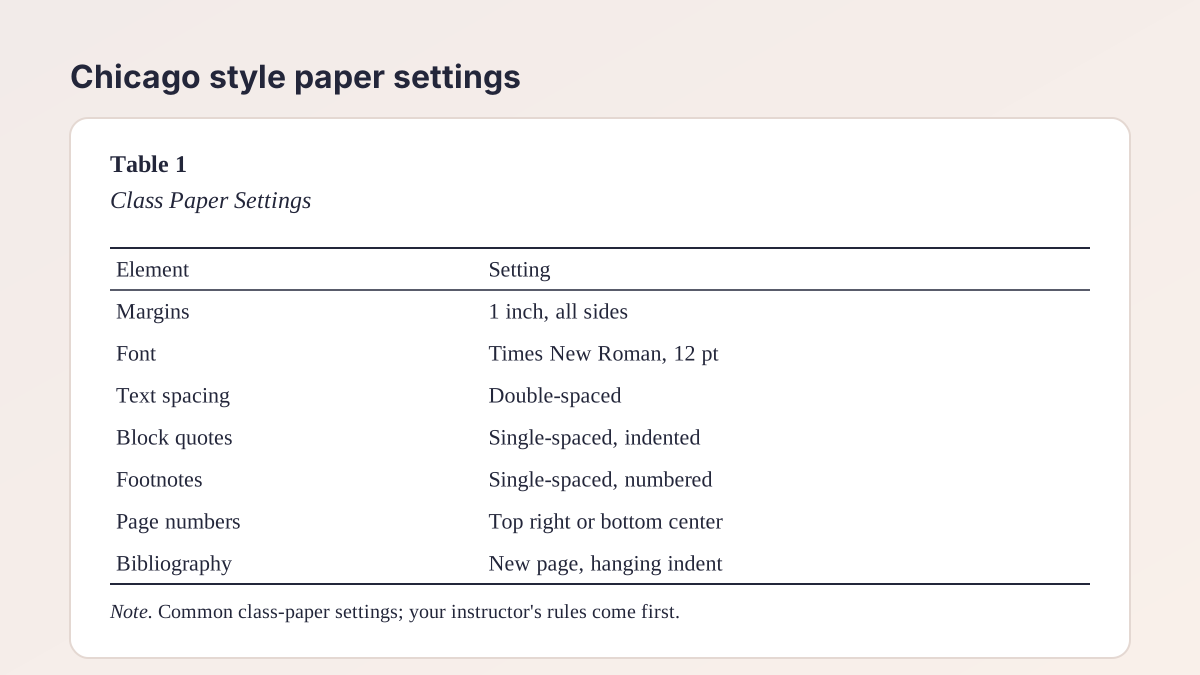
Set margins of at least 1 inch for a Chicago style paper. The Purdue OWL Chicago supplement asks for a readable typeface such as Times New Roman or Courier and a size of no less than 10 point, preferably 12 point. Most college guides give the same Chicago style font advice: Times New Roman, 12 point, unless your instructor names another.
Spacing
Double-space the main text. The exceptions are single-spaced: block quotations, notes, bibliography entries, table titles and figure captions. CMOS Shop Talk also advises one space between sentences rather than two.
Chicago Style Page Numbers
For Chicago style page numbers, Shop Talk advises inserting them "at the top right or bottom center, half an inch from the edge of the page." Pick one position for your Chicago style page numbers and keep it, because most schools now expect a consistent placement throughout the paper.
Where the numbering starts
Practice differs by school, so ask. Shop Talk says not to print a number on a title page but to count it, so the first page of text shows 2. The Purdue OWL supplement simply shows 1 on the first page of text, and some instructors follow that. If you have no separate title page, the first page is simply page 1 and can show its number.
Use Arabic numerals
Number the paper with plain Arabic numerals (1, 2, 3). Roman numerals belong to the front matter of a thesis or dissertation, not to a class paper.
Chicago Style Header and Running Heads
A Chicago style header is usually just the page number. Unlike APA, a student Chicago paper doesn't require a running head with a shortened title, and the guides we checked don't ask for one.
When a last name is added
Some instructors want your last name before the number, such as "Rodriguez 4," and templates like Collin College's put it there. Others want only the number. Because this varies by class, follow your syllabus or sample paper. If it says nothing, the number alone is the safe default.
Header formatting
Use the same font and size in the Chicago style header as in the body, and keep the header half an inch from the top edge. If you hide the number on a separate first page, use Word's Different First Page setting so the later pages still carry their numbers.
The First Page: Cover Page or Title on Page One
Chicago doesn't require a cover page for a Chicago style paper. Turabian and the Purdue OWL supplement treat it as required only when the instructor or context calls for one. Without it, the title goes at the top of page 1, followed by the text.
With a separate cover page
Center the title about a third of the way down the page, in headline-style capitals. Put your name, the class and the date several lines lower, double-spaced. Put a subtitle on its own line, ending the title line with a colon. For exact spacing, see our title page generator for Chicago papers, which also lets you choose whether page numbering starts at 1 or 2.
Without one
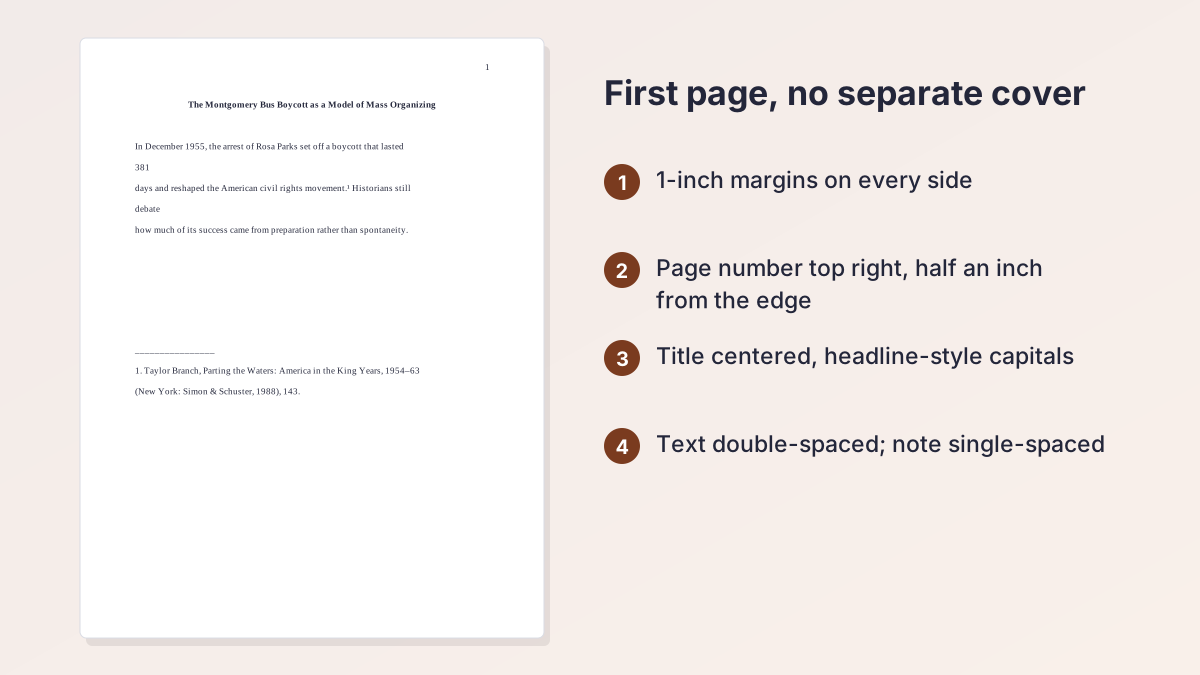
Type the title centered at the top of the first page, add your name and class details if your instructor asks, then begin the text. The first illustration above shows this layout.
Chicago Style Headings and Subheadings
Chicago style headings aren't required in a short paper, and the Purdue OWL supplement recommends no more than three levels. Whatever you pick for your Chicago style headings, keep them consistent and parallel, use headline-style capitals, and don't end a heading with a period. Turabian's optional five-level system sets the pattern most schools adopt.
| Level | Position | Type and capitalization |
|---|---|---|
| 1 | Centered | Bold or italic, headline-style |
| 2 | Centered | Regular type, headline-style |
| 3 | Flush left | Bold or italic, headline-style |
| 4 | Flush left | Regular type, sentence-style |
| 5 | Run in at the start of a paragraph | Bold or italic, sentence-style, ending with a period |
Chicago style subheadings in practice
A seven-page paper might use level 1 for sections such as Introduction, Background and Conclusion, and level 2 for subsections. Don't number headings unless asked. Never leave a heading alone at the bottom of a page.
A check on consistency
Chicago style heading rules mostly come down to consistency. Every level 2 heading should match every other level 2 heading in position, type and capitalization.
Block Quotes in a Chicago Paper
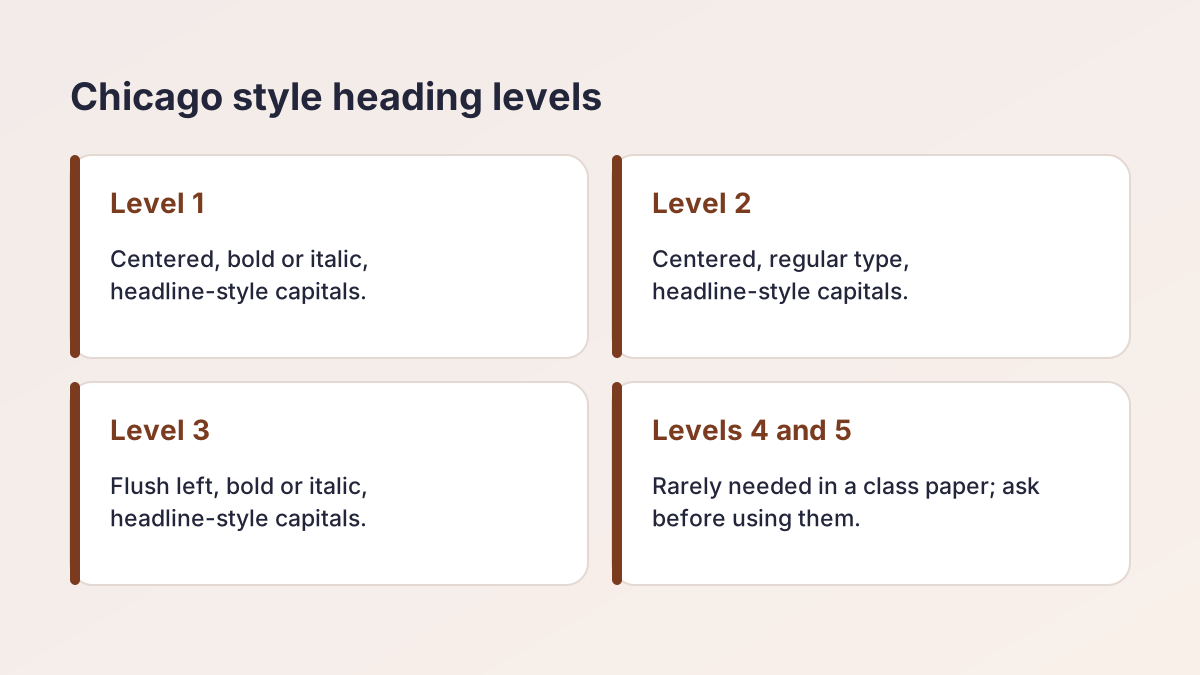
In a Chicago style paper, quote a short passage inside your paragraph in quotation marks. Purdue OWL says to set off prose as a block when it runs five or more lines or more than 100 words, and to block two or more lines of poetry.
How to block a quotation
Start it on a new line and indent it with your word processor's indentation tool, not with the space bar. Leave out the quotation marks. Single-space it, leave a blank line above and below, and put the note number after the final punctuation. Lead into every block with a sentence of your own. Our Chicago in-text citation guide shows how to write the note that follows.
Footnotes: Chicago Footnote Format and Placement
Most papers in Chicago style use footnotes with a bibliography, the notes-bibliography system. Number the notes consecutively from 1 through the paper. In the text, set the number in superscript at the end of the clause or sentence, after all punctuation except a dash.
How each note looks
Footnotes sit at the bottom of the page where you cite the source. Indent the first line, single-space each note and leave a blank line between notes, as the CSUSB and Collin College guides suggest. The number at the start of the note can be full size with a period or superscript; Purdue OWL says either is acceptable, so the number Word inserts is fine. Keep the note text at least 10 points.
Full notes and short notes
The first note for a source gives full publication details; later notes use the author's last name, a short title and the page. Our Turabian footnotes guide explains the patterns, and the Chicago footnote generator builds them from a link, DOI or ISBN. If you prefer author-date citations in parentheses, see Chicago author-date citation.
Chicago Format Bibliography Page
The bibliography starts on a new page after the last page of text. Center the title Bibliography, leave two blank lines and list every source alphabetically by the author's last name. Single-space each entry with a hanging indent, so the first line starts at the margin and the rest are indented. Leave a blank line between entries, as Purdue OWL describes; a few schools double-space between them, so check.
Alphabetizing and details
Use "and," not an ampersand, between author names, and give each publisher's name as it appears, minus Inc. or Co. For an author-date paper the page is titled References. The Chicago citation generator formats each entry, and our Alphabetizer sorts a list you typed by hand. For the entry patterns themselves, read the Chicago in-text citation guide.
Sample Chicago Style Paper: Page-by-Page Layout
Here is how a short Chicago style research paper fits together. The sample is an eight-page paper for a US history course, with a separate cover page. The topic and text are invented for this guide, and the book cited is a real one.
| Page | What's on it | Number shown |
|---|---|---|
| Cover page | Title a third of the way down; name, course and date lower | None (counts as 1) |
| First page of text | Centered title or heading, opening paragraphs, first footnote | 2 |
| Body pages | Level 1 and 2 headings, a block quote, footnotes at the bottom | 3–7 |
| Bibliography | Centered title, entries in alphabetical order with hanging indents | 8 |
What to notice
On a body page, the text is double-spaced with half-inch indents. A block quotation sits indented and single-spaced, and each footnote is single-spaced with a blank line after it. If you skip the cover page, the first page of text becomes page 1 and the rest shift down by one.
Using the sample as a template
Build your Chicago style paper once with these settings, save it, and reuse it as a Chicago format template for later papers. Change only the title, the text and the sources.
Common Chicago Paper Formatting Mistakes
Most lost points in a Chicago style paper come from a few slips. Check your draft against this list before submitting.
| Mistake | Fix |
|---|---|
| Footnotes double-spaced | Single-space each note, with a blank line between notes |
| Page number on a cover page | Hide it with Different First Page |
| Number moves from corner to corner | Choose one position and keep it |
| Quotation marks around a block quote | Remove them; the indent marks the quotation |
| Note number before the period | Put it after the punctuation, except before a dash |
| Headings styled differently at one level | Match every heading at the same level |
| Bibliography in citation order | Sort it alphabetically by last name |
| Two spaces after a period | Use one space between sentences |
A final check
Make sure every source in your notes appears once in the bibliography. If your class is also assigned other styles, our APA format guidelines and MLA heading guides cover their setups, and every guide is listed on the student writing guides page. To format the first page without fuss, use the Chicago title page generator one last time.
Chicago Style Paper Format FAQ
What is Chicago style paper format?
It's the layout used for papers in Chicago or Turabian style: 1-inch margins, a readable 12-point font, double-spaced text, page numbers, footnotes and a bibliography on a new page.
How do I format a Chicago style paper?
Set 1-inch margins, use Times New Roman 12, double-space the text, add page numbers, insert footnotes, and finish with a Bibliography page. Follow your instructor if the rules differ.
What font is used in Chicago style?
Chicago asks for a readable font. Times New Roman at 12 points is the usual choice, and the Purdue OWL supplement says nothing should be below 10 points.
Where do page numbers go in Chicago style?
At the top right or bottom center, half an inch from the edge, in the same place on every page. A separate cover page is counted but usually not numbered.
Does Chicago style have a header?
Not a required running head. The header normally holds only the page number, and some instructors ask for your last name beside it.
How do you format headings in Chicago style?
Keep each level consistent, use headline-style capitals and no final period. Turabian's levels run from centered bold to run-in headings; most papers use two or three.
Is a Chicago style essay double-spaced?
Yes, the main text is double-spaced. Block quotations, footnotes, bibliography entries, table titles and figure captions are single-spaced.
Do Chicago style papers need a cover page?
Only if your instructor asks for one. Otherwise put the title at the top of the first page and begin the text.
Is Turabian the same as Chicago style?
Turabian is the student version of Chicago, with Chicago's citation rules (Turabian 9 follows CMOS 17) and added guidance for class papers. Read our Turabian format guide for its details.
More free guides
- Chicago In-Text CitationsFootnotes and author-date parenthetical citations in Chicago 18, with examples.
- Chicago Book CitationNotes and bibliography entries for books, editions, chapters and ebooks.
- Chicago Movie and Image CitationFilms, streaming, YouTube videos, artwork and images in Chicago style.
- Chicago Author-Date CitationThe author-date system, its reference list, and how it differs from notes and bibliography.
- Chicago Style Block QuoteWhen to block a quotation in Chicago style, how to format it and where the note goes.
- MLA In-Text CitationsAuthor-page citations for every kind of source, with examples.
See all 80 free tools for students
Related tools
Last updated by The Study Corp editorial team.