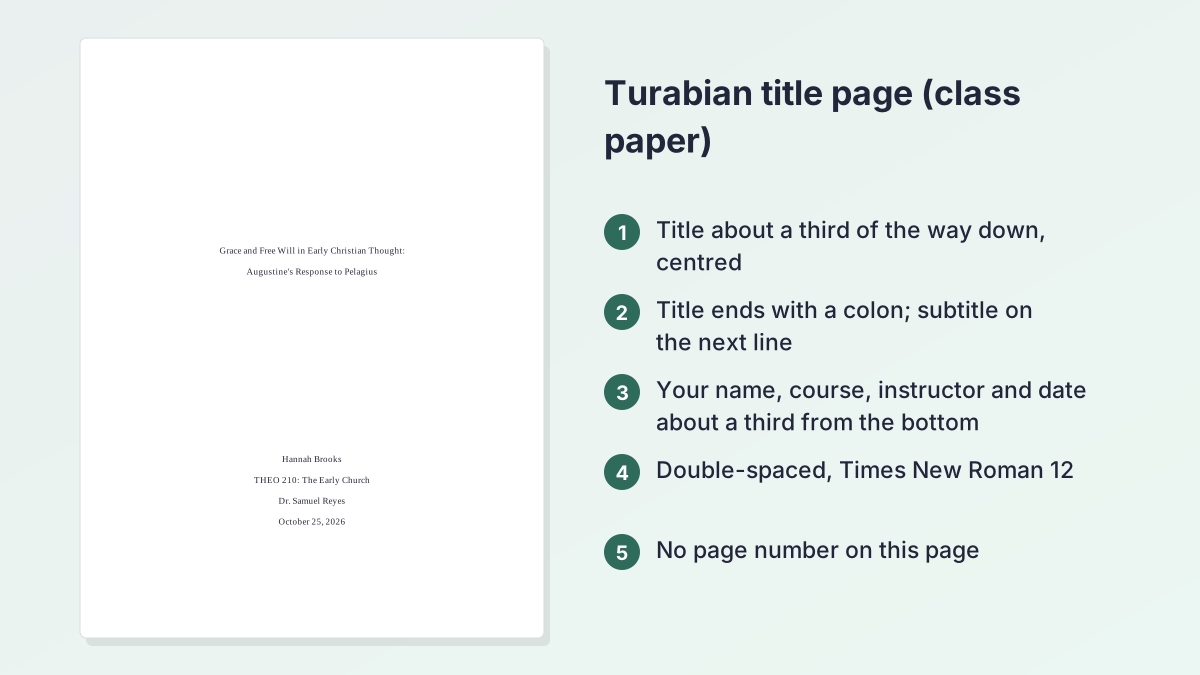
Turabian title page examples: mistakes and fixes
Six problems that tutors often mark on a Turabian title page, each with the corrected version. The titles and names are invented examples.
Common mistakeGrace and free will in early christian thought
CorrectGrace and Free Will in Early Christian Thought
Turabian uses headline-style capitals; short words such as and, in and of stay lowercase.
Common mistakeGrace and Free Will - Augustine's Response to Pelagius
CorrectGrace and Free Will in Early Christian Thought: / Augustine's Response to Pelagius
End the title line with a colon and put the subtitle on the next line.
Common mistakeTitle on the first line at the very top of the page
CorrectTitle about a third of the way down the page
The top third stays empty; the generator works out the blank lines for your paper size.
Common mistakeName, course and date squeezed directly under the title
CorrectName, course, instructor and date about a third from the bottom
Turabian separates the title block from the course information.
Common mistakeA "1" in the top right corner of the title page
CorrectNo number on the title page; numbers start on the text
The title page counts in the class-paper model but never shows its number.
Common mistake10/25/26
CorrectOctober 25, 2026
Write the month as a word so the date can't be misread.
How to use the Turabian title page generator
Everything you type appears in the preview straight away. Fields you leave empty show in grey and are left out of the download.
- Type your title. Enter the title and an optional subtitle. If the capitals look off, select Apply Turabian title case to fix them.
- Add your name. Type your name as it appears on your class list.
- Add course and instructor. Enter the course, such as THEO 210: The Early Church, and your instructor if your school asks for one.
- Set the date. Pick the due date and choose October 25, 2026 or 25 October 2026 as the format.
- Check font, paper and numbering. Open Font, paper and page numbers to change the font, switch to A4, or choose whether the first page of text is page 2 or page 1.
- Download or copy. Select Download Word (.docx) for a ready file, or Copy text to paste the page into Google Docs or Word.
Turabian format title page: the rules, line by line
Turabian is the student version of the Chicago Manual of Style, written for class papers, theses and dissertations. Its title page is short and plain. Here is what a Turabian format title page for a class paper contains, from the top of the page down.
Title and subtitle
Centre the title about a third of the way down the page. Use headline-style capitalisation: capitalise the first and last words and all major words, and lowercase articles, prepositions and the conjunctions and, but, for, or and nor. If there is a subtitle, end the title line with a colon and put the subtitle on the next line.
Your name
Your name goes lower on the page, in the block of course information.
Course and instructor
Give the course name and number, for example HIST 3340: Early Modern Europe. Many instructors also want their own name on the page, so the generator has an optional Instructor field.
Date
The date you hand the paper in, written out in full: October 25, 2026, or 25 October 2026 if your school writes dates day first.
Font, spacing and margins
Times New Roman 12 is the usual choice. Double-space the lines and keep one-inch margins, the same as the rest of the paper. The details block sits about a third of the way up from the bottom.
What a Turabian title page leaves out
There is no page number, no running head, no logo and no "Title page" label. Unless your instructor asks for more, that's the whole page.
Turabian title page template you can copy
If you'd rather build the page yourself, use this Turabian title page template. Each line is one double-spaced line; the blank lines are approximate, because the exact number depends on the paper size and font. The generator works them out for you.
Title page Turabian style, line by line
- About seven blank double-spaced lines from the top margin (roughly a third of the way down).
- [Title of Your Paper:] (centred, headline-style capitals, with a colon only if a subtitle follows)
- [Subtitle] (centred, on the next line)
- About seven more blank lines.
- [Your Name] (centred)
- [Course Number: Course Name] (centred)
- [Instructor] (centred, if your school asks for it)
- [Month Day, Year] (centred)
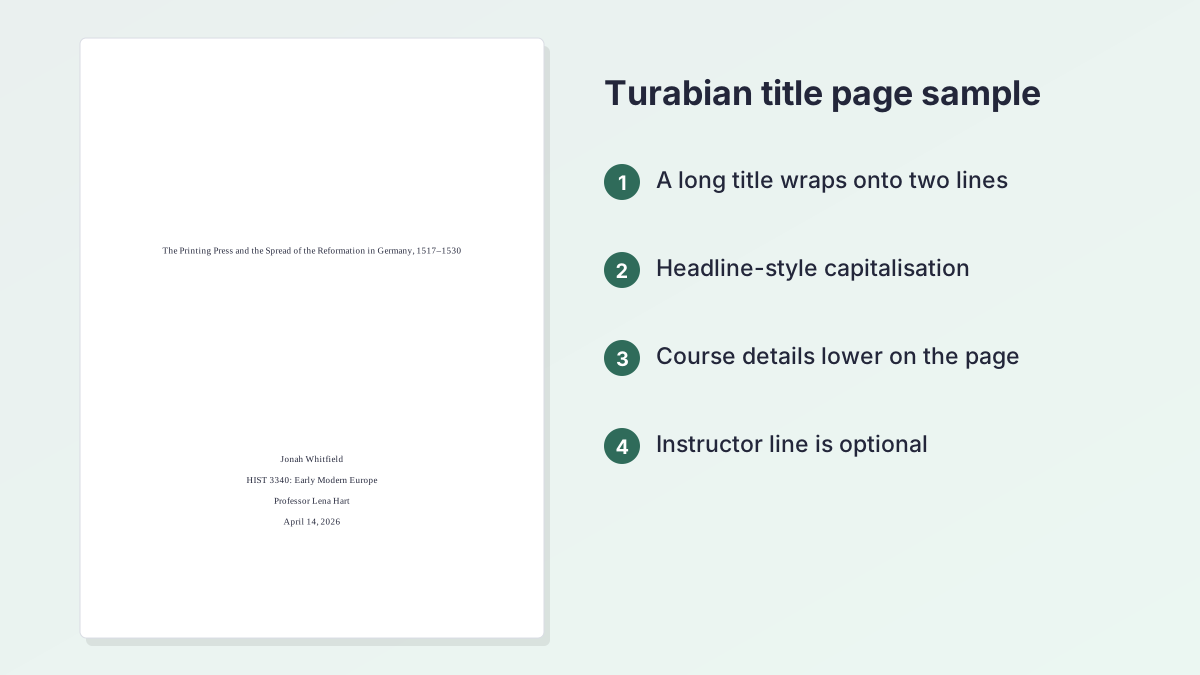
Turabian title page sample
Here is the same Turabian title page template filled in with an invented history paper:
- The Printing Press and the Spread of the Reformation in Germany, 1517–1530
- Jonah Whitfield
- HIST 3340: Early Modern Europe
- Professor Lena Hart
- April 14, 2026
The title is long, so it wraps onto a second line, which is fine. Keep the wrapped lines centred and double-spaced. Need a title in the first place? The Research Paper Title Generator suggests options from your topic.
Turabian cover page vs title page
A Turabian cover page and a Turabian title page are the same thing. Turabian's manual calls it a title page; "cover page" is simply what many students and schools call the first sheet of a paper.
Is a Turabian cover page different?
No. A Turabian cover page has the same title, name, course and date as the title page described above. There's no separate cover sheet in Turabian style, and you don't put a cover page in front of the title page.
When your school adds extra items
Some schools and seminaries publish their own Turabian cover page with extra lines, such as the name of the school at the top, a student ID or the word count. If you have a school template, follow it: your school's rules override the manual. This generator sticks to the standard layout, so add any extra lines in Word after you download the file.
If your school wants its name on the title page, fill in the optional Institution field; it appears with your course details, just above the date. If it must go at the very top, move that line in Word after you download.
Theses and dissertations
A thesis or dissertation title page follows different rules, with the school name, degree and department, and front matter numbered in roman numerals. This tool is built for class papers. For a thesis, use your graduate school's template.
Turabian page numbers: is the title page page 1?
The title page never shows a page number. What changes is whether it counts as page 1. The generator offers both options under First page of text is.
Page 2 (title page counted)
This is the default. In the Turabian class-paper model used by many universities, the title page counts as page 1 even though no number appears on it, so the first page of text shows 2. The Word file is set up this way automatically.
Page 1 (title page not counted)
Some Chicago and Turabian guides start the text on page 1 instead. The Purdue OWL's Chicago general format guide, for example, says numbering begins with Arabic numeral 1 on the first page of text. If your instructor or school template does this, choose Page 1 (title page not counted).
Where the number goes
The downloaded file puts the page number in the header, top right, which is where most Turabian guides place it. Liberty University's Turabian format quick guide, for instance, uses Arabic numerals top right in the body of the paper (Liberty numbers the body from 1; choose Page 1 if you follow its template). If your instructor wants numbers at the bottom, move them in Word's header and footer settings.
Which one should I pick?
Check your syllabus or school template first. If neither says anything, the default (title page counted, text starts on page 2) matches the Turabian class-paper model.
Chicago Turabian title page: what's the difference?
Turabian is based on the Chicago Manual of Style, so a Chicago Turabian title page looks almost the same either way. Both put the title about a third of the way down, centred, with headline-style capitals, and both leave the page unnumbered.
Where they differ
- Audience: Chicago is written mainly for publishing; Turabian adapts it for students, with specific guidance for class papers, theses and dissertations.
- Page count: Turabian's class-paper model counts the title page as page 1, while many Chicago student guides number the first page of text as 1. Both tools let you choose.
Which generator should I use?
If your assignment says "Turabian", use this page. If it says "Chicago style" or "CMOS", use the Chicago Title Page Generator. If it says "Chicago/Turabian", either is fine, and your instructor's own example wins over both.
Notes and bibliography
Most Turabian papers use footnotes and a bibliography. The Turabian Citation Machine formats both, and the Chicago Footnote Generator covers the same system under its Chicago name. For author-date citations, try the Chicago Citation Generator.
How to make a title page in Turabian format in Word or Google Docs
There are three ways to get a title page in Turabian format into your paper.
Download the Word file
Select Download Word (.docx). The file contains the title page and a second page that says "Start typing your paper here." It already uses your chosen font, double spacing and one-inch margins, with an unnumbered title page and page numbers starting on the text. Open it in Word, or upload it to Google Docs, and type over the placeholder line.
Copy and paste
Select Copy text and paste into an existing document. The paste keeps bold, centring and double spacing in Google Docs and Word. Check the font matches the rest of your paper, then add a page break after the date.
Build it by hand
- Set the margins to one inch and the line spacing to double.
- Press Enter until you are about a third of the way down, then type the centred title.
- Press Enter again until you are about a third from the bottom, then type your name, course, instructor and date, one per line.
- Insert a section break after the date so the title page can stay unnumbered.
- Add page numbers to the next section and set the starting number to 2 (or 1 if your instructor prefers).
Step 4 is the fiddly one, and it is where hand-made title pages most often pick up a stray number. The download handles it for you.
Turabian headings, spacing and the rest of the paper
The title page is only the first sheet. These are the formatting points students ask about most once it's done. They are general guidance: if your instructor or school gives different rules, follow those.
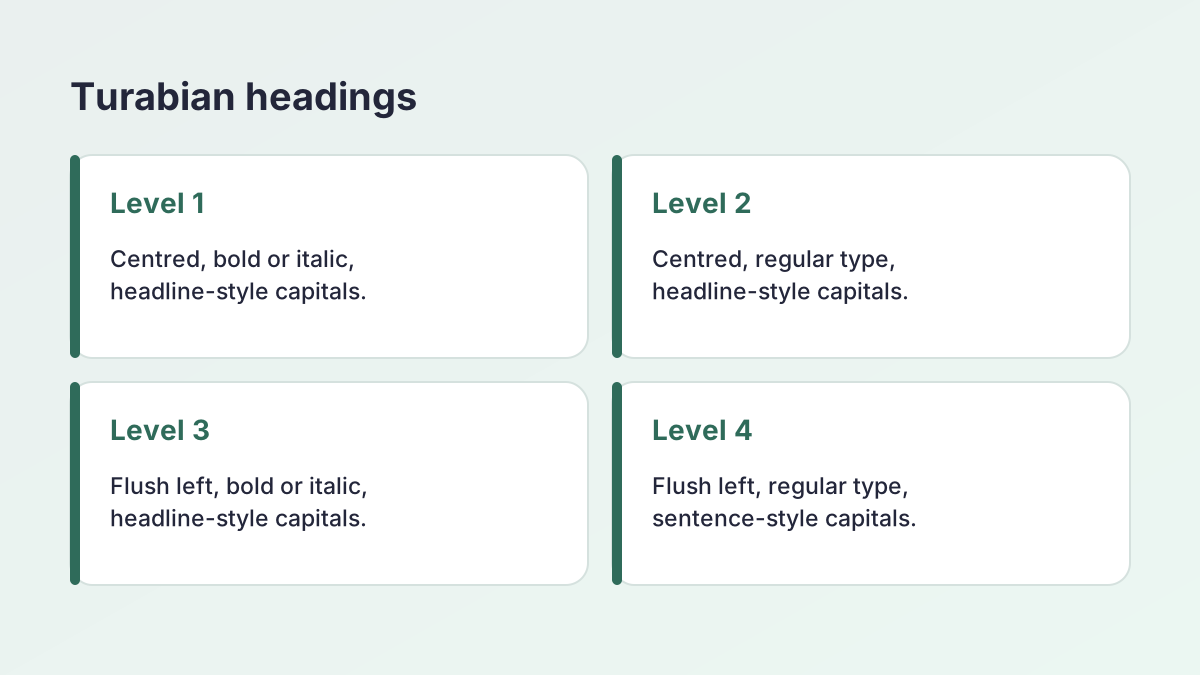
Turabian headings: five levels
Turabian sets out up to five levels of subheading. Most class papers need only one or two.
- Level 1: centred, bold or italic, headline-style capitals.
- Level 2: centred, regular type, headline-style capitals.
- Level 3: flush left, bold or italic, headline-style capitals.
- Level 4: flush left, regular type, sentence-style capitals.
- Level 5: run in at the start of the paragraph, bold or italic, sentence-style capitals, ending with a full stop.
Use the same heading style for every heading at the same level. To fix capitals quickly, paste a heading into the Case Converter.
Turabian line spacing
Double-space the text. Block quotations, footnotes and bibliography entries are usually single-spaced inside each item, with a blank line between items. Many school guides set it out this way.
Turabian margins and font
One-inch margins on every side and a readable font, typically Times New Roman 12. Indent each new paragraph half an inch.
Title page in Turabian for research papers, book reviews and essays
The same title page in Turabian works for almost every kind of class assignment. A few types raise their own questions.
Research papers
A research paper title page is the standard layout. Long titles are common, so let them wrap onto a second centred line rather than shrinking the font. If you are still choosing a title, the Essay Title Generator and the Research Paper Title Generator both give ideas.
Book reviews
Book titles inside your own title are normally italicised, for example A Review of Confessions. The generator writes plain text, so italicise the book title in Word or Google Docs after you download or paste the page.
Short essays
Some instructors don't want a separate title page for a short essay. Without one, the title can go at the top of the first page, as Chicago guides allow. Check the assignment brief before you add a page nobody asked for.
Common Turabian title page mistakes
These are the problems that come up most often on home-made title pages.
- A number on the title page. The page counts, but it never shows a number.
- The title at the very top. It belongs about a third of the way down.
- Everything bunched together. The course details sit in a separate block, about a third from the bottom.
- Bold, large or decorative type. Turabian doesn't call for a bigger font on the title page. Keep the paper's font and size.
- Lowercase or all-caps titles. Use headline-style capitals.
- A dash instead of a colon. Separate title and subtitle with a colon and a line break.
- Single spacing. Double-space the lines, like the rest of the paper.
- A running head. That's an APA feature, not a Turabian one.
- Mixing styles. If your bibliography is Turabian, the title page should be too, not APA or MLA.
Writing in another style?
Use the APA Title Page Generator, the MLA Title Page Generator or the Harvard Title Page Generator, or browse every style on the title page generator hub.
Is this Turabian title page generator free and private?
Yes to both. The tool is free, with no account, no sign-up and no limit on downloads.
Nothing leaves your browser
Everything runs on your own device. Your title, name and course are never sent to a server, and there is no AI involved: the layout comes from fixed formatting rules, so the same input always gives the same page.
Before you hand it in
- Check your name and course code are spelled exactly as your instructor expects.
- Make sure the date is the due date, not the day you started.
- Check the word count of the paper itself with the Word Counter if your instructor set a limit.
- Read your syllabus for any school-specific title page rules, which always come first.
Turabian title page FAQ
What goes on a Turabian title page?
For a class paper: the title (and subtitle) about a third of the way down, then your name, the course, often the instructor, and the date about a third from the bottom. Everything is centred and double-spaced, with no page number.
Does a Turabian title page have a page number?
No number appears on it. In the Turabian class-paper model the title page counts as page 1, so the text starts on page 2. Some guides start the text on page 1 instead; the generator offers both.
Is a Turabian cover page the same as a title page?
Yes. Turabian calls it a title page, and cover page is another name for the same sheet. Use your school's template if it gives one.
Is the title bold on a Turabian title page?
Turabian doesn't require bold or a larger font on a class-paper title page, so the generator uses regular type in your chosen font. If your instructor wants a bold title, make it bold in Word after downloading.
What font should a Turabian title page use?
The same font as the paper, usually Times New Roman 12. The generator also offers Arial, Calibri and Georgia at 12 point.
What is the difference between a Chicago and a Turabian title page?
They are almost identical. The main difference is numbering: Turabian's class-paper model counts the title page as page 1, while many Chicago guides number the first page of text as 1.
Does this work for a Turabian thesis or dissertation?
No. Theses and dissertations follow different title page rules and number the front matter in roman numerals. Use your graduate school's template for those.
Can I use the Turabian title page in Google Docs?
Yes. Upload the downloaded Word file to Google Docs, or use Copy text and paste it in. The paste keeps the centring and double spacing.
More free title page generators
- APA Title Page GeneratorAn APA 7 student or professional title page, previewed and ready for Word.
- MLA Title Page GeneratorThe MLA first-page heading, or a title page if your instructor asks.
- Chicago Title Page GeneratorA Chicago style title page with the title a third of the way down.
- Harvard Title Page GeneratorA clean Harvard-style cover page with student number and word count.
See all 80 free tools for students
Free guides
Related tools
Last updated by The Study Corp editorial team.