APA Format Guidelines in Practice: Common Mistakes and Fixes
Each example shows a habit instructors often mark and the version that follows APA format guidelines. Reference entries come from our citation engine; italics don't show here, so remember that journal names, volume numbers and book titles are italic in your paper.
Common mistakeA student paper typed in 14-point Arial to look longer.
APA 7 format11-point Arial, 11-point Calibri, 12-point Times New Roman or another legible font, used throughout.
APA names specific fonts and sizes. Use one for the whole paper.
Common mistakeDouble spacing plus an extra blank line between paragraphs.
APA 7 formatDouble spacing only, with 0 points before and after paragraphs and a 0.5-inch first-line indent.
APA says not to add extra space before or after paragraphs.
Common mistakeSLEEP AND PERFORMANCE at the top left and 1 at the top right of a class paper.
APA 7 formatOnly the page number at the top right, starting with 1 on the title page.
Student papers don't need a running head unless your instructor asks for one.
Common mistakeA bold, centered “Introduction” heading at the top of page 2.
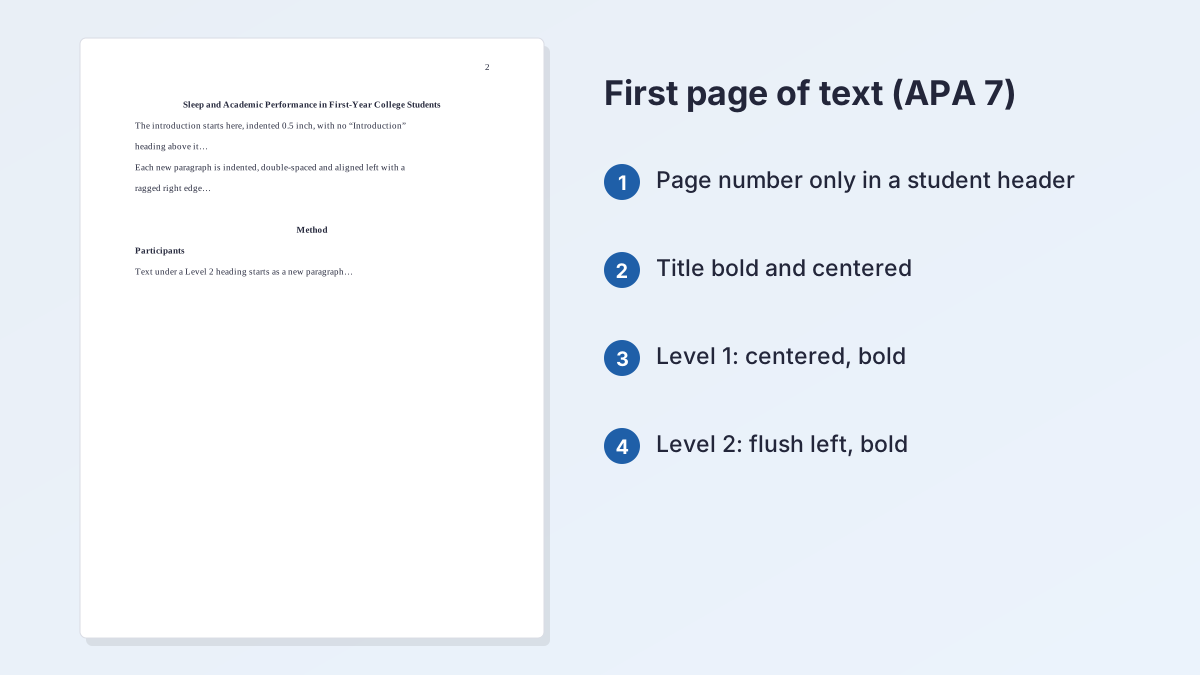
APA 7 formatThe paper's title in bold, centered, then the first indented paragraph.
APA doesn't label the introduction; the title acts as its Level 1 heading.
Common mistakeParticipants (centered, underlined)
APA 7 formatParticipants (flush left, bold, title case, text starting on the next line)
Level 2 is flush left and bold. Underlining isn't part of any APA heading level.
Common mistakeKahneman and Tversky, Prospect Theory, Econometrica 1979, pages 263-291
APA 7 formatKahneman, D., & Tversky, A. (1979). Prospect theory: An analysis of decision under risk. Econometrica, 47(2), 263–291. https://doi.org/10.2307/1914185
Initials, the year in parentheses, a sentence-case article title, and the DOI as a link.
Common mistakeKahneman & Tversky (1979) showed that losses weigh more than gains.
APA 7 formatKahneman and Tversky (1979) showed… or …than gains (Kahneman & Tversky, 1979).
Use “and” in a narrative citation and “&” inside parentheses.
How to Set Up an APA Paper, Step by Step
These steps apply the APA format guidelines for a student paper from the Publication Manual, 7th edition. Set them up before you write.
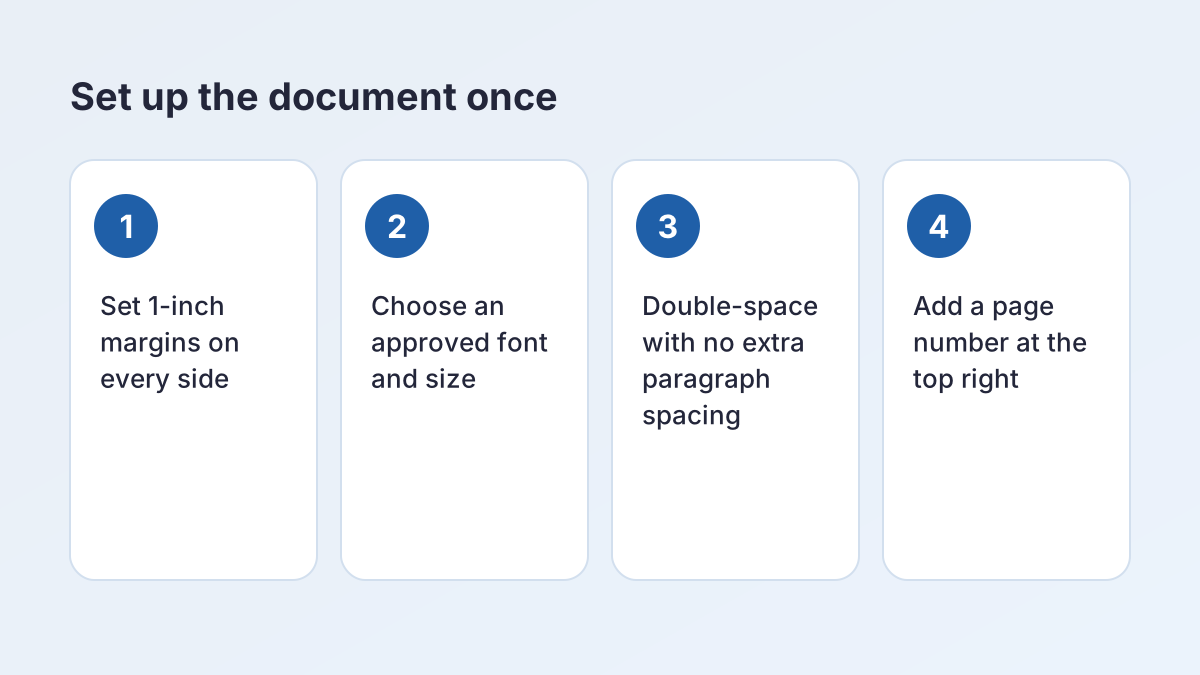
- Set margins and font. Use 1-inch margins on every side and one approved font, such as 12-point Times New Roman, 11-point Calibri or 11-point Arial.
- Double-space everything. Set line spacing to double for the whole document, with 0 points before and after paragraphs.
- Add page numbers. Insert an automatic page number in the top right corner. The title page is page 1.
- Build the title page. Center the bold title three or four lines down, then your name, school, course, instructor and due date on double-spaced lines.
- Write with headings. Repeat the title in bold at the top of page 2, indent paragraphs 0.5 inch and add Level 1 and 2 headings as needed.
- Finish with references. Start a new page labeled References, bold and centered, with entries in alphabetical order and a 0.5-inch hanging indent.
What Is APA Style Format?
APA style is the writing and citation system of the American Psychological Association. Its current rules are in the seventh edition of the Publication Manual, released in late 2019. US instructors assign it most in psychology, nursing, education, social work, business and other social sciences, in courses such as PSYC 2301 or nursing research.
What APA covers
So what is APA style format in practice? It has three parts: how the page looks (margins, font, spacing, headings), how you cite sources in your text and reference list, and how you write (clear, concise, bias-free language). The quickest way to start a correctly formatted paper is the APA Title Page Generator, which builds the first page and downloads a Word file with the font, margins and page numbers set.
Where the rules come from
The official source is the APA Style paper format pages, which apply to both student assignments and journal manuscripts. Your instructor can change any of these APA format guidelines for a class, and their instructions come first.
Student vs. Professional Papers
APA 7 sets out separate rules for student papers and for professional papers written for publication. Unless your instructor says otherwise, follow the student version. The differences are small but easy to get wrong.
| Element | Student paper | Professional paper |
|---|---|---|
| Page header | Page number only | Page number plus an all-caps running head of 50 characters or fewer |
| Title page | Title, name, affiliation, course, instructor, due date | Title, names, affiliations, author note |
| Author note | Not included | Included on the title page |
| Abstract | Not usually required unless your instructor asks | Usually required |
Which one should you use?
If you're writing for a class, follow the student APA format guidelines. Theses and journal submissions follow the professional rules or your school's guide. If an instructor asks for a running head, add one in the professional format.
Margins, Fonts and Page Numbers
These three APA format guidelines make the biggest difference to how a paper looks at a glance.
Margins
The APA format guidelines call for 1-inch margins on every side of every page.
What is APA format font?
APA 7 doesn't require one font. It suggests accessible fonts in specific sizes, such as these, and you use one for the whole paper:
| Type | Accepted fonts and sizes |
|---|---|
| Sans serif | 12-point Aptos, 11-point Calibri, 11-point Arial, 10-point Lucida Sans Unicode |
| Serif | 12-point Times New Roman, 11-point Georgia, normal (10-point) Computer Modern |
| Inside figures | A sans serif font between 8 and 14 points |
| Footnotes | Your word processor's default footnote font and spacing |
Page numbers
Put an automatic page number in the top right corner of every page, and count the title page as page 1. In a student paper the header holds only the number. Professional papers add a running head, a shortened title in capital letters, at the left.
Is APA Format Double Spaced?
Is APA format double spaced everywhere? Almost. The APA format guidelines double-space the paper from start to finish: the title page, the abstract, the text, block quotations, table and figure numbers, titles and notes, and the reference list, both within and between entries.
The exceptions
APA allows a few: the body of a table may be single-, one-and-a-half- or double-spaced; text inside a figure image can be spaced however reads best; and footnotes may use your word processor's default single spacing.
No extra space between paragraphs
APA's line spacing page says not to add extra space before or after paragraphs. Word and Google Docs often add a few points after each paragraph by default, so set "Before" and "After" to 0.
Alignment and indents
Align text to the left margin and leave the right edge ragged; don't use full justification. Indent the first line of each paragraph 0.5 inch with the Tab key or the paragraph settings, not the space bar.
APA Paper Format Headers: Heading Levels 1–5
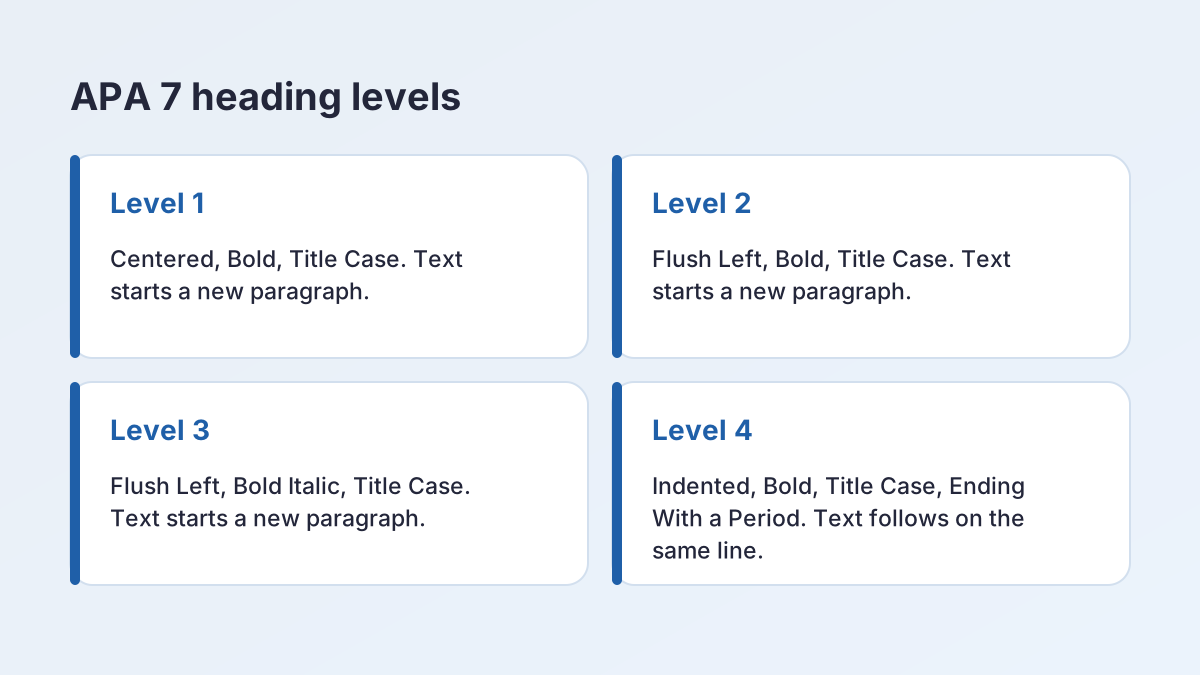
The APA format guidelines give five heading levels. Use only as many as your paper needs, starting with Level 1 and moving down in order.
| Level | Format | Where the text begins |
|---|---|---|
| 1 | Centered, Bold, Title Case | New paragraph |
| 2 | Flush Left, Bold, Title Case | New paragraph |
| 3 | Flush Left, Bold Italic, Title Case | New paragraph |
| 4 | Indented, Bold, Title Case, Ending With a Period. | Same line as the heading |
| 5 | Indented, Bold Italic, Title Case, Ending With a Period. | Same line as the heading |
No "Introduction" heading
Don't put "Introduction" at the top of the first page of text. The paper's title, repeated in bold and centered at the top of page 2, works as the Level 1 heading for the introduction.
APA format example headings
A typical empirical paper uses Level 1 for Method, Results and Discussion, and Level 2 for parts of the method such as Participants and Procedure.
Subheadings in APA format: example rules
Give at least two subsections whenever you divide a section, and keep headings at the same level in the same style. Don't number or letter them.
The First Page and the Abstract
Under the APA format guidelines, every paper opens with a title page. In a student paper it shows the bold, centered title three or four lines down, then your name, your school, the course number and name, your instructor and the due date, each centered on its own double-spaced line. The page number 1 sits in the header. The free APA Title Page Generator lays this page out for you and switches between student and professional versions.
Do student papers need an abstract?
Usually not. APA says abstracts and keywords aren't typically required for student papers, so include one only when your instructor or assignment asks for it.
How to format an abstract
Put the abstract on its own page after the title page. Type the label "Abstract" in bold, centered, on the first line. Write the abstract as one paragraph that isn't indented, and keep it to 250 words unless your instructor sets another limit. If keywords are required, add a line below with the label Keywords: in italics, indented like a paragraph, followed by three to five words or phrases.
The Reference List and In-Text Citations
The APA format guidelines tie the text to the sources: every source you cite needs an entry in the reference list, and every entry should be cited in the text.
Setting up the reference list
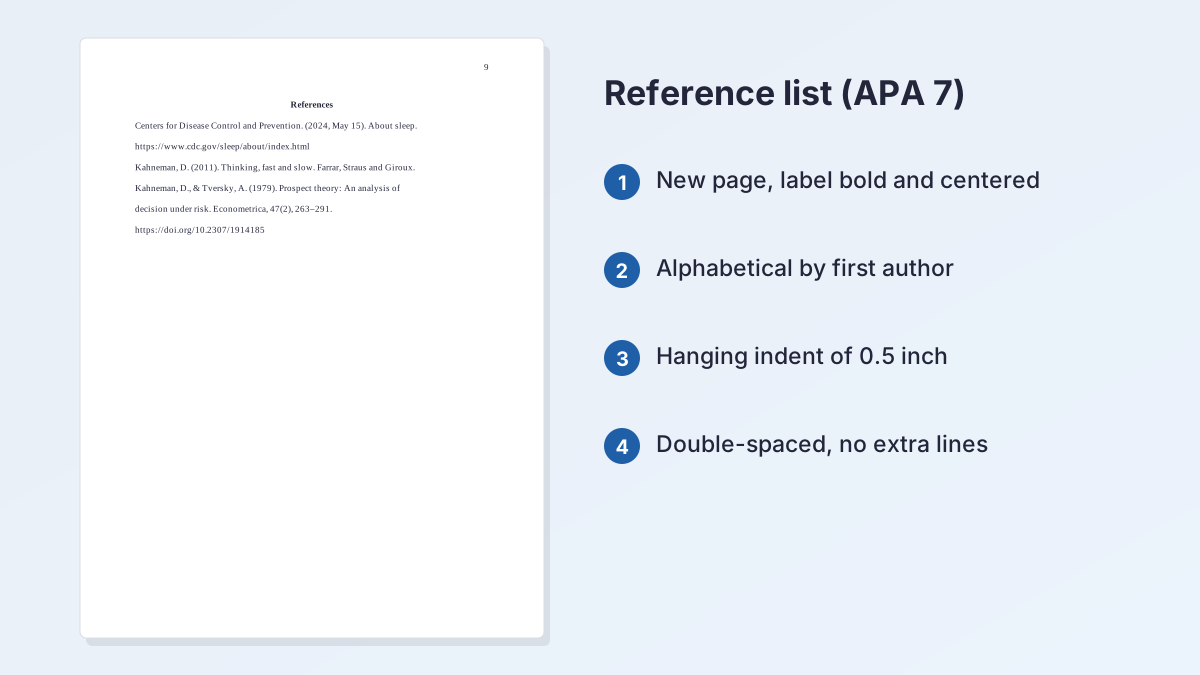
Start a new page after the text, labeled "References" in bold and centered at the top. Double-space every entry, give each one a 0.5-inch hanging indent, and put the entries in alphabetical order by the first author's last name.
Example entries
APA drops the site name when it matches the author, as in the CDC entry:
- Centers for Disease Control and Prevention. (2024, May 15). About sleep. https://www.cdc.gov/sleep/about/index.html
- Kahneman, D. (2011). Thinking, fast and slow. Farrar, Straus and Giroux.
- Kahneman, D., & Tversky, A. (1979). Prospect theory: An analysis of decision under risk. Econometrica, 47(2), 263–291. https://doi.org/10.2307/1914185
In-text citations
APA uses the author's last name and the year. A parenthetical citation puts both in parentheses with an ampersand for two authors: (Kahneman & Tversky, 1979). A narrative citation names the authors in your sentence with "and": Kahneman and Tversky (1979). For three or more authors, use the first author's surname and "et al." every time. For a direct quotation, add the page after the year: (Author, Year, p. #). To format entries without typing them, paste a DOI or link into the APA Citation Machine.
Tables and Figures in an APA Paper
In the APA format guidelines, tables and figures follow the same basic pattern. Above each one, put a bold number (Table 1, Figure 1) and, on the next double-spaced line, a short title in italic title case. Notes go below. Number tables and figures in the order you first mention them in the text.
Where they go
You have two choices: place each table or figure in the text right after the paragraph that first mentions it, or put each one on its own page after the reference list. Ask which your instructor prefers.
Lines and spacing
Use few lines: usually the top and bottom of the table and under the column headings, never vertical lines. The guide to APA table format walks through numbers, titles, notes and templates with full examples.
APA Format in Word, Step by Step
Setting up APA format in Word takes about five minutes, and Word can hold all of these APA format guidelines in one file. Set it up once, then save it as your template for the semester.
- Margins: Select Layout > Margins. Word's default is one inch on every side; choose Custom Margins if yours differ.
- Font: Press Ctrl + A and choose an approved font and size from the Home tab, such as Times New Roman at 12 point.
- Spacing: With everything still selected, go to Home > Line and Paragraph Spacing > Line Spacing Options. Choose Double and set Before and After to 0.
- Page numbers: On the Insert tab, select Page Number, choose the top of the page and pick the right-aligned style. Leave Different First Page unchecked, since the title page shows page 1.
- Hanging indent: On the reference page, select the entries and go to Home > Paragraph Settings dialog launcher > Indents and Spacing. Under Special, choose Hanging and check that it's 0.5 inch. Microsoft's hanging indent help page shows each step.
Headings and templates
Word's built-in Heading styles don't follow APA format guidelines, so modify Heading 1 to be centered, bold and black at text size, and Heading 2 to be flush left and bold. Save the result as a template, and APA format in Word takes seconds for the next paper.
How to Do APA Format in Google Docs
Here's how to do APA format in Google Docs. Docs has every setting you need, as long as the file is in pages format; headers, page numbers and margins don't appear in pageless documents.
- Margins: Open File > Page setup, choose Pages, and set every margin to 1 inch.
- Font: Select all and pick an approved font. Docs often starts new files in 11-point Arial, which APA lists as an example.
- Spacing: Go to Format > Line & paragraph spacing and choose Double. Open Custom spacing to set the space before and after paragraphs to 0.
- Page numbers: Go to Insert > Page elements > Page number and pick the option that places numbers at the top right on every page, including the first. Google's page number help page describes the options.
- Hanging indent: Select the references, then go to Format > Align & indent > Indentation options. Under Special indent, choose Hanging and keep 0.5 inch.
Check before you submit
That's how to do APA format in Google Docs in five settings. If your instructor wants a Word file, use File > Download > Microsoft Word (.docx) and check that the spacing carried over.
Literature Reviews, Proposals and Other Assignments
Most assignments in APA classes use the same APA format guidelines for the page. What changes is the structure inside the paper, and your instructor's prompt sets that.
Literature review in APA format
A literature review uses the standard title page, double spacing and references. Organize the body by theme or trend with Level 1 and 2 headings rather than summarizing one source per paragraph.
Research proposal in APA format
Proposals usually have an introduction, a Method section written in the future tense and references. Many instructors ask for an abstract here.
Article review, critique and summary
These short papers may need no headings. Cite the article in the text and list it in the references.
Appendix in APA format
Each appendix starts on a new page after the references (and after any tables and figures placed at the end). Center the label "Appendix" in bold, and center the appendix title in bold on the next line. With more than one, label them Appendix A, Appendix B and so on.
Discussion posts and PowerPoint presentations
APA format guidelines are written for papers. For a discussion post, follow your instructor's APA format discussion post guidelines, which usually mean citing in the text and listing references at the end. For slides, APA says you may need to adjust spacing and font size; keep the citations and a reference slide.
APA vs. MLA Format: The Key Differences
What is APA style format compared with MLA? The page setup is similar; the first page and citations are not.
| Feature | APA 7 | MLA 9 |
|---|---|---|
| First page | Separate title page | Four-line heading on page 1 |
| Page header | Page number at the top right | Last name and page number at the top right |
| In-text citation | (Author, year) | (Author page) |
| Source list | References | Works Cited |
| Headings | Five set levels | Optional, no fixed levels |
Use one style per paper
Don't mix them. If a class switches to MLA, the guide to the MLA heading shows its first page. When your paper is ready, the APA citation generator formats each reference, and you can browse every topic on the student writing guides page. For a finished first page with the font, margins and header already in place, start with the APA Title Page Generator.
APA Format Guidelines FAQ
What is APA style format?
It's the American Psychological Association's system for formatting papers and citing sources, now in its 7th edition. It covers margins, fonts, spacing, headings, in-text citations and the reference list.
Is APA format double spaced?
Yes. Double-space everything, including the title page, block quotations and the reference list. Table bodies, figure text and footnotes are the main exceptions.
What font is required for APA format?
APA format guidelines name no single font. Examples include 12-point Times New Roman, 11-point Calibri, 11-point Arial, 12-point Aptos, 11-point Georgia, 10-point Lucida Sans Unicode and 10-point Computer Modern.
What are the margins in APA format?
1 inch on every side of every page. A thesis or dissertation may follow different margins set by your school.
Do student papers need an abstract in APA 7?
Usually not. APA says abstracts aren't typically required for student papers, so add one only if your instructor or assignment asks.
Do you need a running head in APA 7?
Not for a student paper, which needs only the page number at the top right. Professional papers, and classes whose instructors ask for one, use an all-caps running head at the left.
How many heading levels does APA have?
Five. Level 1 is centered and bold, Level 2 flush left and bold, Level 3 flush left bold italic, and Levels 4 and 5 are indented and end with a period.
How do you do APA format in Google Docs?
Set 1-inch margins in File > Page setup, choose an approved font, set double spacing in Format > Line & paragraph spacing, and add page numbers with Insert > Page elements > Page number.
More free guides
- APA Lab Report FormatSections, headings, tables and references for a lab report in APA 7.
- APA Table FormatNumber, title, body and notes for APA 7 tables, with templates.
- How to Cite an Image in APAImages, figures, the Bible, dictionary entries and songs in APA 7.
- APA Outline FormatOutline levels, numbering and a copyable template for an APA paper.
- How to Cite a Quote in APAShort quotes, block quotes, page numbers and quotes without pages in APA 7.
- Citing Two Authors in APATwo authors, three or more, groups and no author, in text and in the reference list.
See all 80 free tools for students
Related tools
Last updated by The Study Corp editorial team.