
Chicago footnote examples: first notes and shortened notes
Each row shows what the Chicago footnote generator gives you for a real source in the 18th edition: the full note from the Footnote tab and the shortened note from the Short note tab. The note under each row says what, if anything, to change by hand. Italics are kept when you copy from the tool.
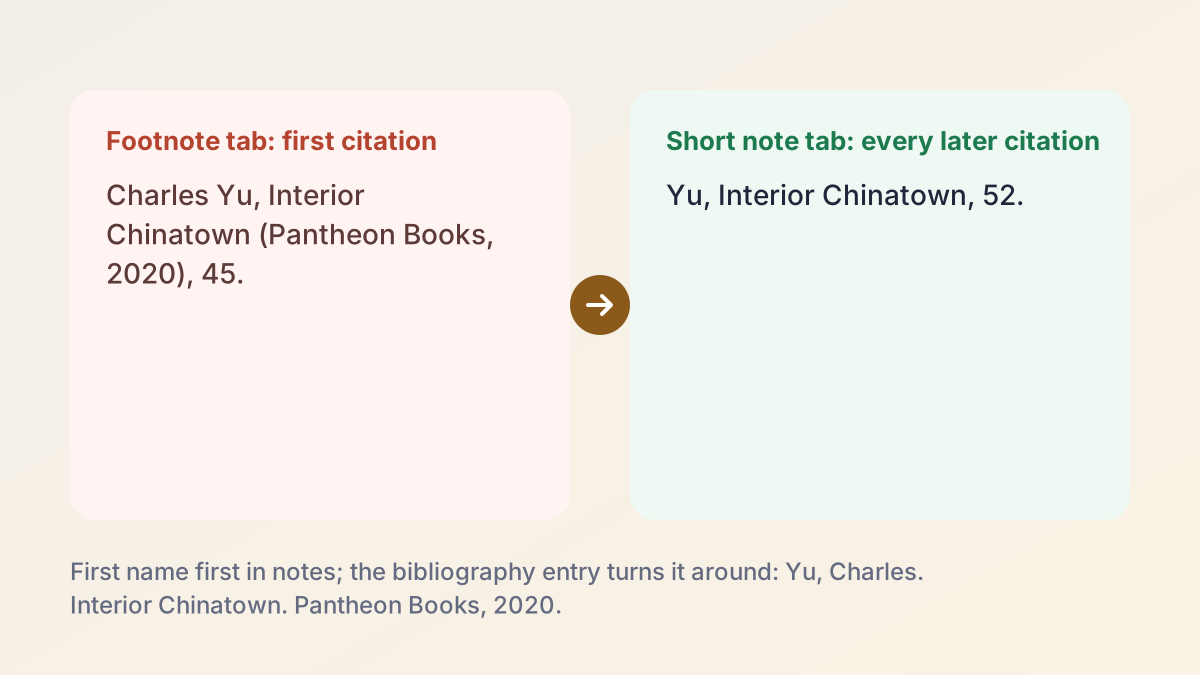
First note (Footnote tab)Charles Yu, Interior Chinatown (Pantheon Books, 2020), 45.
Shortened note (Short note tab)Yu, Interior Chinatown, 52.
Change the page number between copies: the page box applies to both notes.
First note (Footnote tab)Daniel Kahneman et al., Noise: A Flaw in Human Judgment (Little, Brown Spark, 2021), 112.
Shortened note (Short note tab)Kahneman et al., Noise: A Flaw in Human Judgment, 112.
The short note repeats the full title. Chicago shortens titles over four words, so trim it: Kahneman et al., Noise, 112.
First note (Footnote tab)J. D. Watson and F. H. C. Crick, “Molecular Structure of Nucleic Acids: A Structure for Deoxyribose Nucleic Acid,” Nature 171, no. 4356 (1953): 737, https://doi.org/10.1038/171737a0.
Shortened note (Short note tab)Watson and Crick, “Molecular Structure of Nucleic Acids: A Structure for Deoxyribose Nucleic Acid,” 737.
Trim the title to its first key words: Watson and Crick, “Molecular Structure,” 737.
First note (Footnote tab)“The Bill of Rights: A Transcription,” National Archives, accessed October 20, 2026, https://www.archives.gov/founding-docs/bill-of-rights-transcript.
Shortened note (Short note tab)National Archives, “The Bill of Rights: A Transcription.”
The page shows no publication date (only a “last reviewed” date), so Date stays blank. The first note starts with the title; the short note names the organization. No page number for a web page.
First note (Footnote tab)Nicholas Carr, “Is Google Making Us Stupid?,” The Atlantic, July/August 2008.
Shortened note (Short note tab)Carr, “Is Google Making Us Stupid?”
The comma after the question mark is correct. The date field takes one month, so for a double issue the note says July 2008; add “/August” after pasting.
First note (Footnote tab)Selma, directed by Ava DuVernay (Paramount Pictures, 2014).
Shortened note (Short note tab)Selma.
Film notes start with the title, so the short note is the title alone.
How to use the Chicago footnote generator
In the Chicago footnote generator, Notes & Bibliography and the 18th edition are already selected. You need the source, or a DOI, URL, ISBN or title for it, and the page you are citing.
- Check the system and edition. Leave Notes & Bibliography selected. Select 17th in the Edition row only if your instructor asks for it; Author-Date gives parenthetical citations instead of notes.
- Find the source. Paste a URL, DOI, ISBN or title into Find your source and select Find, or choose a source type (Website, Journal, Book, or More) and type the details.
- Check the fields. Fix anything highlighted. In the Chicago footnote generator, a status box tells you whether the details matched a database record or need review.
- Add the page and copy the footnote. Open the Footnote tab of the Chicago footnote generator, type the page into Page number (optional), and copy the note into the footnote your word processor inserts.
- Use the short note after that. For every later citation of the same source, open the Short note tab, change the page and copy again.
- Build and export the bibliography. Select Add to bibliography for each source, then Download for Word, Copy all, or More formats for RIS, BibTeX or plain text.
How the Chicago footnote generator builds each note
Once a source is found, the Chicago footnote generator shows three tabs under Your citation:
- Footnote: the full note, for the first time you cite the source.
- Short note: the shortened note, for every later citation.
- Bibliography: the entry for the list at the end of your paper.
The Page number (optional) box sits under the Footnote and Short note tabs. Whatever you type there, such as 45 or 45–47, goes at the end of both notes; the bibliography entry never takes a page number. The copy button keeps italics when you paste into Word or Google Docs, and it copies the note text only, because your word processor adds the note number.
Sources are found by DOI (doi.org and Crossref), ISBN (Open Library, then Google Books), web page metadata or title search. The Chicago Citation Generator explains the lookups, the two Chicago systems and the 18th edition changes in full; this page sticks to notes.
First notes: what a full Chicago footnote contains
The first note the Chicago footnote generator writes for a source gives everything a reader needs to find it, written as one sentence-like string separated by commas. For a book that is the author's name in normal order, the title in italics, the publisher and year in parentheses, and the page: Charles Yu, Interior Chinatown (Pantheon Books, 2020), 45. A journal article note puts the article title in quotation marks, then the journal, volume, issue, year and the page you cite, then the DOI.
Chicago footnote citation generator: note vs bibliography entry
The same facts appear in the note and in the bibliography, punctuated differently. Students lose marks for mixing the two forms, so the Chicago footnote citation generator gives you each one on its own tab.
| Footnote | Bibliography entry | |
|---|---|---|
| Example | Charles Yu, Interior Chinatown (Pantheon Books, 2020), 45. | Yu, Charles. Interior Chinatown. Pantheon Books, 2020. |
| Author's name | First name first | Last name first |
| Separators | Commas | Periods |
| Publisher and year | In parentheses | No parentheses |
| Page number | The page you cite | None for a book; the full range for an article |
| Three or more authors (18th) | First author et al. | Up to six names |
Full notes when there is no bibliography
If your instructor doesn't want a bibliography, every source still gets one full note the first time it appears, and short notes after that. In a long paper with chapters, Chicago suggests giving the full note again at the first citation in each new chapter.
Shortened notes in the 18th edition
After the first full note, Chicago wants a shortened note: the author's last name, a short form of the title, and the page. The Chicago footnote generator puts it on the Short note tab: Yu, Interior Chinatown, 52.
Trimming long titles
Chicago shortens titles of more than four words, usually to the first key words of the main title, and drops the subtitle. The Chicago footnote generator repeats the main title on the Short note tab as the record gives it, so trim long ones yourself:
- Noise: A Flaw in Human Judgment becomes Noise
- "Prospect Theory: An Analysis of Decision under Risk" becomes "Prospect Theory"
- "Molecular Structure of Nucleic Acids: A Structure for Deoxyribose Nucleic Acid" becomes "Molecular Structure"
Keep the italics or quotation marks of the full title. Never shorten a title so far that two sources by the same author look alike.
Consecutive notes to the same source
When note 5 and note 6 cite the same work, the 18th edition allows an even shorter form in note 6: the author's name alone with the page, such as "Yu, 58", or the title alone for a work with no author. The fuller short note is still usually preferred, and it is never wrong.
Ibid. in the Chicago 18th edition
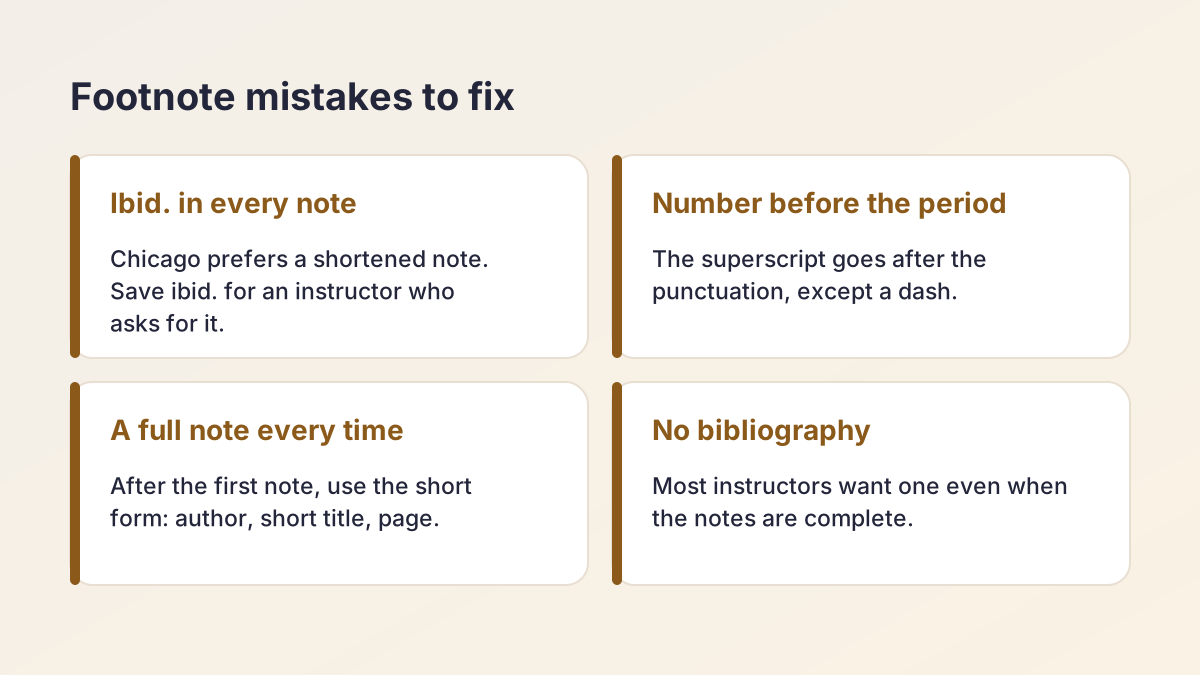
Ibid. is short for ibidem, "in the same place", and it points to the source in the note immediately before. Chicago discourages it in favor of shortened notes, which are clearer to readers and rarely longer than a line. Purdue OWL's Chicago 18th edition overview puts it the same way: discouraged, but acceptable for the same source in consecutive notes.
The Chicago footnote generator never writes ibid. It always gives a shortened note, which is the choice Chicago recommends.
If your instructor wants ibid.
Some history departments and high school teachers still ask for it. Then:
- Use it only when the previous note cites one source, the same one.
- Write "Ibid." with a capital I and a period, not in italics.
- Add the page if it changed: "Ibid., 58." Leave the page off if it is the same page.
- Don't use it after a note that cites two or more sources; write a short note instead.
Endnotes vs footnotes
Footnotes sit at the bottom of the page where you cite the source. Endnotes are gathered at the end of the paper, or at the end of each chapter in a long work, under the heading Notes. The content of each note is identical, so the choice is about layout, and your instructor or department decides. Footnotes are more common in US class papers because readers can glance down instead of flipping pages.
Chicago endnotes generator: footnotes into endnotes
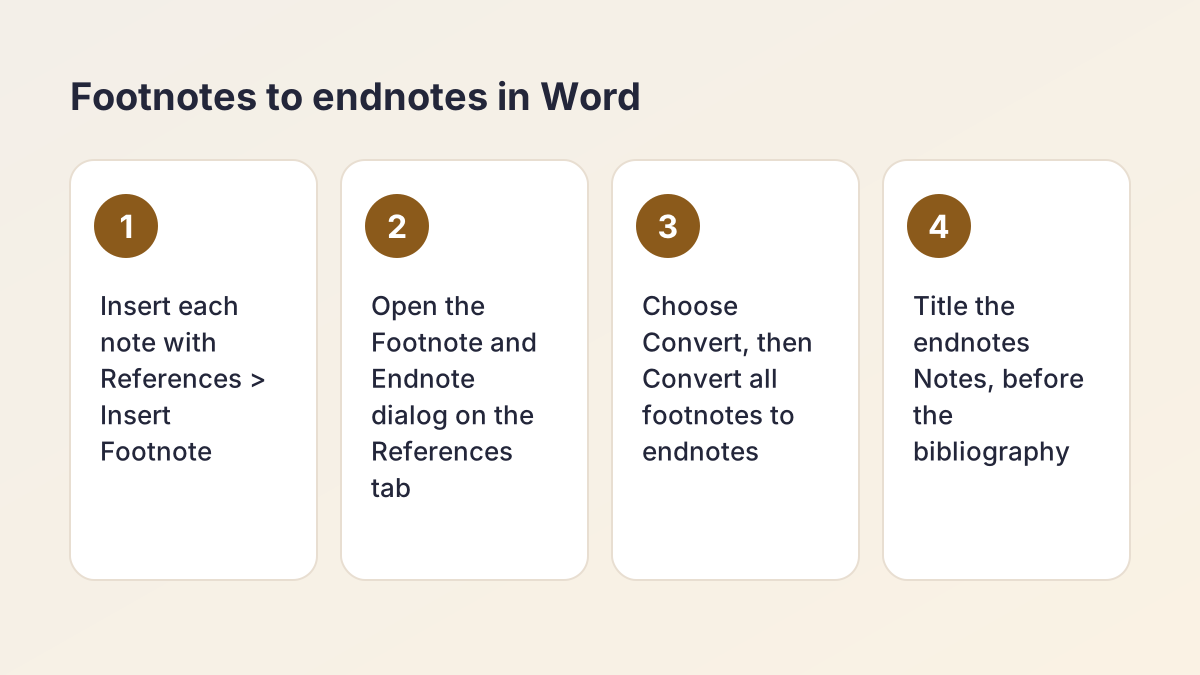
There is no separate endnote mode in the Chicago footnote generator, because none is needed: the note on the Footnote tab is the endnote text. The Chicago endnotes generator workflow is the same until the last step:
- Insert each note with References > Insert Footnote in Microsoft Word and paste the note.
- When the draft is done, open the Footnote and Endnote dialog from the small arrow on the References tab.
- Select Convert, then Convert all footnotes to endnotes.
- Make sure the notes come before the bibliography and are titled Notes.
Footnotes in Google Docs
Google Docs inserts footnotes with Insert > Footnote but has no built-in endnotes. For endnotes, download the document as a Word file and convert it there, or type a Notes page at the end with numbers that match your superscripts.
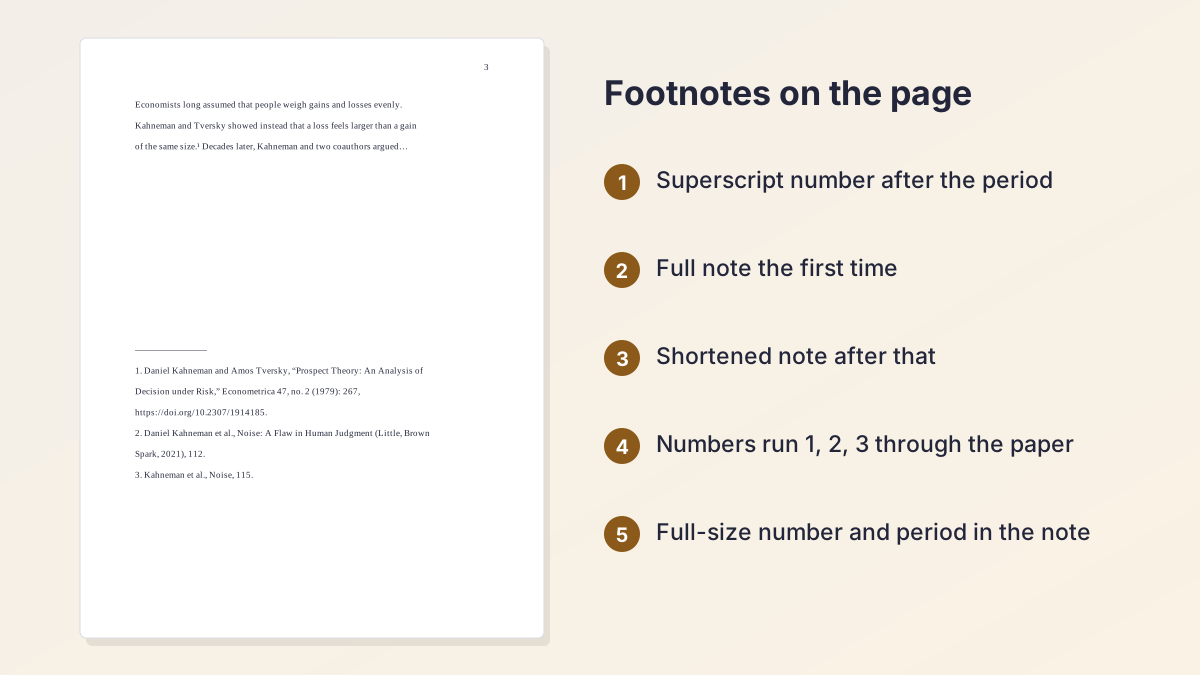
Note numbering and placement
Note numbers are where a footnoted paper usually looks sloppy. The Chicago footnote generator copies the note text; numbering is up to your word processor and you.
In your text
- Put the superscript number at the end of the sentence or clause it supports, after the punctuation: period, comma, quotation mark or closing parenthesis. A dash is the exception: the number goes before it.
- Number notes 1, 2, 3 in order through the whole paper. Don't restart on each page.
- Every citation gets a new number, even when you cite the same source again. Never reuse a number.
- Use one note per place: the Chicago footnote citation generator gives one source at a time, so if a sentence draws on two sources, cite both in one note, separated by a semicolon.
In the note itself
Chicago prefers a full-size number followed by a period at the start of each note, as in "1." Word and Google Docs show a superscript number by default, and most instructors accept it. Footnotes are usually single-spaced with a blank line between notes, though class papers often follow the instructor's own rules.
Discursive notes
A note can also hold a short comment, such as a counterargument or a pointer to further reading. Keep it brief: if a point matters to your argument, it belongs in the main text.
Chicago bibliography citation generator: does a footnoted paper need one?
Usually, yes, and the Chicago bibliography citation generator builds it as you go. Chicago treats the bibliography as optional when every source has a full note, but most US instructors want one, and it lets you keep the notes short. If the assignment sheet doesn't say, include it.
How the bibliography is built
Select Add to bibliography after copying a note, and the source joins your saved list. The Chicago bibliography citation generator sorts the list alphabetically by author and formats every entry with a hanging indent. Download for Word gives a .docx titled Bibliography; Copy all pastes the list with italics; More formats gives RIS for Zotero and BibTeX for LaTeX.
Lists stay in your browser on this device, with New list for each assignment. The Word file holds the bibliography only, not your notes. For bibliography layout and how entries changed in the 18th edition, see the Chicago Citation Generator. If you rearrange entries by hand, the Alphabetizer puts them back in order.
Footnotes for tricky sources
These cases come up in almost every research paper. The Chicago footnote generator handles the format; you decide what goes in the fields.
No author
A web page with no named author starts its first note with the page title, then the site or organization. Don't type "Anonymous" or invent a name. A film note likewise starts with the title, followed by the director.
Three or more authors
In the 18th edition, notes name the first author followed by et al.: Daniel Kahneman et al. Enter every author in the form anyway, because the bibliography entry lists them.
A source quoted in another source
If you only read a quotation inside a secondary source, cite the source you actually read. Chicago allows a "quoted in" note, but it has to be typed by hand: put the original first, then "quoted in" and the source you read.
Different pages of the same source
Type each page into the page box before you copy. One source can appear in many notes with different pages; it appears once in the bibliography.
Common footnote mistakes and how to fix them
Instructors spot these quickly, whether the notes came from a Chicago footnote generator or were typed by hand.
- A full note every time. Only the first citation gets the full note. Use the Short note tab after that.
- Copying the bibliography entry into a footnote. Last name first and periods mean you copied the wrong tab.
- Ibid. after a note with two sources. It's ambiguous. Use a shortened note.
- The superscript before the period. Move it after the punctuation.
- A page number in the bibliography for a book. Pages belong in the notes.
- Untrimmed short titles. Cut titles over four words to their first key words.
- Notes in two styles. Don't paste a 17th edition note, with a city, into an 18th edition paper.
Checking length too? The Word Counter can leave citations and the bibliography out of the count.
Is the Chicago footnote generator free and private?
Yes. The Chicago footnote generator is free, with no account.
What is sent where
When you select Find, what you pasted goes to our server, which asks doi.org, Crossref, Open Library or Google Books, or fetches the public web page you linked. To show a note, the source details go to our server to be formatted and come straight back; nothing is saved to a database. Lookup results are cached in server memory for up to six hours, and lookups are limited to 60 every 10 minutes per IP address. No AI writes or guesses any part of a note.
Saved lists are stored only in your browser's local storage, and the Word, RIS, BibTeX and text files are built on your device. To show a list formatted, its sources' details are sent to our server each time the list is displayed or switched to another style; they are formatted, sent straight back, never stored and never linked to an account.
How the notes are formatted
Notes are formatted with citeproc-js, the open-source citation processor behind Zotero, using the Citation Style Language project's Chicago notes and bibliography styles (18th and 17th editions), open style files maintained by Zotero and CSL volunteers (not published by the University of Chicago Press).
More tools for the same paper
Set up the cover with the Chicago Title Page Generator. For a paper that names Turabian, use the Turabian Citation Machine. Every style we cover is on the citation machines page.
Chicago footnote generator FAQ
How do you do footnotes in Chicago style?
Put a superscript number after the sentence that uses the source, then write a note with that number at the bottom of the page. The first note for a source is the full note; later notes are shortened. The Chicago footnote generator gives you both.
What is a shortened note in Chicago?
The author's last name, a short form of the title (four words or fewer) and the page, such as Yu, Interior Chinatown, 52. Use it for every citation of a source after the first full note.
Does Chicago 18th edition still use ibid.?
Chicago discourages ibid. and recommends shortened notes instead, but still allows it for the same source in consecutive notes. The Chicago footnote generator always gives the shortened note.
What is the difference between footnotes and endnotes?
Only where they appear. Footnotes sit at the bottom of each page; endnotes are collected under the heading Notes at the end of the paper. The text of each note is the same.
Where does the footnote number go in Chicago style?
After the punctuation at the end of the sentence or clause, as a superscript. The one exception is a dash, which comes after the number.
Do I need a bibliography if I use footnotes?
Chicago makes it optional when every source has a full note, but most instructors want one. Add each source to your list in the Chicago footnote generator and download the bibliography for Word.
How do I cite the same source twice in a row in Chicago?
Use the shortened note again with the new page. The 18th edition also allows the author's name alone with the page in a consecutive note, such as Yu, 58.
Can I make Chicago footnotes in Google Docs?
Yes. Use Insert > Footnote and paste the note from the Footnote tab; italics are kept. Google Docs has no built-in endnotes, so convert to endnotes in Word if you need them.
More free citation generators
- MLA Citation MakerMLA 9 works cited entries from a URL, DOI, ISBN or title.
- APA Citation MachineAPA 7 references and in-text citations, exported to Word.
- Chicago Citation GeneratorChicago 18th edition notes, bibliography and author-date citations.
- Turabian Citation MachineTurabian 9 footnotes, bibliography and author-date references.
- IEEE Citation GeneratorNumbered [1] IEEE references for engineering and computer science.
- Harvard Referencing GeneratorHarvard (Cite Them Right) references and (Author, Year) citations.
- ASA Citation GeneratorASA 7th edition references and (Author Year) citations for sociology.
- ACS Citation GeneratorNumbered ACS references for chemistry papers and lab reports.
- CSE Citation GeneratorCSE 9th edition citation-sequence, name-year and citation-name references.
- AMA Citation GeneratorAMA 11th edition references with superscript numbers for medicine and nursing.
- Vancouver Citation GeneratorNumbered Vancouver (NLM) references for medicine and nursing.
See all 80 free tools for students
Related tools
Last updated by The Study Corp editorial team.