Sentence shortener examples
Each example shows the target chosen and what changed. The main point and every fact survive.
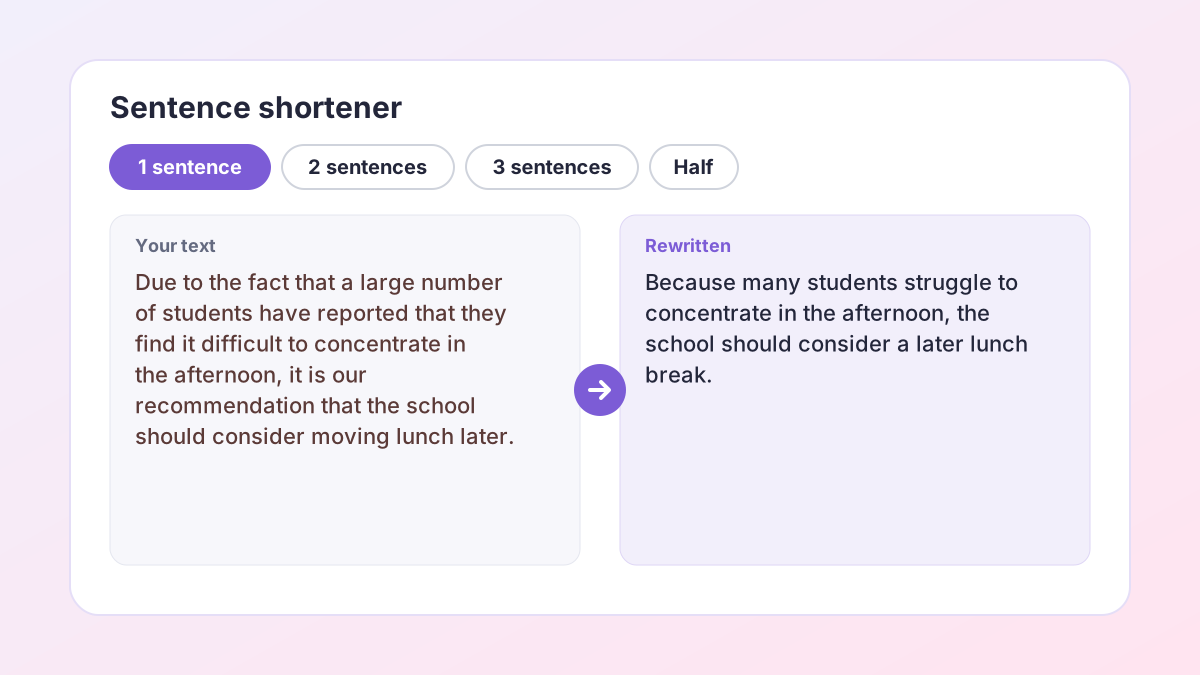
BeforeDue to the fact that a large number of students in our school have reported that they find it difficult to concentrate in the afternoon, it is our recommendation that the school should take into consideration the possibility of moving the lunch break to a slightly later time.
AfterBecause many students struggle to concentrate in the afternoon, the school should consider a later lunch break.
48 words become 17; the reason and the recommendation stay.
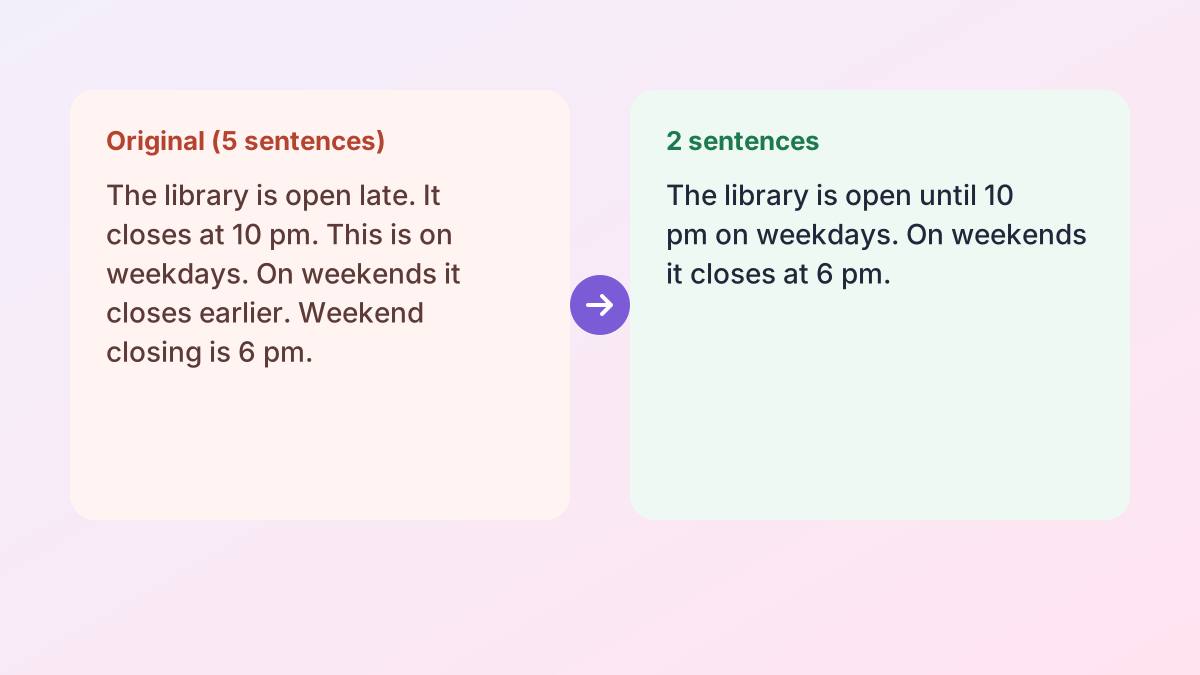
BeforeThe experiment was repeated three times. Each time, the results were recorded. The results were similar every time. The average temperature rise was 4°C. This suggests the method is reliable.
AfterThe experiment was repeated three times, with an average temperature rise of 4°C. The consistent results suggest the method is reliable.
Five sentences combined into two; 4°C and “suggest” are kept.
BeforeIn my personal opinion, I honestly believe that social media platforms have, over the course of the past decade or so, had a really significant and noticeable impact on the way in which young people communicate with each other.
AfterI believe social media has significantly changed how young people communicate over the past decade.
Repeated ideas (“personal opinion”, “I believe”) and filler removed.
BeforeMy grandmother was born in Jamaica. She moved to London in 1962. She worked as a nurse for 35 years.
AfterBorn in Jamaica, my grandmother moved to London in 1962 and worked as a nurse for 35 years.
A sentence combiner job: three facts, one smooth sentence.
BeforeThe novel opens in a small village where nothing ever seems to happen, and the main character, who is a young woman named Ada, spends most of her days working in her father's shop, although she secretly dreams of becoming a writer and moving to the city, which her family strongly disapproves of because they think it is dangerous and that she should stay home and marry.
AfterThe novel opens in a quiet village where Ada works in her father's shop. She secretly dreams of becoming a writer in the city. Her family disapproves, believing the city is dangerous and that she should stay home and marry.
One 70-word sentence split and trimmed into three clear ones.
BeforeIt is important to note that the results of this study should be interpreted with a degree of caution, as the sample size was relatively small and may not be fully representative of the wider population.
AfterThese results should be read with caution, as the small sample may not represent the wider population.
The hedges “caution” and “may not” are kept.
How to use the sentence shortener
Works on anything from one long sentence to about 600 words.
- Paste your text. Copy the long sentence or paragraph and paste it into the box.
- Choose a target. Pick 1 sentence, 2 sentences, 3 sentences or Half the length.
- Select Shorten it. You get several shortened versions, closest to your target first, each with its sentence and word count.
- Check the meaning. Any version where a number, negative or hedge changed is marked. Pick the one that keeps your point best.
- Copy or try again. Copy the version you like, or select Try again for new options.
What is a sentence shortener?
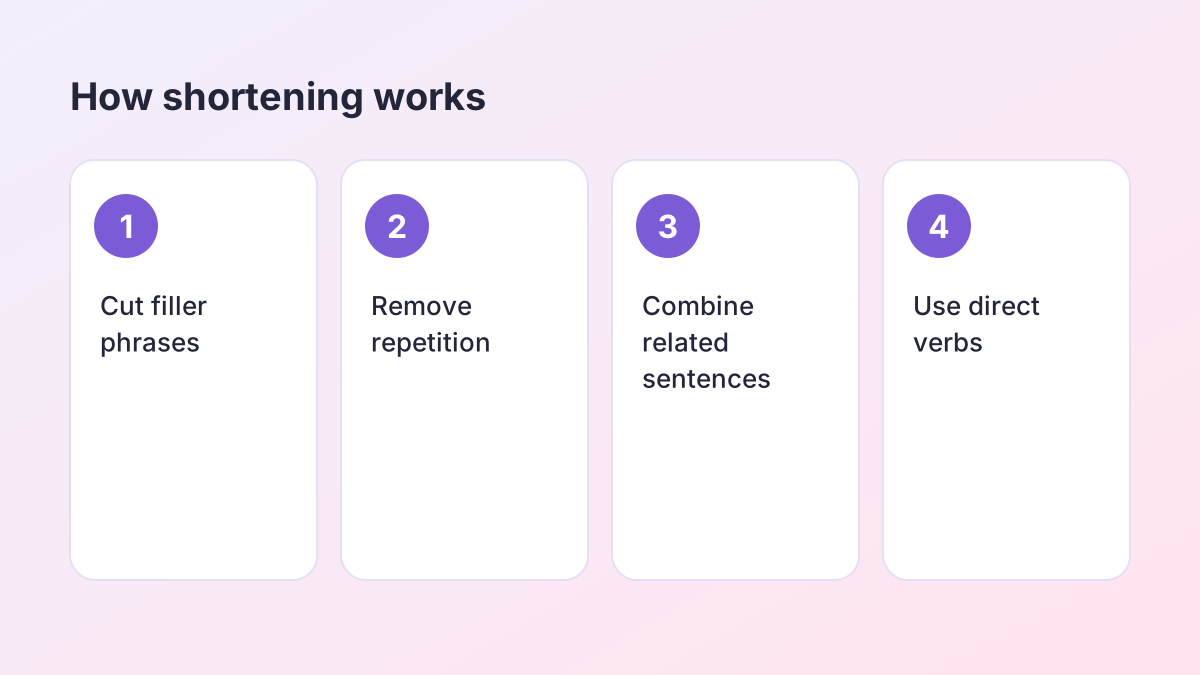
A sentence shortener is a tool that makes writing shorter without changing what it says. It removes filler phrases, repeated ideas and roundabout wording, and it can combine several short sentences into fewer, stronger ones. The result says the same thing in fewer words.
Shortening is different from summarising. A summary picks out only the main ideas and leaves the rest. The sentence shortener tries to keep every fact and only removes words that add no meaning. If your text is already tight, a sentence shortener will cut very little, and that is a good sign.
Why shorter is often better
Readers understand short sentences faster and remember them better. Markers notice when an answer is padded to look longer. Word limits on applications, abstracts and exam answers force you to say more with less. In each case, cutting the padding makes your writing stronger, not weaker.
What you can shorten
- A single long, tangled sentence.
- A paragraph that needs to fit a word limit.
- An abstract, summary or personal statement that runs over.
- Notes you want to condense for revision.
- A message or email you want to make more direct.
Make it 2 sentences, 1 sentence or 3
A common request is to “make it 2 sentences” or “make this one sentence”, usually because an assignment, form or caption asks for a set number of sentences. The sentence shortener lets you choose the exact target.
Make it 1 sentence
Choose 1 sentence when you need a one-line summary, a topic sentence, a tweet-length caption or the one-sentence answer an exam asks for. The tool finds the main claim, keeps the most important supporting detail and joins them into a single clear sentence.
Make it 2 sentences
Choose 2 sentences when you need a little more room: one sentence for the main point and one for the reason, result or example. This is a useful length for short-answer questions and for summarising a source in your notes.
Make it 3 sentences
Choose 3 sentences for a mini-paragraph: point, explanation and example, or claim, evidence and link. It is the right size for a short paragraph in a discussion post or a brief summary of an article.
Half the length
If you do not need a specific number of sentences, choose Half the length. The sentence shortener aims for about 50% of your original word count and keeps the same overall structure.
The results are sorted so the version closest to your target comes first, and each shows its sentence and word count, so you can see at a glance which one fits.
Sentence combiner: join short sentences
Sometimes writing is not too wordy; it is too choppy. A run of very short sentences sounds like a list and makes the reader stop and start. A sentence combiner joins related short sentences into longer, smoother ones. The sentence shortener does this automatically when you choose a smaller number of sentences.
Ways to combine sentences
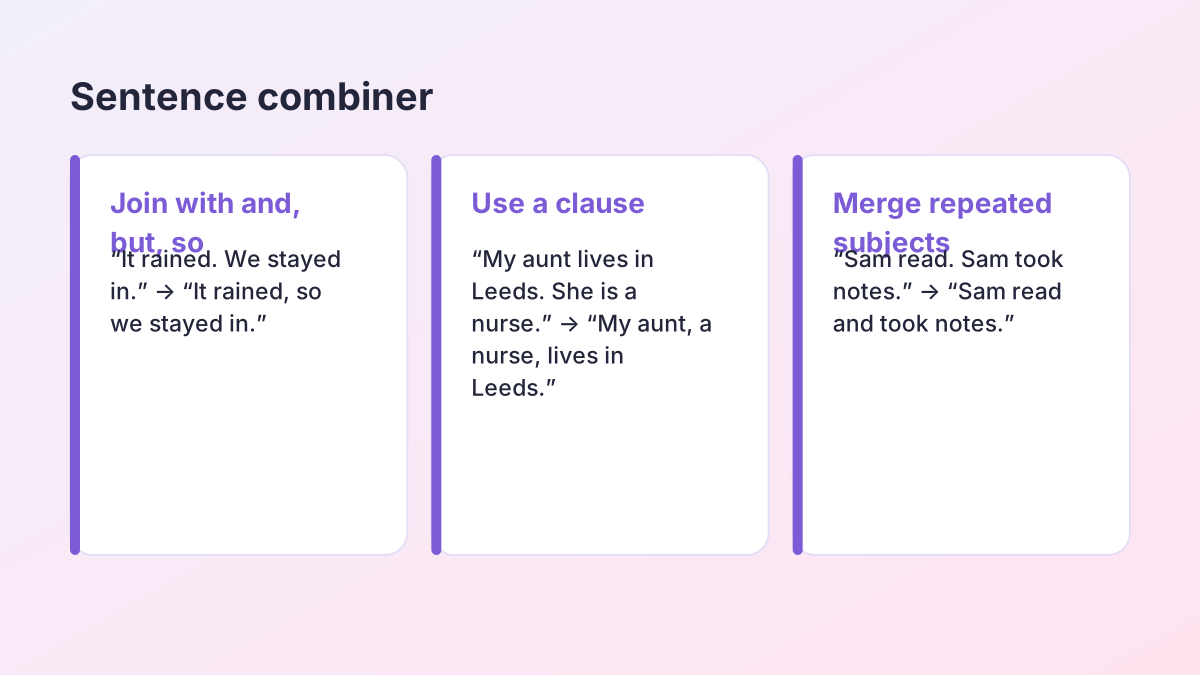
- Join with a conjunction. Use and, but, so, because or although. “The bus was late. I missed the start.” becomes “The bus was late, so I missed the start.”
- Turn one sentence into a clause. “The Nile is the longest river in Africa. It flows through eleven countries.” becomes “The Nile, the longest river in Africa, flows through eleven countries.”
- Merge a repeated subject. “Plants need light. Plants need water.” becomes “Plants need light and water.”
- Use a phrase at the start. “She finished her essay. Then she went to bed.” becomes “After finishing her essay, she went to bed.”
Do not combine everything
Combining works best for closely related ideas. If two sentences make separate points, keep them apart; one very long sentence is as hard to read as five choppy ones. The Purdue OWL's guide to sentence variety shows how to mix short and long sentences for rhythm.
Wordy phrases the sentence shortener removes
Most extra words come from a small set of habits. Learning to spot them helps you write shorter in the first place.
- Filler openers: “It is important to note that”, “It should be mentioned that”, “The fact of the matter is”. Usually you can just delete them.
- Long versions of short words: “due to the fact that” (because), “in order to” (to), “at this point in time” (now), “in the event that” (if), “a large number of” (many).
- Doubled words: “each and every”, “first and foremost”, “end result”, “past history”, “completely finished”.
- Weak verb + noun: “make a decision” (decide), “give consideration to” (consider), “carry out an investigation” (investigate).
- Empty intensifiers: “really”, “very”, “quite”, “actually”, “basically”.
- Throat-clearing: “In my personal opinion, I think that…”. “I think” is enough, or cut it entirely in formal writing.
The University of North Carolina Writing Center's handout on writing concisely has many more examples and exercises.
Cutting a sentence by hand: a worked example
Here is how an editor would cut one long sentence, step by step, so you can do the same in an exam or when you want full control.
Original (41 words): “It is important to note that, in the event that the weather conditions turn out to be unfavourable on the day of the trip, the school will make a decision as to whether or not the trip should be postponed.”
- Delete the filler opener. “It is important to note that” adds nothing. (35 words left.)
- Swap long phrases for short words. “In the event that” becomes “if”; “turn out to be unfavourable” becomes “are bad”. (28 words.)
- Replace the weak verb + noun. “Make a decision as to whether or not” becomes “decide whether”. (22 words.)
- Cut what the reader already knows. “On the day of the trip” can become “that day”. (19 words.)
Result (17 words): “If the weather is bad that day, the school will decide whether to postpone the trip.”
Every fact survived: the condition, who decides, and what they decide about. Only the padding went. Practising this a few times trains your eye, and soon you will write the short version first.
Using a sentence shortener for word limits
Word limits are everywhere in school: abstracts, personal statements, scholarship essays, lab report summaries and short-answer exam questions. A sentence shortener helps you hit the limit without losing content.
A good routine
- Write your full draft first, without worrying about length.
- Shorten one paragraph at a time with Half the length, and compare the result with your original.
- Keep the cuts that remove padding; restore anything important that was lost.
- Check the total in the Word Counter.
What to cut first
Cut repetition before content. If you make the same point twice, keep the clearer version. Then cut filler phrases. Only after that should you consider removing examples or details, and when you do, keep the strongest one.
Do not cut your evidence
In an academic answer, the evidence and analysis earn the marks. A shorter answer that drops its key quote or statistic is not better. The sentence shortener protects numbers, quotes and citations, but you decide which details matter most.
Will shortening change my meaning?
It should not. Before the text is shortened, numbers, dates, quotes, citations and links are protected, so they come back exactly as you wrote them. After shortening, each version is checked against your original. If a negative disappeared, a hedge such as “may” became “will”, or a number changed, the version is marked for you to review, and versions that drift too far from your meaning are filtered out.
The most common risk when shortening is losing a qualifier. “Most students” and “students” are different claims; so are “may reduce” and “reduces”. Read each option against your original, especially in science or argument writing.
Protect key terms
If a term must stay exactly as written, add it under More options as a protected term. This is useful for subject vocabulary, names of theories or phrases your teacher expects to see.
Privacy
The Study Corp does not store your text. It is sent to our AI providers (Groq, with Google Gemini as a backup) only to create the versions you see.
Shorter, simpler or longer: picking the right tool
The sentence shortener makes text shorter. If your text is the right length but hard to read, use the Text Simplifier instead; it keeps every fact but uses easier words and shorter sentences. If your text is too short and needs more detail, the Sentence Expander adds explanation without inventing facts. If you want the same length in different words, the AI Sentence Rewriter and the Paragraph Rewriter offer several writing goals.
Responsible use
Shortening your own writing is ordinary editing. If you shorten someone else's text for your notes, that is fine for studying, but if you use it in an assignment, the ideas still belong to the original author, so cite the source.
Sentence shortener FAQ
Is the sentence shortener free?
Yes. It is free with no account or sign-up. A fair hourly allowance per visitor keeps it fast for everyone.
How do I make a paragraph 2 sentences?
Paste the paragraph, choose 2 sentences as the target and select Shorten it. The version closest to two sentences is shown first.
Can it combine sentences?
Yes. When you choose fewer sentences than you pasted, it works as a sentence combiner and joins related sentences smoothly.
How much text can I shorten?
Up to about 600 words per run. For longer pieces, shorten one paragraph at a time.
Is shortening the same as summarising?
Not quite. A summary keeps only the main ideas. The sentence shortener tries to keep every fact and cuts only words that add no meaning.
Will it keep numbers and quotes?
Yes. Numbers, dates, quotes, citations and links are protected and come back exactly as written.
Why do I get several versions?
Different cuts suit different purposes. Each version shows its sentence and word count so you can choose the one that fits.
More free rewriting tools
- AI Paraphrasing ToolParaphrase any text, and learn to paraphrase and cite well.
- AI Sentence RewriterFix an awkward sentence and choose from several better versions.
- Paragraph RewriterMake the sentences in one paragraph connect and flow.
- Rewording ToolReword any text in fresh words: emails, reports, applications and more.
- Essay RewriterRewrite a whole essay or paper, paragraph by paragraph, keeping its structure.
- Restate Thesis GeneratorRestate your thesis in new words for the conclusion, keeping the same claim.
- Text SimplifierSimplify text to a reading level: grade 5, grade 7, grade 9 or plain English.
- Sentence FinisherGet five ways to finish a sentence you started.
- Say It BetterFind a better way to say a sentence or phrase, with alternatives.
- Sentence ExpanderExpand a sentence into a fuller, more detailed version without new facts.
- Poem RewriterParaphrase a poem line by line, modernise it, or polish your own poem.
See all 74 free tools for students
Related tools
Last updated by The Study Corp editorial team.