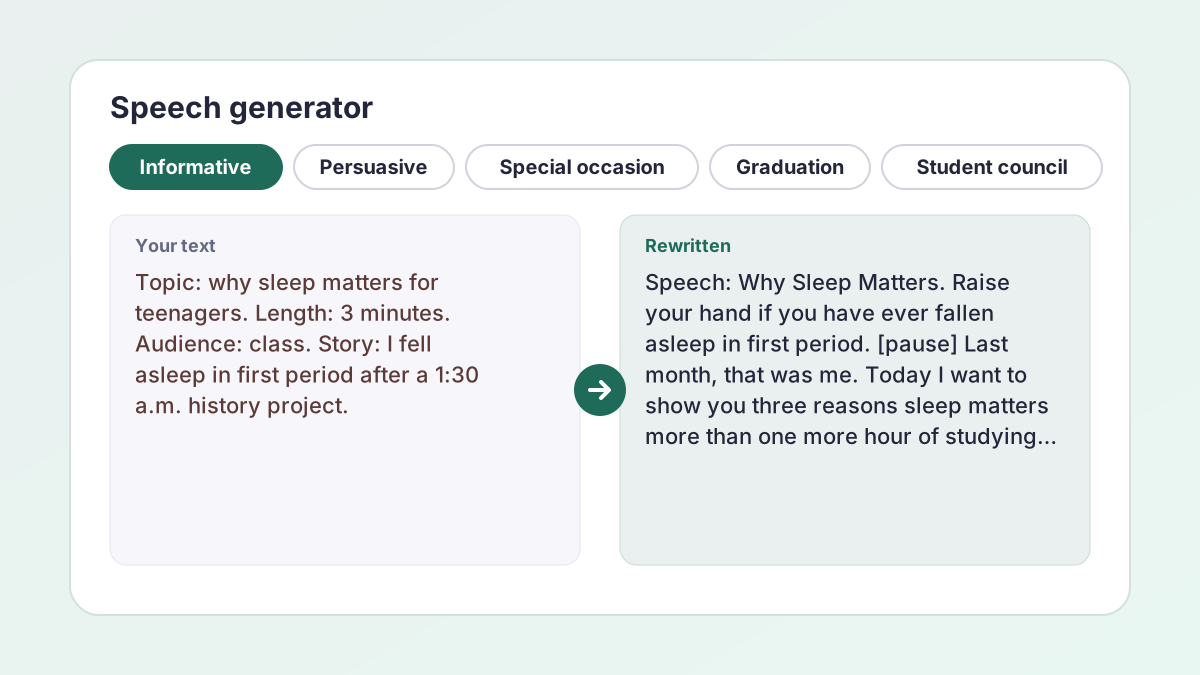
Speech generator examples
Illustrative examples of what students typed and the kind of speech parts the tool gives. Your results will differ, and brackets mark places where you need to add a source or a detail.
You typedTopic: why sleep matters for teenagers. Speech type: Informative. Length: 3 minutes. Audience: Class. Story: stayed up until 1:30 a.m. and fell asleep in first period.
Result (excerpt)Raise your hand if you have ever fallen asleep in first period. [pause] Last month, that was me. Today I will show you three reasons sleep matters more than one more hour of studying. First, sleep is when your brain sorts what you learned [add a fact from a medical or university source]…
An opening, a preview, signposts and [pause] marks, with a bracket where a fact needs a source.
You typedTopic: I am running for sophomore class treasurer. Speech type: Student council. Length: 1 minute. Audience: School assembly. Idea: fund a spring dance and a study snack table.
Result (excerpt)Hi, I am [your name], and I want to be your treasurer. [pause] Here is my promise: every dollar we raise goes to something you can see. First, a spring dance everyone can afford. Second, a snack table during finals week. Vote for a plan you can count on.
A one-minute speech with a hook, two promises and a call to action. The tool does not invent names, so it leaves a bracket for yours.
You typedTopic: what we learned in four years. Speech type: Graduation. Length: 5 minutes. Audience: Community or family. Detail: the rainy first day of freshman year.
Result (excerpt)Four years ago, on a rainy first day of freshman year, we all stood outside this building holding our new schedules. [pause] Today we are holding something different. Let me tell you three things this school taught us, and none of them are on a test.
The close is written to call back to this opening. Add real names and memories only you know.
You typedTopic: thank you to our volunteer coach. Speech type: Special occasion. Length: 3 minutes. Audience: Community or family. Detail: Coach Williams drove the van to every away game.
Result (excerpt)Coach Williams drove the van to every away game. [pause] Every single one. That is the kind of person we are thanking tonight. First, he showed up for us [add a game or moment you remember]. Second…
The tool uses the details you give and leaves a bracket for anything else it would need to guess.
You typedTopic: left empty. Speech type: Persuasive. Length: 5 minutes. Audience: College class.
Result (excerpt)Speech: Keep Quiet Floors Open All Night During Finals. Think about the night before your hardest final. [pause] I want to persuade you that campus libraries should keep quiet floors open all night during finals. First, students already need them…
With the topic empty, the tool picks one school-appropriate topic and names it in the speech label.
You typedTopic: the world's worst group project. Speech type: Entertaining. Length: 3 minutes. Audience: Class.
Result (excerpt)Every group project has four people: the planner, the worker, the ghost and the person who adds clip art at 11:59 p.m. [pause] Today I will introduce you to all four, and tell you which one I am.
Light humor written for the ear. Keep jokes kind and school-appropriate.
How to use the speech generator
The speech generator needs only a speech type and a length, and your notes make the result sound like you.
- Choose a speech type. Under Speech type, select Informative, Persuasive, Special occasion, Graduation, Student council or Entertaining.
- Enter a topic, or leave it empty. Type your subject in Topic, up to 300 characters. Leave Topic empty and the tool picks a school-appropriate topic and names it in the speech label.
- Add your own material. In Points, stories or details to include, add names, a story or your main points. This box is optional, but a real story makes the speech yours.
- Set the length and audience. Choose 1 minute, 3 minutes, 5 minutes or 7 minutes under Length, and Class, School assembly, College class or Community or family under Audience.
- Write, rehearse and edit. Select Write my speech. Copy the speech and the Speaking notes, read it aloud with a timer and rewrite it in your own words.
What this speech generator writes
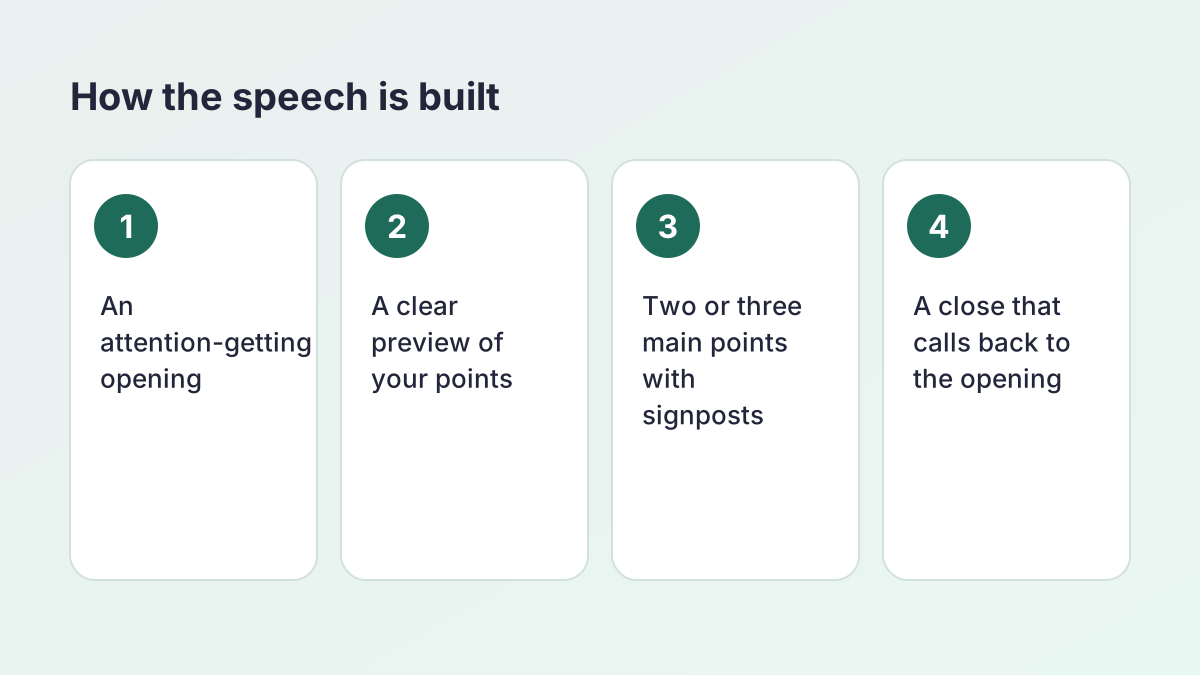
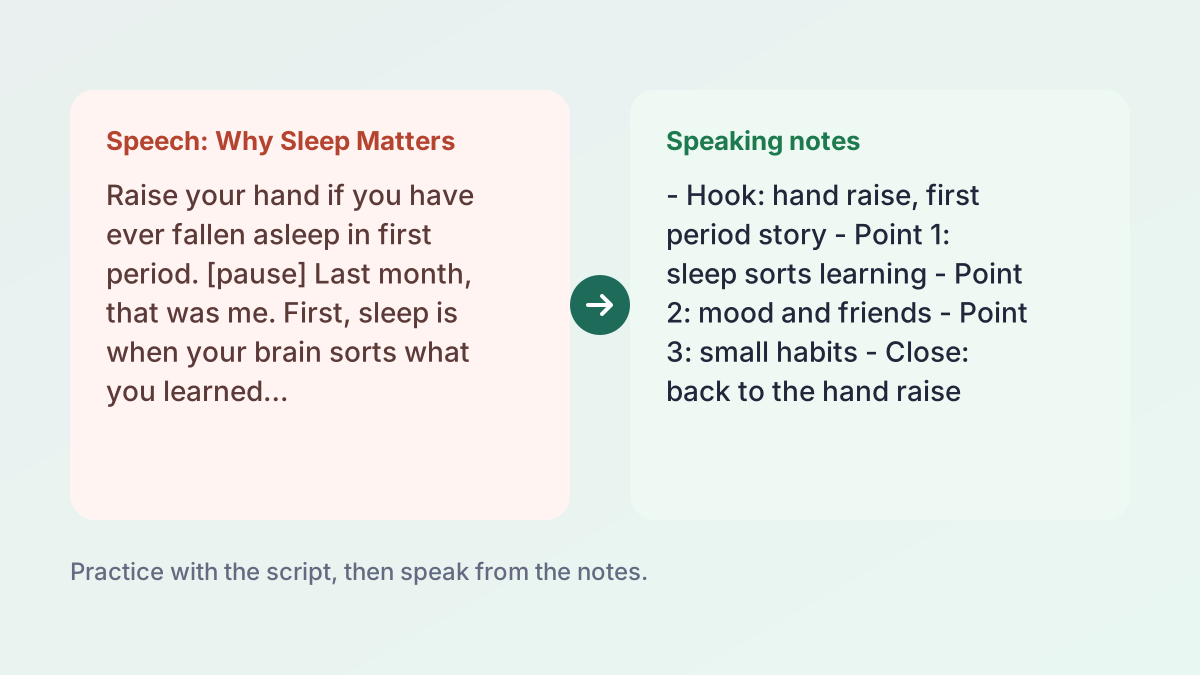
Each time you select Write my speech, you get two parts you can copy separately:
- The speech, labeled with its topic. It has an attention-getting opening, a preview of what you will cover, two or three main points with signposts such as “First” and “My second point,” and a memorable close that calls back to the opening.
- Speaking notes, a short bulleted outline you can glance at while you speak, so you are not reading from a page.
Written for the ear
This AI speech writer uses short sentences and direct address, the way people actually talk. It also marks a few deliberate pauses with [pause], which tell you where to breathe and let a point land.
What it will not do
It is told never to invent facts, statistics, studies, dates, names or quotations. If a speech needs a specific figure or source that you did not give, it writes a bracketed placeholder. It also keeps the speech suitable for school.
Random speech generator: let it choose the topic
Stuck on what to talk about with this speech generator? Leave the Topic box empty and the tool works as a random speech generator. It chooses one interesting, school-appropriate topic that fits the speech type you picked and states the topic in the speech label.
When this helps
- Impromptu practice. Get a topic you did not prepare, then see how a speech on it could be organized.
- Speech class warm-ups. Practice delivery without spending an hour deciding what to say.
- Idea hunting. Generate three or four and keep the one you like, then add your own examples.
Make a random topic your own
A random topic is a starting point. If you like it, copy it into the Topic box, add a personal story or detail in the second box and select Generate more. The next version builds in your material. If Topic stays empty, the tool picks a new topic each time. Speeches that include something only you could say are far more memorable, and a random speech generator is just the quickest way to start.
Six speech types: informative, persuasive, special occasion, graduation, student council and entertaining
The Speech type chips change the goal of the speech, and the speech generator writes toward it.
Informative
Explains something so the audience understands it. It has a clear preview and main points. Good for health, science and history classes.
Persuasive
Tries to change what the audience thinks or does. Persuasive speeches usually name a position, give reasons and end with a call to action.
Special occasion
A tribute, welcome, award or thank-you. It is personal and warm, and it works best with real names and details from you.
Graduation
Looks back and looks forward. Add a memory or a lesson that only your class would recognize.
Student council
A campaign speech. Give your office and two or three promises, and keep it short. Many schools set a time limit for campaign speeches, so check yours before you pick a length.
Entertaining
A light speech for a humorous or surprising topic. Humor is hard to get right, so edit anything that does not sound like you.
Speech length: 1, 3, 5 and 7 minutes
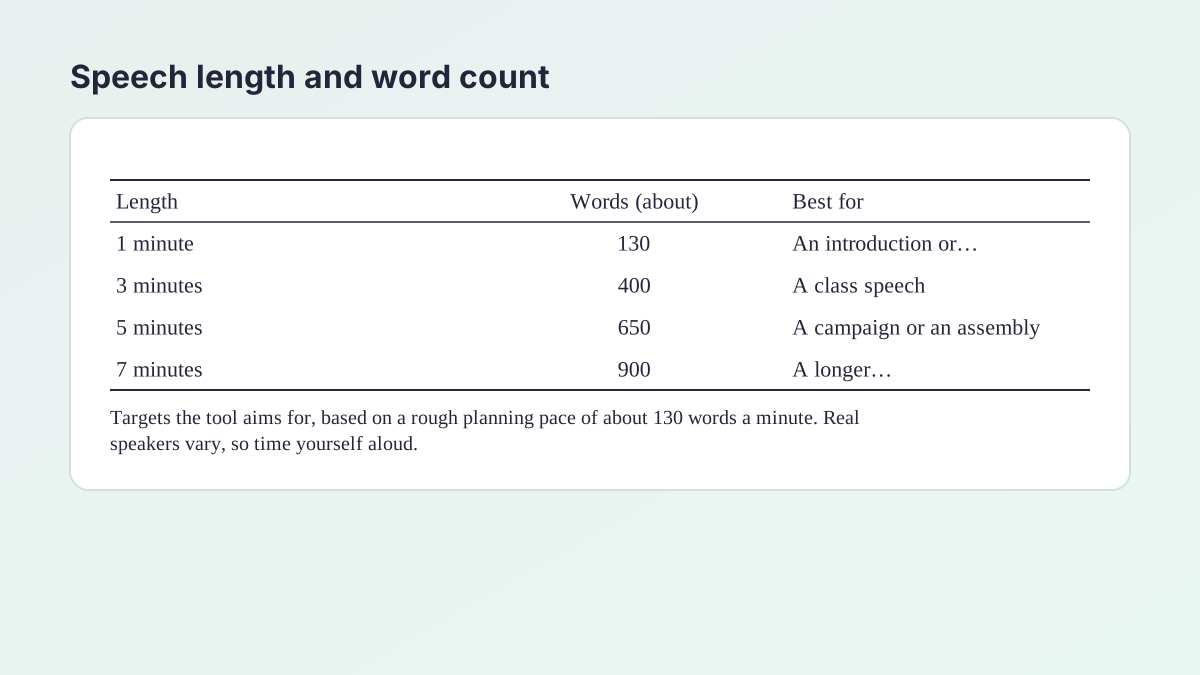
The Length setting gives the speech generator a word target for the clock: about 130 words for 1 minute, about 400 for 3 minutes, about 650 for 5 minutes and about 900 for 7 minutes.
These targets assume a pace of roughly 130 words a minute. That is a planning convention, not a rule: there is no single correct speaking rate.
Time it yourself
Speaking pace varies from person to person, nerves can speed you up, and [pause] marks add seconds. Read the speech aloud with a timer. If it runs long, cut the weakest example, not the opening or the close.
Choosing a length
- 1 minute: a campaign pitch, an introduction or a short toast.
- 3 minutes: a typical class speech.
- 5 minutes: an assembly, a persuasive speech or a graduation speech.
- 7 minutes: a longer speech with more examples. Check your teacher's limits first.
If you are over the limit
Select a shorter length and Generate more, or trim by hand. It is better to finish a little early than to be cut off before your close.
Speech writer settings: choosing your audience
A good speech writer thinks first about who is listening, and the speech generator does too. The Audience setting tells the tool who that is, and each choice usually calls for a slightly different approach:
- Class: classmates and a teacher. Usually friendly and direct.
- School assembly: a larger room. Simpler ideas and bigger pauses tend to work better.
- College class: usually more serious and analytical.
- Community or family: a mixed audience of all ages. Warm and clear.
Why audience matters
A joke that works with classmates may not suit a graduation crowd that includes grandparents. A statistic that fits a college seminar may lose a school assembly. Choosing the audience first keeps your language, examples and tone consistent.
Add what you know about the room
Use the details box for anything about the audience: “Our principal will be there,” “Most of them are parents,” “They have just finished an exam.” The tool is told to use the points and details you give it.
AI speech writer: what it does and what you add
As an AI speech writer, this speech generator is a fast way to get a structured draft. It is not a replacement for your voice.
What it does well
- Builds the standard shape of a speech from your topic.
- Writes for the ear, with short sentences and signposts.
- Gives you speaking notes so you can practice without a script.
What only you can add
- Real stories. A memory from your own life beats any invented anecdote.
- Facts and sources. The tool will not invent them. Look them up, and cite them if your teacher requires it.
- Your wording. If a sentence does not sound like you, change it. People can tell when a speaker is reading someone else's words.
Using it honestly
Use the draft to study and to practice, then write your final speech in your own words and follow your school's AI policy. For graded speeches, ask your teacher what is allowed.
Speech maker: from draft to delivery
A speech maker gives you words, but a speech happens out loud, so this speech maker also returns notes. The University of North Carolina's Writing Center guide to speeches is a good companion, and its main points fit what the tool is built to do.
Signpost
The guide says verbal cues, such as previews and recaps, help listeners put the pieces of your speech together. The tool uses phrases such as “First” and “My second point” for that reason.
Repeat key terms
It notes that repeating key terms helps an audience connect information. If the draft changes words for variety, change them back so the main idea is easy to follow.
Keep sentences short
The guide warns against getting too complicated, because listeners have only one chance to understand what you say. Cut any sentence you run out of breath on.
Read it aloud
The guide recommends saying the speech out loud to a friend or in front of a mirror, then asking where listeners might lose the thread. Do this with the generated version at least twice.
Check your time
Run the speech with a timer and edit until it fits.
How a good speech is built, step by step
You can write this structure yourself, and knowing it helps you edit what the speech generator gives you.
1. Open with a hook
A question, a short story, a surprising fact (with a source) or a direct challenge. Do not start with “Hi, my name is…” unless your teacher requires it.
2. Preview
Tell the audience what you will cover. The UNC Writing Center's advice is to state your thesis right away and explain how you will support it.
3. Main points
Two or three is enough for most speeches. Give each a signpost, one clear idea and one example.
4. Close
Summarize without repeating word for word, then end with a memorable line or a call to action. Calling back to your opening gives the speech a satisfying shape. The conclusion generator can help with written endings.
5. Notes
Reduce the speech to a short outline of key words. If you can speak from the outline, you know the speech.
Student council and graduation speeches: what to include
These two speech types have audiences with specific expectations.
Student council speech
- Who you are, in one sentence.
- Two or three promises that are specific and achievable: a spring dance, longer lunch seating, a study space.
- Why you, with a real example of leadership or reliability.
- A clear ask: the date of the vote, and what you want people to do.
Avoid attacking other candidates. A positive speech is more memorable.
Graduation speech
- A shared memory the audience will recognize.
- One or two lessons, told through a story.
- Thanks to the people who helped, using real names.
- A look ahead that is hopeful and honest.
Any speech maker works best with details only you know, so use the points box generously. For ideas about arguing a position with evidence, see the Debate Argument Generator.
Common speech mistakes and how to fix them
- Reading every word. Practice until you can speak from the notes.
- Too many points. Cut to two or three, so each one gets a signpost and an example.
- No preview. Without one, the audience does not know where you are going.
- Long sentences. If you cannot say it in one breath, split it.
- A weak ending. Return to your opening, then stop. Do not trail off or say “That's all.”
- Unchecked facts. Replace each bracketed placeholder with a real, sourced fact.
- No practice. Rehearse aloud at least three times with a timer.
A quick self-check
Can a friend repeat your main points after hearing the speech once? If not, simplify. You can also compress a draft with the Key Points Generator to see which points stand out.
Is the speech generator free and private?
Yes, the speech generator is free, with no account or sign-up. To keep it fast for everyone, each visitor can make up to 30 requests an hour.
Your topic, stories and details are sent to our AI providers (Groq, with Google Gemini as a backup) only to write the speech you see. The Study Corp does not save them.
Using it responsibly
Use the speech to study and to draft. Then write in your own words, add real sources and follow your school's AI policy. If a speech is graded, ask your teacher what help is allowed.
Speech generator FAQ
Is the speech generator free?
Yes. It is free with no account or sign-up. Each visitor can make up to 30 requests an hour.
Can it write a speech for me about any topic?
Yes. Type any school-appropriate topic, or leave Topic empty and the tool will choose one that fits your speech type.
What types of speeches can it write?
Informative, Persuasive, Special occasion, Graduation, Student council and Entertaining.
How long will the speech be?
Choose 1, 3, 5 or 7 minutes. The tool aims for about 130, 400, 650 and 900 words, which assumes a rough planning pace of about 130 words a minute. Read it aloud with a timer, because your own pace sets the real length.
Is it a random speech generator?
It can be. Leave Topic empty and it picks one school-appropriate topic that fits the speech type, and names it in the speech label.
Does the speech writer make up facts?
It is told not to invent facts, statistics, studies, names or quotations. Where a source is needed it writes a bracketed placeholder for you to fill. Check the speech anyway, because AI can still make mistakes.
What are speaking notes?
A short bulleted outline that comes with the speech. You can glance at it while you speak, so you are not reading from a script.
Can I turn in the speech for a grade?
Use it to study and to draft, then write in your own words and follow your school's AI policy. If your speech is graded, ask your teacher what is allowed.
More free study tools
- Essay Summary GeneratorA summary in your chosen length, plus a one-sentence version, using only what the text says.
- Key Points GeneratorThe main idea and the 3 to 10 most important points of any text, ranked.
- Study Notes GeneratorOutline, Cornell, bullet or flashcard notes from your class material.
- Question GeneratorQuiz and study questions from any text, with an answer key.
- Case Study Analysis GeneratorA structured analysis of your case: general, SWOT, PESTLE, clinical or ethics.
- Quote Analysis ToolMeaning, key words, devices and significance, plus a ready analysis paragraph.
- Rhetorical Analysis GeneratorSOAPSTone, appeals and rhetorical choices with exact quotes, or two AP-style body paragraphs.
- Poem Analysis ToolTheme, tone, structure and devices with quoted lines, plus a sample paragraph.
- Debate Argument GeneratorDefinitions, contentions with claim, warrant and impact, rebuttals and a closing.
See all 80 free tools for students
Related tools
Last updated by The Study Corp editorial team.