Turabian citation examples by source type
Each example is this Turabian citation machine's own output for a real source, in the notes-bibliography system. Word adds the footnote numbers, so each note starts with the author. In the tool, titles of books, journals and newspapers are italic.
Source detailsCharles Yu, Interior Chinatown, Pantheon Books, New York, 2020; cited at page 45
Turabian 9 note and bibliography entryNote: Charles Yu, Interior Chinatown (New York: Pantheon Books, 2020), 45. Short note: Yu, Interior Chinatown, 45. Bibliography: Yu, Charles. Interior Chinatown. New York: Pantheon Books, 2020.
Paste the ISBN to fill in the details. ISBN lookups don't fill in the city of publication, which Turabian 9 still uses, so type it in Edit details.
Source detailsKahneman and Tversky, "Prospect Theory," Econometrica 47, no. 2, pages 263–291, 1979; DOI 10.2307/1914185
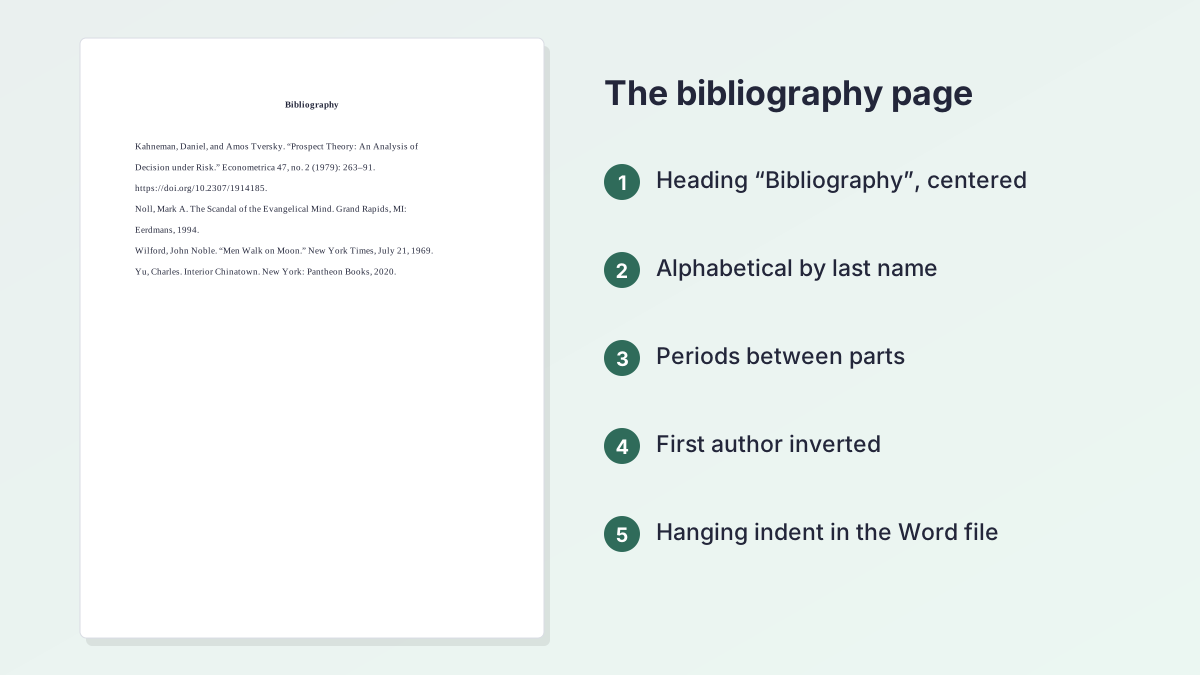
Turabian 9 note and bibliography entryNote: Daniel Kahneman and Amos Tversky, “Prospect Theory: An Analysis of Decision under Risk,” Econometrica 47, no. 2 (1979): 263, https://doi.org/10.2307/1914185. Bibliography: Kahneman, Daniel, and Amos Tversky. “Prospect Theory: An Analysis of Decision under Risk.” Econometrica 47, no. 2 (1979): 263–91. https://doi.org/10.2307/1914185.
The note cites the page you used; the bibliography gives the full range.
Source detailsMark A. Noll, The Scandal of the Evangelical Mind, Eerdmans, Grand Rapids, MI, 1994; cited at page 112
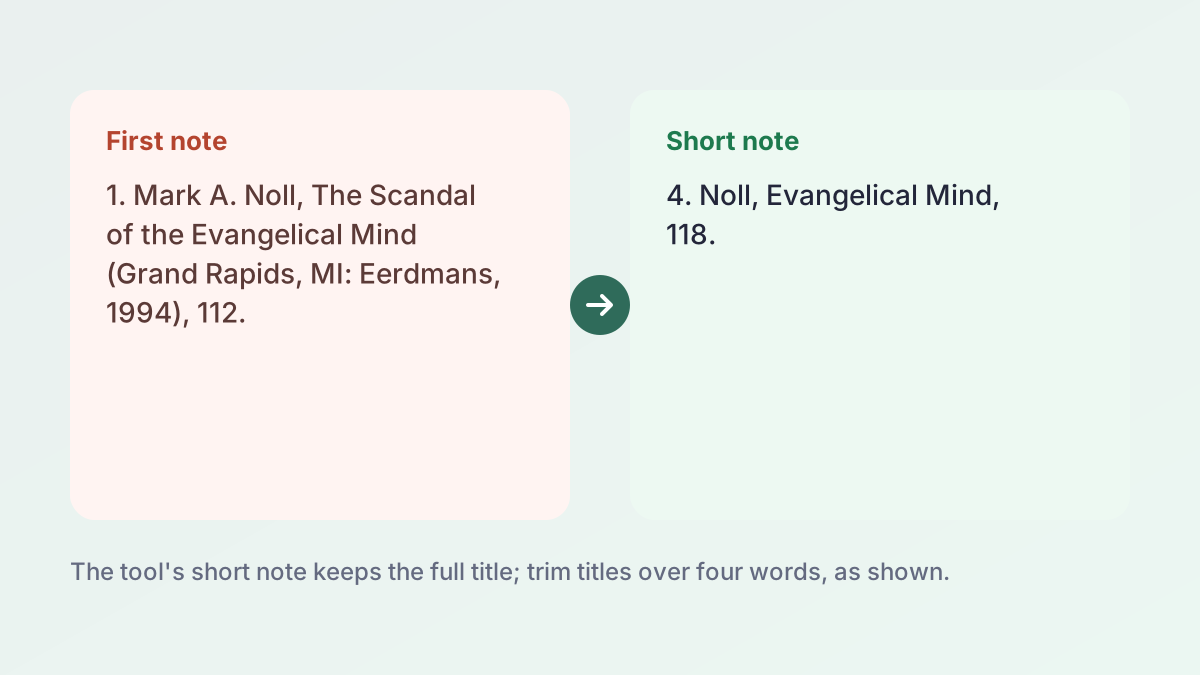
Turabian 9 note and bibliography entryNote: Mark A. Noll, The Scandal of the Evangelical Mind (Grand Rapids, MI: Eerdmans, 1994), 112. Bibliography: Noll, Mark A. The Scandal of the Evangelical Mind. Grand Rapids, MI: Eerdmans, 1994.
A typical source for a seminary course.
Source details"Declaration of Independence: A Transcription," National Archives, archives.gov, no publication date (only a “last reviewed” date), accessed October 26, 2026
Turabian 9 note and bibliography entryNote: “Declaration of Independence: A Transcription,” National Archives, accessed October 26, 2026, https://www.archives.gov/founding-docs/declaration-transcript. Bibliography: National Archives. “Declaration of Independence: A Transcription.” Accessed October 26, 2026. https://www.archives.gov/founding-docs/declaration-transcript.
With no author or date, the site owner leads the entry and an access date is added.
Source detailsJohn Noble Wilford, "Men Walk on Moon," New York Times, July 21, 1969
Turabian 9 note and bibliography entryNote: John Noble Wilford, “Men Walk on Moon,” New York Times, July 21, 1969. Bibliography: Wilford, John Noble. “Men Walk on Moon.” New York Times, July 21, 1969.
Newspapers take the full date; page numbers are usually left out.
Source detailsSelma, directed by Ava DuVernay, Paramount Pictures, 2014
Turabian 9 note and bibliography entryNote: Selma, directed by Ava DuVernay (Paramount Pictures, 2014). Bibliography: DuVernay, Ava, dir. Selma. Paramount Pictures, 2014.
Choose Film or video under More. For YouTube, put the channel in the studio box.
How to use the Turabian citation machine
Have the source, or its DOI, ISBN, web address or title, in front of you. The Turabian citation machine does the formatting; you check the facts.
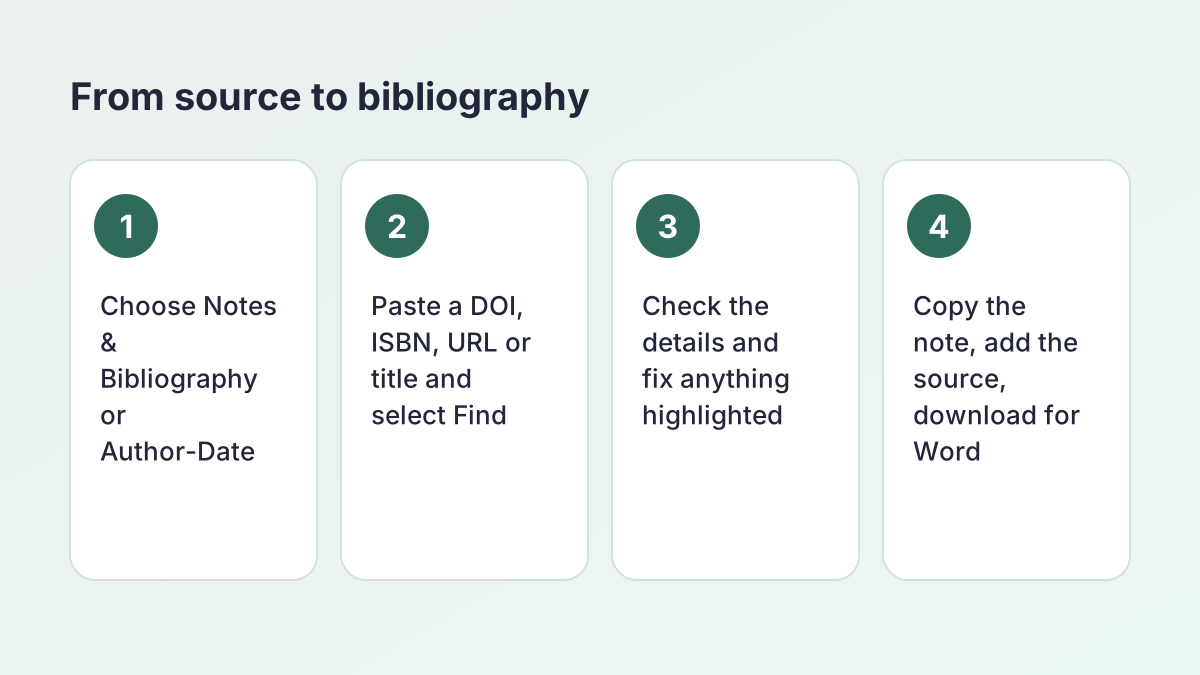
- Choose the citation system. Select Notes & Bibliography for footnotes or Author-Date for (Author Year) citations. Both follow the 9th edition, so there is no edition to pick.
- Find your source. Paste a URL, DOI, ISBN or title into Find your source and select Find. For a title search, pick the right match from the list. To type the details yourself, choose Website, Journal, Book or a type under More.
- Check the details. A status box says whether the details matched a database record or need review. Open Edit details and fix any highlighted field: author, title, publisher or date.
- Copy the note or citation. Switch between the Bibliography, Footnote and Short note tabs (Reference, In-text and Narrative in author-date). Type a page number in the optional box, then copy.
- Add it to your bibliography. Select Add to bibliography. The list is sorted and formatted for you, and the tool warns you if the same source is already there.
- Download or export. Select Download for Word for a .docx file, Copy all to paste the list, or open More formats for plain text, RIS or BibTeX.
How the Turabian citation machine finds your source
Paste what you have and the Turabian citation machine works out what it is. The hint under the box tells you: "DOI detected", "ISBN detected", "Web address detected" or "We'll search by title".
DOI
Journal articles and many scholarly books have a DOI, a permanent ID starting with 10. The tool asks the DOI registry (doi.org), then Crossref. These records are the most reliable, and the status box shows Source details matched.
ISBN
Paste the 10- or 13-digit ISBN from the copyright page. The tool checks Open Library, then Google Books. ISBN lookups don't fill in the city of publication, which Turabian 9 uses, so type it in Edit details.
Web address
Paste a link and the tool reads the page's own information: the title, author, site name and publication date. If the page lists a DOI, it looks that up instead. Web details are marked Details need review, because sites label them inconsistently.
Title
Type a title, plus the author's last name if you know it. The tool searches Crossref and Open Library and shows a short list. Choose the right edition, or select None of these, enter it manually.
If nothing is found, the Turabian format generator never guesses. It opens a blank form instead.
Turabian citation basics: notes, short notes and bibliography
Kate L. Turabian's A Manual for Writers of Research Papers, Theses, and Dissertations adapts the Chicago Manual of Style for students. It offers two ways to cite. The University of Chicago Press's Turabian quick guide describes notes-bibliography as popular in the humanities and author-date as more common in the sciences, and says that apart from the in-text form, the two are very similar.
Notes-bibliography
You put a superscript number in your sentence and a matching note at the foot of the page. The first note for a source gives the full details. Every later note gives a short form. At the end of the paper, a bibliography lists each source once, in alphabetical order.
How a note differs from a bibliography entry
The same source is written two ways. Notes read like a sentence; bibliography entries are built from separate parts.
| Footnote | Bibliography entry | |
|---|---|---|
| Author's name | Given name first: Charles Yu | Last name first: Yu, Charles |
| Separators | Commas | Periods |
| Publication facts | In parentheses: (New York: Pantheon Books, 2020) | No parentheses: New York: Pantheon Books, 2020. |
| Page number | The page you cite: 45 | None for books; full range for articles |
| Indent | First line indented | Hanging indent |
The Turabian citation machine gives you all three forms at once, under the Footnote, Short note and Bibliography tabs. Type the page you used in Page number (optional) and it appears at the end of both notes.
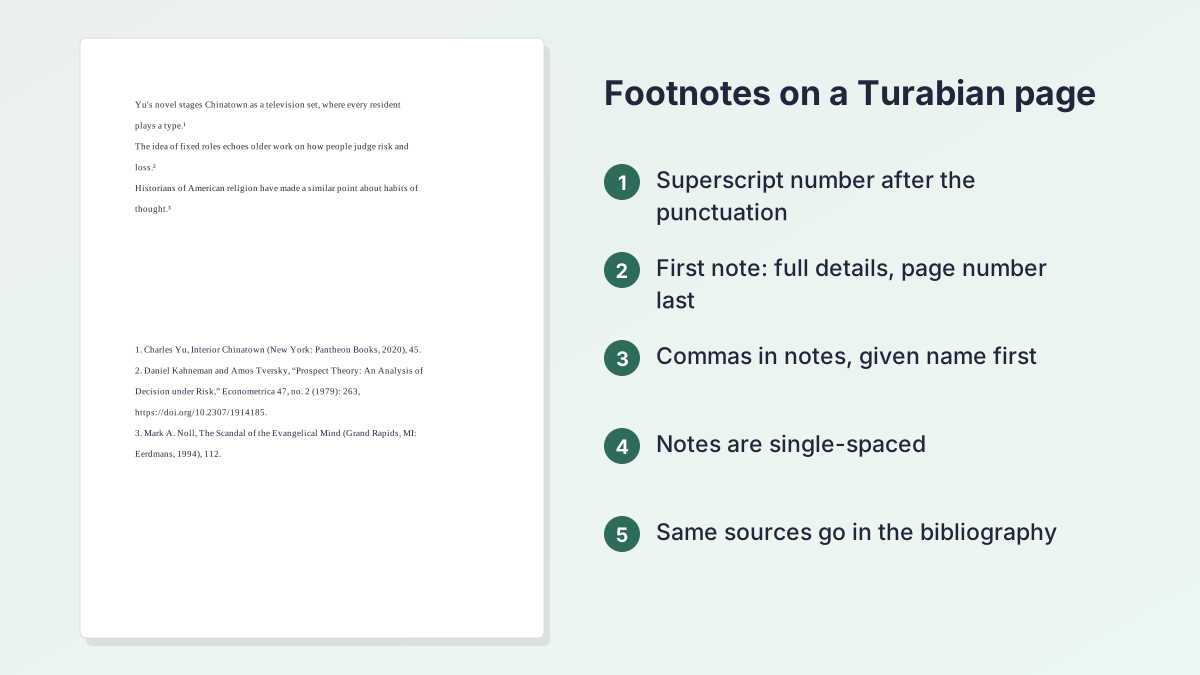
Turabian footnote generator: first notes and short notes
This Turabian footnote generator writes each note so you only paste it after the number your word processor inserts.
Turabian footnote maker for Word and Google Docs
Use the program's own footnote command, so the numbers update when you add or move a note: References > Insert Footnote in Word, or Insert > Footnote in Google Docs. Then paste the text from the Footnote tab. The note number goes after the punctuation at the end of the clause, and Turabian single-spaces each note with a blank line between notes.
Short notes
After the first full note, use the short form: last name, short title and page. The Short note tab gives this for every later citation, so you don't need "ibid."
One thing to fix by hand: the Turabian footnote generator keeps the full title in the short note, because it has no short-title field. Turabian asks for no more than four words, so "The Scandal of the Evangelical Mind" becomes "Evangelical Mind".
Turabian endnote generator
Endnotes are the same notes, collected at the end of the paper under "Notes". Copy the text from the same tab and use Word's Insert Endnote command.
Turabian reference generator for author-date papers
Select Author-Date at the top of the Turabian reference generator and the same source becomes an in-text citation and a reference list entry. Social science, education and science courses tend to use this system.
What changes in author-date
The year moves right after the author's name, and the citation in your sentence is short:
- In-text: (Yu 2020, 45)
- Narrative: Yu (2020, 45)
- Reference list: Yu, Charles. 2020. Interior Chinatown. New York: Pantheon Books.
For a journal article, the volume and issue are written 47 (2) instead of 47, no. 2: Kahneman, Daniel, and Amos Tversky. 1979. "Prospect Theory: An Analysis of Decision under Risk." Econometrica 47 (2): 263–91. https://doi.org/10.2307/1914185.
Sources with no date
A web page with no publication date gets "n.d.", as in (National Archives, n.d.).
Switching systems
Your saved Turabian citations re-format as soon as you switch, and the heading changes from Bibliography to References. Use one system for the whole paper.
Turabian format generator for every common source type
The Turabian format generator's manual form changes its boxes to match the source. Website, Journal and Book are on the main row; Book chapter, Newspaper, Magazine, Report, Thesis and Film or video are under More.
Turabian website citation generator
Paste the page's URL. The tool reads the title, author and date, and adds today's date as the access date. If there is no author, the site owner (for example "National Archives") leads the bibliography entry.
Turabian journal article citation generator
Paste the DOI if the article has one; it gives the most complete record. Without a DOI, enter the journal, volume, issue, pages and year, and paste the database URL.
Turabian ebook citation generator
Use the ebook's ISBN, or choose Book, and add the link in the "URL (ebooks)" box.
Turabian book chapter citation generator
Choose Book chapter under More. Enter the chapter author and title, the book title, the editor in the "Book editor (if any)" row, the publisher and the chapter's page range.
Turabian newspaper article citation generator
Choose Newspaper and enter the headline, paper and full date. Magazine works the same way.
Turabian video citation generator
Choose Film or video and enter the title, director, studio or channel, and date. A PDF is cited as what it is (report, article or book) with its URL.
Is Turabian the same as Chicago?
Almost. Turabian is the student version of Chicago style. Its citations follow the Chicago Manual of Style; what it adds is guidance for class papers, theses and dissertations, such as title pages, margins and headings. If you need that page layout, the Turabian Title Page Generator sets it up.
Chicago Turabian citation generator: which edition?
The current Turabian manual, the 9th edition, lines up with the 17th edition of the Chicago Manual of Style. Chicago released its 18th edition in 2024, and a few details changed there. The Turabian citation machine uses Chicago 17th edition style files, so your notes match the Turabian manual on your desk.
A 10th edition of Turabian, updated to the current Chicago Manual, is due from the University of Chicago Press in December 2026. Until your instructor switches, the 9th edition remains the standard, and this tool follows it.
| Detail | Turabian 9 (this tool) | Chicago 18 |
|---|---|---|
| City of publication | Included: New York: Pantheon Books, 2020 | Dropped: Pantheon Books, 2020 |
| Audience | Students: papers, theses, dissertations | Authors, editors and publishers |
| Paper format | Title page, margins and headings covered | Left mostly to publishers |
| Citation systems | Notes-bibliography and author-date | Notes-bibliography and author-date |
If your instructor names Chicago 18 instead, use the Chicago Citation Generator, which offers both editions, or the Chicago Footnote Generator for notes. The Other styles menu in the tool switches between them too, and every style is listed on the citation machines page.
Turabian at Christian universities and seminaries
Turabian is widely taught in history, religion and theology, so many Christian colleges, Bible colleges and seminaries in the US ask for it, often across all courses. Search data shows it too: students search "liberty turabian" every month.
Check your school's own guide
Schools that use Turabian often publish a house guide that adds local rules, such as a set title page or a preference for footnotes. Those rules come first. This Turabian citation machine formats the citations to the 9th edition; your school's guide decides the rest.
Bible and other scripture
Turabian usually cites the Bible in notes or in parentheses by book, chapter and verse, with the version, and leaves it out of the bibliography. The tool has no scripture source type, so write those references by hand. Commentaries, lexicons and study Bibles with an editor are books, and the tool handles them.
Sources common in theology papers
For books from publishers such as Eerdmans or Baker Academic, paste the ISBN and type the city, which ISBN lookups don't fill in. An essay in an edited volume goes under Book chapter.
Download for Word, RIS or BibTeX, and keep saved lists
Each Turabian citation you add goes into a list that stays sorted and formatted.
Download and copy
- Download for Word builds a .docx file with the heading (Bibliography or References), Times New Roman 12 and a hanging indent on every entry.
- Copy all puts the whole list on your clipboard with the italics intact.
- More formats gives plain text, RIS for Zotero, Mendeley and EndNote, and BibTeX for LaTeX and Overleaf.
Saved lists
Your sources are saved in this browser's local storage, not on our server, so there is no account. Use New list to keep one list per assignment, such as "Church History 201 paper", and Rename or Delete list to tidy up.
Clearing your browsing data deletes the list, and other devices won't see it, so download a copy first. To sort a list you typed by hand, the Alphabetizer puts entries in order, and the Word Counter checks your draft's length.
Common Turabian mistakes and how to fix them
Check your Turabian citations against these before you submit.
- Mixing systems. Footnotes in one section and (Author Year) in another. Pick one system and keep it.
- Bibliography formatting in a note. Notes use given name first and commas; bibliography entries use last name first and periods.
- Full notes every time. After the first note, use the short form: last name, short title, page.
- Long short titles. Trim them to four words or fewer. The tool keeps the full title, so this is a hand fix.
- No page number in the note. Add the exact page you quote or paraphrase in the page number box.
- Missing city. Turabian 9 includes the city before the publisher. ISBN lookups don't fill it in, so type it.
What the Turabian citation machine checks
It flags missing authors, titles, publishers and dates, warns before you add a duplicate, and marks saved entries that are missing details. It can't check your copy, so compare the details with the title page or web page.
Privacy: what this tool sends and what stays in your browser
Here is exactly what happens.
What is sent
- Lookups. What you type in Find your source goes to our server, which asks doi.org, then Crossref, for DOIs; Open Library, then Google Books, for ISBNs; Crossref and Open Library for titles; or the public page you linked, for URLs. Lookup results are cached briefly on the server so repeat lookups are fast.
- Formatting. The source details are sent to our server to be formatted, and the finished citation comes back. They are not stored.
- Fair use limits. Your IP address is used to cap lookups over a short period.
What stays with you
Saved lists are stored only in your browser's local storage. To show a list formatted, its sources' details are sent to our server each time the list is displayed or switched to another style; they are formatted, sent straight back, never stored and never linked to an account. No AI writes or changes your citations.
Credits
Turabian citations are formatted with citeproc-js, the open-source engine used by Zotero and Mendeley, and the Citation Style Language project's Chicago 17th edition notes-bibliography and author-date styles, open style files maintained by Zotero and CSL volunteers (not published by the University of Chicago Press), which Turabian 9 follows.
Turabian citation machine FAQ
Is the Turabian citation machine free?
Yes. The Turabian citation machine is free, with no account. Lookups are capped at 60 every 10 minutes; you can always enter details by hand.
Which edition of Turabian does it use?
The 9th edition of Kate L. Turabian's A Manual for Writers, for both notes-bibliography and author-date. It uses Chicago 17th edition style files, which the 9th follows. A 10th edition is due in December 2026; until your instructor switches, the 9th remains the standard.
Is Turabian the same as Chicago style?
Nearly. Turabian is Chicago adapted for student papers. The citations follow Chicago 17th edition, and Turabian adds rules for title pages, margins and headings. Chicago's 18th edition (2024) changed a few details, such as dropping the city of publication.
Can it make Turabian footnotes?
Yes. The Turabian footnote generator gives the full first note, a short note for later citations and the bibliography entry.
How do I cite a website in Turabian with no author?
Paste the URL. With no author, the note starts with the page title in quotation marks, and the bibliography entry starts with the site owner, such as National Archives, followed by the title, the access date and the URL.
Do I need ibid. in Turabian?
No. Use a short note (author's last name, short title, page) for every citation after the first. The tool's Short note tab gives you this form.
Can I use it for a Liberty University or seminary paper?
Yes, for the citations. Many Christian universities and seminaries use Turabian 9. Follow your school's own Turabian guide where it differs.
Where are my saved sources kept?
In your browser's local storage on this device. To display a list formatted, its sources' details are sent to our server, formatted and sent back, never stored or linked to an account. Clearing your browsing data removes them.
More free citation generators
- MLA Citation MakerMLA 9 works cited entries from a URL, DOI, ISBN or title.
- APA Citation MachineAPA 7 references and in-text citations, exported to Word.
- Chicago Citation GeneratorChicago 18th edition notes, bibliography and author-date citations.
- Chicago Footnote GeneratorFirst notes, shortened notes and the bibliography entry for each source.
- IEEE Citation GeneratorNumbered [1] IEEE references for engineering and computer science.
- Harvard Referencing GeneratorHarvard (Cite Them Right) references and (Author, Year) citations.
- ASA Citation GeneratorASA 7th edition references and (Author Year) citations for sociology.
- ACS Citation GeneratorNumbered ACS references for chemistry papers and lab reports.
- CSE Citation GeneratorCSE 9th edition citation-sequence, name-year and citation-name references.
- AMA Citation GeneratorAMA 11th edition references with superscript numbers for medicine and nursing.
- Vancouver Citation GeneratorNumbered Vancouver (NLM) references for medicine and nursing.
See all 80 free tools for students
Free guides
Related tools
Last updated by The Study Corp editorial team.