APA Table Example Fixes: Common Mistakes and the APA 7 Version
Most lost marks come from spreadsheet habits. Each APA table example below pairs a common mistake with the APA 7 version; italics and bold don't show in these boxes, so the note says where they go.
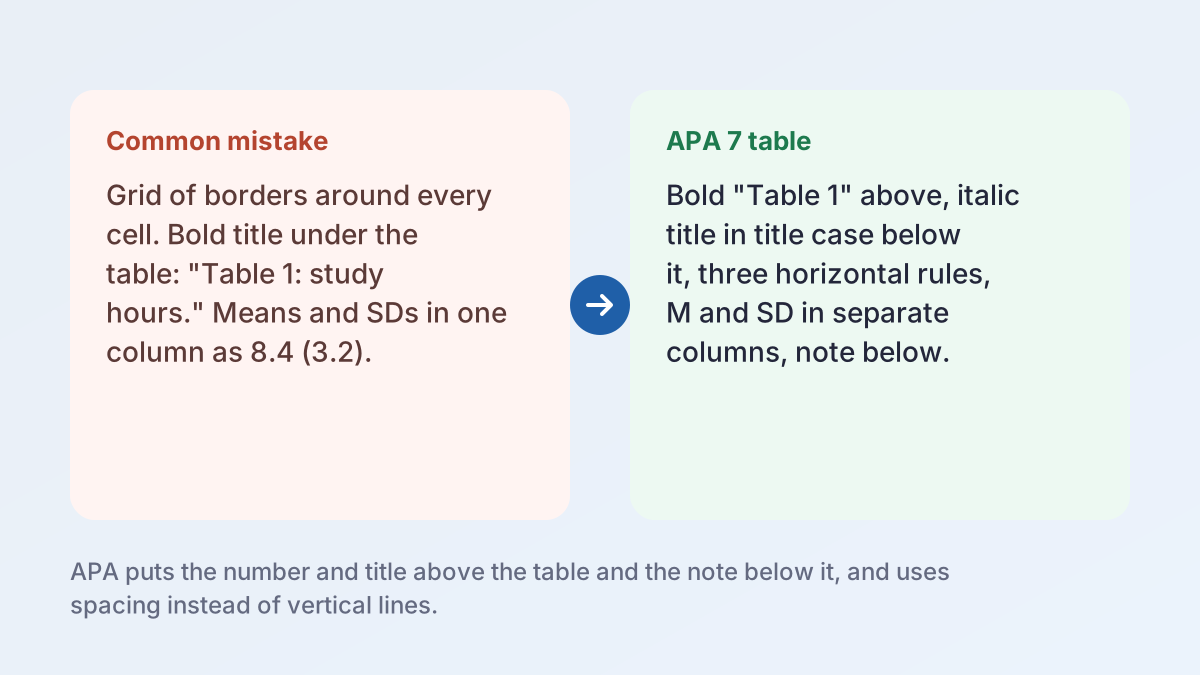
Common mistakeTable 1: Study hours and exam scores (bold, centered, below the table)
APA 7 versionTable 1 (bold, flush left) / Study Hours and Exam Scores of First-Year Students (italic, title case, next line)
The number and title sit on separate double-spaced lines above the table.
Common mistakeAll borders on, with a line around every cell and between every column
APA 7 versionOne line at the top, one under the column headings, one at the bottom; no vertical lines
An extra line above a total row is allowed.
Common mistakeExam score | 78.2 (10.5)
APA 7 versionExam score | 78.20 | 10.45 (M and SD in separate columns, two decimals each)
Different statistics go in different columns, with consistent decimals in each.
Common mistake0.52, 0.30, 0.44
APA 7 version.52, .30, .44
Values that can't exceed 1, such as correlations and p values, drop the leading zero.
Common mistake.52 (sig.) with no explanation
APA 7 version.52** with the APA table note "*p < .05. **p < .01." below
Use the same asterisks for the same alpha level in every table.
Common mistake"The table below shows the results."
APA 7 version"As Table 1 shows, students who completed more practice quizzes scored higher."
Call out every table by number and state its main point.
How to Format Tables in APA, Step by Step
This is how to format tables in APA for a student paper, from a frequency count to a regression table.
- Decide if you need it. Purdue OWL suggests putting data with two or fewer rows and columns in a sentence instead.
- Build a real table. Use Insert > Table. APA says not to fake columns with tabs or spaces.
- Add the number and title. Type Table 1 in bold, flush left, then a short title in italic title case on the next line.
- Write the headings. Give every column a centered heading in sentence case, including the stub heading.
- Fill and align the body. Left-align the stub column, center the other cells, and keep decimals consistent.
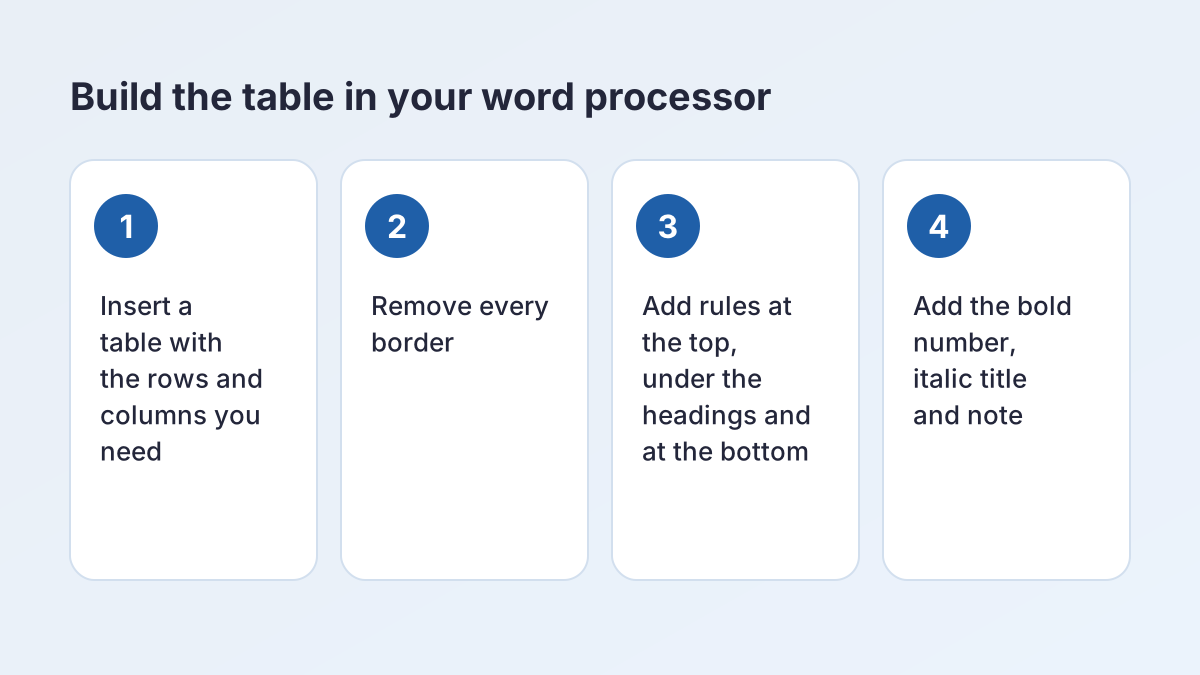
- Set the borders. Remove all borders, then add lines at the top, under the headings and at the bottom.
- Add notes and a callout. Put any notes below the table, and mention it by number in your text.
APA Table Format: The Five Parts of an APA 7 Table
APA format and tables go together in any paper that reports data, from an AP Psychology lab report to a survey project in PSYC 2301. The APA table format in the Publication Manual, 7th edition, gives every table the same five parts, in the same order. To cite the sources behind your data, the APA Citation Machine formats the reference list.
| Part | Where it goes | How to format it |
|---|---|---|
| Number | Above the title | Bold, flush left: Table 1, Table 2, in the order you first mention them |
| Title | One double-spaced line below the number | Italic, title case, brief and descriptive |
| Headings | Top row of the table | Sentence case, centered; every column has one, including the stub heading |
| Body | All rows and columns | Stub column left-aligned, other cells centered; single, 1.5 or double spacing |
| Note | Below the table | Only if needed: general, then specific, then probability notes |
The number and title
Number tables with Arabic numerals in the order you first mention them. The number is bold; the title goes on the next line in italics. APA's table setup page asks for a brief but descriptive title, so "Descriptive Statistics for Study Habits and Exam Scores" beats "Results".
Headings and the stub column
The leftmost column is the stub column, and its heading is the stub heading; "Variable" works when nothing else fits. All headings are centered and in sentence case. Bigger tables can add column spanners, headings over two or more columns, such as "Grade 9" over M and SD.
The body
Put statistics such as means and standard deviations in separate columns, and keep the same number of decimal places down a column. Leave a cell blank if a value doesn't apply, or use a dash and explain it in the APA table note.
APA Table Format Template You Can Copy
Here is the APA table format template with every part in place. Copy the layout and swap in your own text; every APA table example in this guide follows it.
Table 1
Title of the Table in Italic Title Case
| Stub heading | Column heading | Column heading | Column heading |
|---|---|---|---|
| Row label | Data | Data | Data |
| Row label | Data | Data | Data |
| Row label | Data | Data | Data |
Note. General note: what the whole table needs explained, such as abbreviations and the sample size.
a Specific note about one row, column or cell.
*p < .05.
APA formatted table template for Word and Google Docs
To make an APA formatted table template you can reuse, build this APA table format template once in Word or Google Docs with the borders set (steps below) and save it. For each new table, copy it, change the number and title, and add or delete rows.
Table format for APA student and professional papers
The table format for APA is the same in student and professional papers; the title page and running head are what change, and the APA Title Page Generator handles those. If your instructor provides an APA table format template, use theirs.
Examples of Tables in APA Format
These examples of tables in APA format use invented example data from a made-up study of 120 students in an intro psychology course. Each APA table example follows the APA table format as you'd submit it.
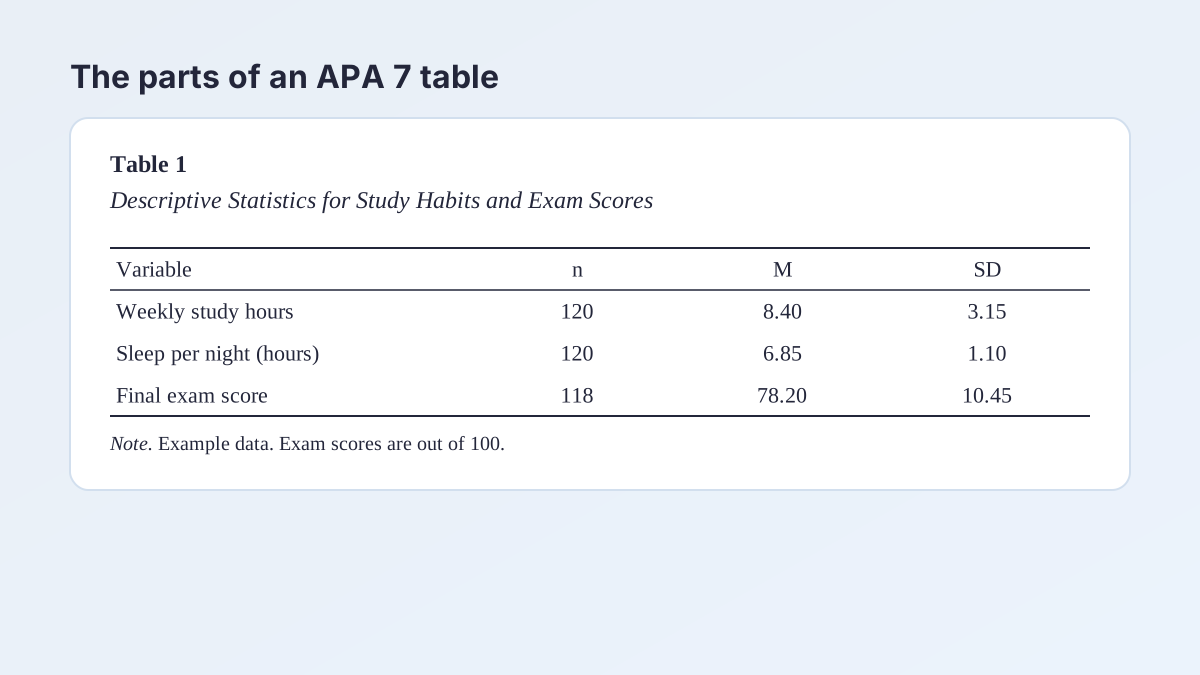
Descriptive statistics: an APA format data table
The most common APA format data table reports the sample size, mean and standard deviation for each measure. Statistical symbols such as n, M and SD are italic.
Table 1
Descriptive Statistics for Study Habits and Exam Scores
| Variable | n | M | SD | Range |
|---|---|---|---|---|
| Weekly study hours | 120 | 8.40 | 3.15 | 1–18 |
| Sleep per night (hours) | 120 | 6.85 | 1.10 | 4–10 |
| Practice quizzes completed | 120 | 5.30 | 2.05 | 0–10 |
| Final exam score | 118 | 78.20 | 10.45 | 41–99 |
Note. Example data for illustration. Two students did not take the final exam. Exam scores are out of 100.
Frequency table
A frequency table counts how many participants gave each answer. The line above the total row is optional.
Table 2
Primary Study Location Reported by Participants
| Location | n | % |
|---|---|---|
| Home | 48 | 40 |
| Campus library | 42 | 35 |
| Coffee shop | 18 | 15 |
| Residence hall lounge | 12 | 10 |
| Total | 120 | 100 |
Note. Example data for illustration. Participants chose one location.
APA format correlation table
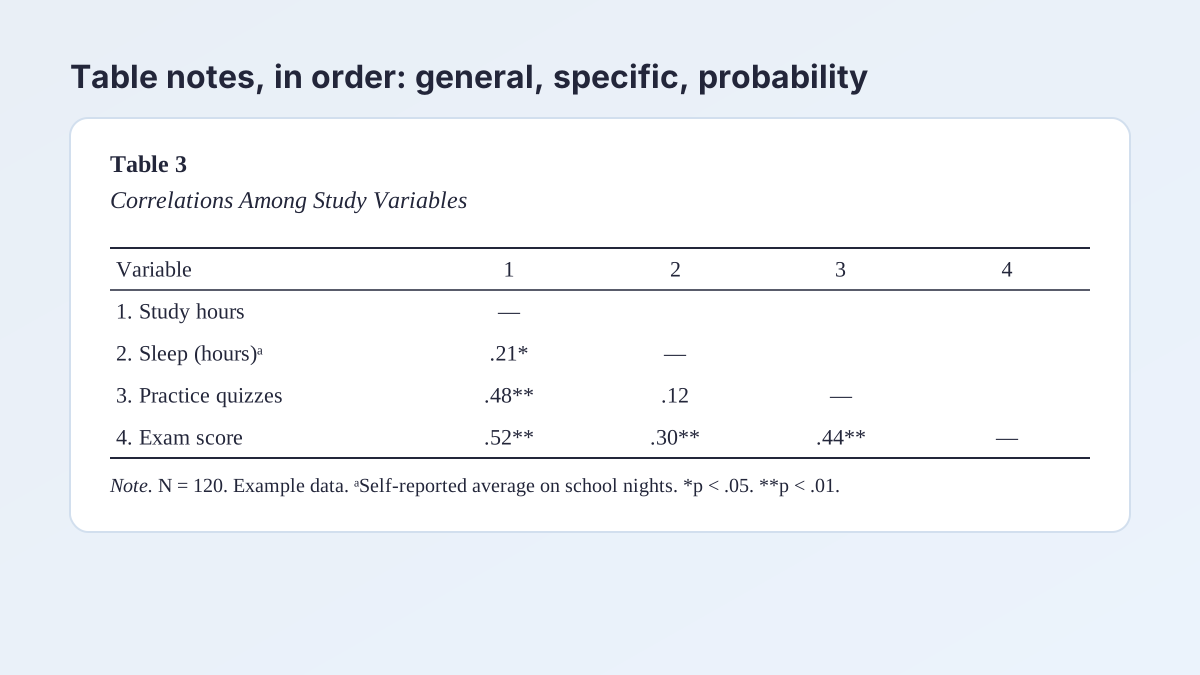
An APA format correlation table numbers each variable in the stub column and uses those numbers as column headings. An em dash fills the diagonal, the upper triangle stays blank, and correlations drop the leading zero.
Table 3
Correlations Among Study Variables
| Variable | 1 | 2 | 3 | 4 |
|---|---|---|---|---|
| 1. Weekly study hours | — | |||
| 2. Sleep per nighta | .21* | — | ||
| 3. Practice quizzes completed | .48** | .12 | — | |
| 4. Final exam score | .52** | .30** | .44** | — |
Note. N = 120 (final exam score n = 118). Example data for illustration.
a Self-reported average hours on school nights.
*p < .05. **p < .01.
APA format regression, t test and ANOVA tables
The same APA table format carries over. A t test table in APA format puts M and SD for each group side by side, then t, p and Cohen's d. An APA format ANOVA table gives F with its degrees of freedom, such as F(1, 294), and an effect size. An APA format regression table gives each predictor's estimate, SE, 95% CI and p. APA's sample tables page shows each one.
APA Table Note: General, Specific and Probability Notes
An APA table note explains what the title and body can't. Add notes only as needed; many simple tables have none. There are three kinds of APA table note, in this order.
| Note | Starts with | Use it for |
|---|---|---|
| General | The word Note in italics, then a period | The table as a whole: abbreviations, sample size, units, the source of reprinted data |
| Specific | A superscript lowercase letter (a, b, c) | One column, row or cell; letters run left to right, then top to bottom |
| Probability | Asterisks, such as *p < .05. | Which p value each number of asterisks stands for |
How to write the general note
Start with Note in italics, a period, then plain text: "Note. N = 120. CI = confidence interval." Define every abbreviation except standard statistical symbols. For a reprinted or adapted table, the copyright attribution goes at the end of the general note.
Specific and probability notes
Each kind starts on a new line. Specific notes begin with superscript a, then b, in reading order across the table. A probability note lists each level once: "*p < .05. **p < .01." For one-tailed tests, Purdue OWL advises a different symbol, such as a dagger.
An APA table note in a student paper
The APA table note is double-spaced like the number and title, in the same font as the paper. Keep it short; long explanations belong in your text.
Borders, Spacing and Fonts in the APA 7 Table Format
The APA 7 table format keeps lines to a minimum: a border at the top and bottom of the table, one beneath the column headings, and one above any column spanners. An extra line can set off a total row. APA says not to use vertical lines or borders around every cell.
Spacing
The table number, title and notes are double-spaced. The body can be single-, one-and-a-half- or double-spaced, whichever reads best.
Font and alignment
Use the same font as your text, such as 12-point Times New Roman or 11-point Calibri. Center the cells, and left-align the stub column and any cell with a lot of text.
Long and wide tables
For a table longer than a page, repeat the heading row at the top of each page. For one too wide for the page, turn that page to landscape.
Formatting tables in APA 7th edition vs 6th edition
The APA table format in the 7th edition changed a few things from the 6th. The table number is now bold, while the italic title in title case stays on its own line. APA 7 also lets tables sit inside the text, after their first mention, instead of only at the end of the paper.
Where Tables Go in an APA Paper
APA allows two places for tables, and many instructors pick one, so check your assignment sheet.
Option 1: in the text
Place each table after the paragraph that first mentions it. A short table that shares a page with text goes at the top or bottom of the page, not the middle, with one blank double-spaced line between table and text.
Option 2: after the reference list
Put each table on its own page after the references, in number order.
Calling out a table in your text
Every table needs a callout naming it by number. Write "As Table 2 shows, most participants studied at home", not "the table below", and give the main point without repeating every number.
Tables in an appendix
Appendix tables take the appendix letter: Table A1, Table A2. For other parts of the paper, see our free guides.
Citing a Table in APA Format From Another Source
A table copied from a source is reprinted; one you change, for example by keeping only some rows, is adapted. Either way, APA asks for a copyright attribution at the end of the general APA table note, plus a reference list entry.
How do you cite a table in APA format?
Start the attribution with "From" for a reprint or "Adapted from" for an adaptation. Give the title in title case, the author, the year and the source, then the copyright status: "Copyright 2015 by the American Psychological Association", a license such as "CC BY 4.0", or "In the public domain". Bureau of Labor Statistics data is in the public domain, so Table 4, adapted from the American Time Use Survey, ends that way.
Table 4
Average Hours per Day Spent in Selected Activities, by Sex, 2025
| Activity | Total | Men | Women |
|---|---|---|---|
| Sleeping | 9.03 | 8.93 | 9.13 |
| Leisure and sports | 5.16 | 5.58 | 4.76 |
| Working and work-related activities | 3.32 | 3.82 | 2.84 |
| Household activities | 1.99 | 1.58 | 2.38 |
| Eating and drinking | 1.21 | 1.24 | 1.18 |
| Educational activities | 0.44 | 0.41 | 0.47 |
Note. Data are 2025 annual averages for the civilian population ages 15 and over. Adapted from “Table 1. Time Spent in Primary Activities and Percent of the Civilian Population Engaging in Each Activity, Averages per Day by Sex, 2025 Annual Averages,” by U.S. Bureau of Labor Statistics, 2026 (https://www.bls.gov/news.release/atus.t01.htm). In the public domain.
The matching reference and in-text citation
The source goes in your reference list like any web page:
U.S. Bureau of Labor Statistics. (2026, June 25). Table 1. Time spent in primary activities and percent of the civilian population engaging in each activity, averages per day by sex, 2025 annual averages. https://www.bls.gov/news.release/atus.t01.htm
In the text, cite it as (U.S. Bureau of Labor Statistics, 2026). The APA citation generator builds this entry from the URL. The reference uses sentence case; the attribution uses title case.
Permission and class papers
Publishing a reprinted table may need the copyright holder's permission; for a class paper, the attribution is usually enough, but your instructor decides. In an MLA class, the source goes on your MLA works cited page with an MLA in-text citation instead.
APA Format Tables and Figures: Which to Use
APA format tables and figures share the same setup: a bold number, an italic title, the display, and notes. The difference is what's inside.
| Table | Figure | |
|---|---|---|
| What it shows | Numbers or text in rows and columns | Any other visual: graphs, charts, photos, drawings, maps, flowcharts |
| Label | Table 1, Table 2 | Figure 1, Figure 2 |
| Numbering | Its own series | Its own series |
| Best for | Exact values readers can look up | Trends, patterns and comparisons at a glance |
If readers need exact numbers, use a table; to show a pattern, such as scores rising with study hours, use a figure. Don't show the same data in both.
APA Format Table in Word and Google Docs
Formatting tables in APA takes a few minutes once you know where the border settings are. Type the number and title as paragraphs above the table, and the APA table note as a paragraph below it.
APA format table in Word
- Go to Insert > Table and choose the number of columns and rows.
- Select the whole table. On the Table Design tab, open Borders and choose No Border.
- Select the top row and choose Top Border, then Bottom Border. Select the last row and choose Bottom Border.
- Center the cells with Home > Center, then left-align the first column.
- For a long table, select the heading row and choose Repeat Header Rows on the Layout tab (called Table Layout in some versions).
APA table in Google Docs
- Go to Insert > Table and pick the size.
- Select every cell, then set Border width in the toolbar to 0 pt.
- Select the heading row, click the small arrow at the top-right corner of a selected cell, choose the top border and set its width to 1 pt. Repeat for the bottom of the heading row and the bottom of the last row.
- For a long table, go to Format > Table > Table options and check Pin header row(s).
Before you submit
Check that every table is called out in order, every abbreviation is defined, and reprinted tables carry an attribution. Then let the APA Citation Machine format your references. Purdue OWL's APA tables and figures page is a good second source.
APA Table Format FAQ
What is the APA table format?
The APA table format has a bold number, an italic title in title case, centered headings in sentence case, the body, and notes below, with horizontal lines only at the top, under the headings and at the bottom.
How do you format a table in APA?
Insert a real table, type Table 1 in bold above it and the italic title below that, center the headings and cells (left-align the first column), keep three horizontal rules, and add notes below.
Is the table title italicized in APA 7?
Yes. The title is italic and in title case, on the line below the bold table number. Both are flush left.
Do APA tables have vertical lines?
No. The APA table format uses no vertical borders and no borders around every cell.
Can an APA table be single-spaced?
Yes. The body can be single-, one-and-a-half- or double-spaced. The number, title and notes stay double-spaced.
Where do tables go in an APA paper?
In the text after the paragraph that first mentions the table, or each on its own page after the reference list. Ask your instructor which they prefer.
What goes in an APA table note?
A general note covers the whole table, such as abbreviations and sample size. Specific notes use superscript letters. Probability notes explain asterisks, such as *p < .05.
How do you cite a table in APA format?
End the general note with "From" or "Adapted from", the title, author, year, source and copyright status. Then add the source to your reference list.
More free guides
- How to Cite an Image in APAImages, figures, the Bible, dictionary entries and songs in APA 7.
- How to Cite a Quote in APAShort quotes, block quotes, page numbers and quotes without pages in APA 7.
- Citing Two Authors in APATwo authors, three or more, groups and no author, in text and in the reference list.
- APA Format GuidelinesMargins, font, spacing, page numbers and headings for an APA 7 paper.
- APA Outline FormatOutline levels, numbering and a copyable template for an APA paper.
- APA Lab Report FormatSections, headings, tables and references for a lab report in APA 7.
See all 80 free tools for students
Related tools
Last updated by The Study Corp editorial team.